

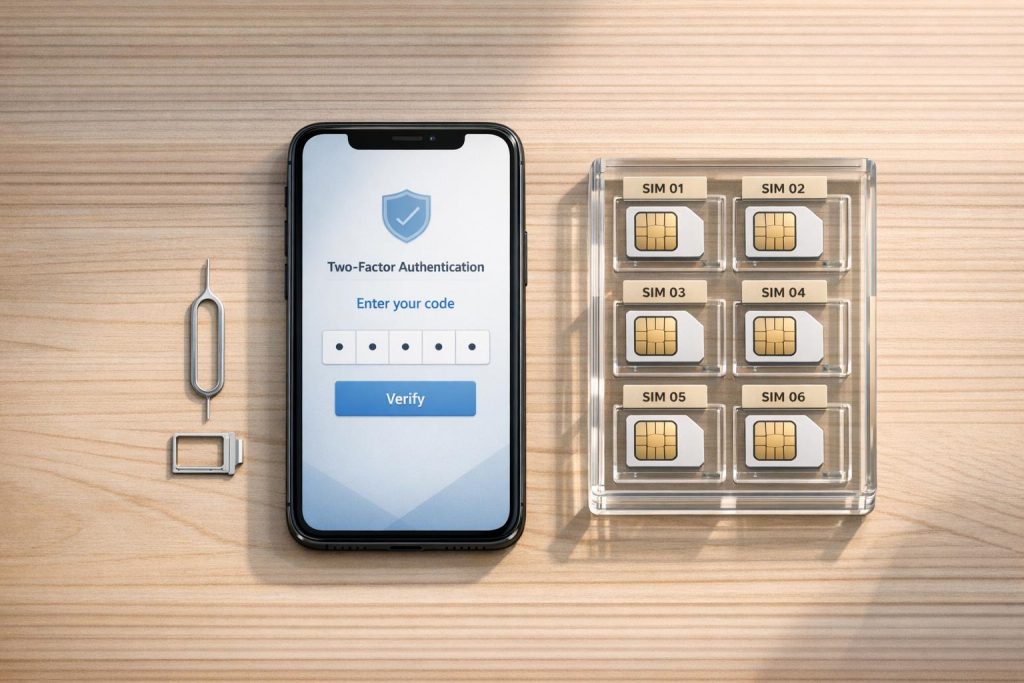
If you’re managing Facebook Business Manager or Ads accounts, phone verification is a critical step to secure your account and maintain smooth operations. Meta uses verified phone numbers to confirm account legitimacy, enable Two-Factor Authentication (2FA), and send important alerts. Here’s what you need to know:
- Why Phone Verification Matters: It protects your account, improves its trust score, and reduces ad disapprovals. Verified numbers are also essential for receiving alerts about payment issues or policy updates.
- Who Needs It: Media buyers, agencies, and businesses managing multiple accounts must use dedicated phone numbers for each account to avoid linking and potential bans.
- Common Issues: Account suspensions, verification delays, and shutdowns often stem from shared or unreliable phone numbers.
- Best Practices: Use real SIM-based numbers (not VoIP), ensure each account has a unique number, and maintain access to long-term numbers for future verifications.
Meta prioritizes security, and failing to verify your account properly can lead to restrictions. For agencies, dedicated long-term phone numbers are a reliable way to safeguard multiple accounts and avoid disruptions.
Common Facebook Business Manager and Ads Account Problems
Managing Facebook ads can come with unexpected hurdles. Account suspensions, verification requests, and restrictions can grind campaigns to a halt in an instant. Knowing how these issues arise – and the role phone verification plays – can help you avoid costly interruptions. Let’s dive into the common challenges and how dedicated phone numbers can keep your operations running smoothly.
Account Suspensions and Verification Requests
Facebook frequently suspends accounts or blocks ad activity until phone verification is completed. If you’re setting up a new ad account, verification is often required before launching your first campaign. Meta also flags accounts for behaviors like unusual activity, which includes failed payments, charge disputes, or sudden spikes in ad spend.
Policy violations are a leading cause of account suspensions. Breaching Meta’s Community Standards, Advertising Standards, or Commerce Policies can put your account into verification limbo. Accounts that deal with sensitive topics, such as social issues or politics, may face extended freezes – sometimes up to 14 business days – while awaiting verification.
Account Linking and Ban Risks
Using the same phone number across multiple Business Managers can raise red flags with Meta. Their system automatically links accounts that share contact details, payment methods, or IP addresses. If one account is disabled for a policy violation, this connection can trigger a chain reaction, putting all linked accounts at risk.
"If that card gets flagged for a payment failure or a policy violation on one account, Facebook may pre-emptively disable all other accounts associated with it." – AGrowth
This "domino effect" is something agencies must avoid at all costs. Meta interprets shared identifiers as evidence of fraudulent activity or "bulk-created accounts", which can lead to widespread bans. In essence, one misstep can jeopardize your entire portfolio of accounts.
Managing Multiple Accounts Separately
To avoid these risks, agencies need to focus on account isolation. Each Business Manager should have its own dedicated phone number, especially when managing multiple clients. This isn’t just a matter of convenience – it’s a critical step in preventing Meta from linking unrelated accounts. If one account encounters issues, dedicated numbers ensure the rest remain unaffected.
Separate phone numbers also help build trust with Meta. Each verified number signals that you’re running legitimate operations, which can lead to faster ad approvals and fewer security checks. Meta discourages managing unrelated accounts under one verified entity, as this often triggers compliance issues. Additionally, a single personal profile can only create two to three Business Managers, and each verified business can typically oversee up to 25 ad accounts depending on spending history.
For verification, real SIM-based mobile numbers are the gold standard. VoIP services like Google Voice often fail to receive SMS codes and are flagged as less trustworthy by Meta’s systems. For agencies, investing in dedicated phone numbers for each client isn’t just a smart move – it’s a necessary safeguard to protect both your business and your clients’ campaigns. This approach not only secures individual accounts but also strengthens your overall standing with Meta.
sbb-itb-5a89343
How to Verify Facebook Accounts with Phone Numbers
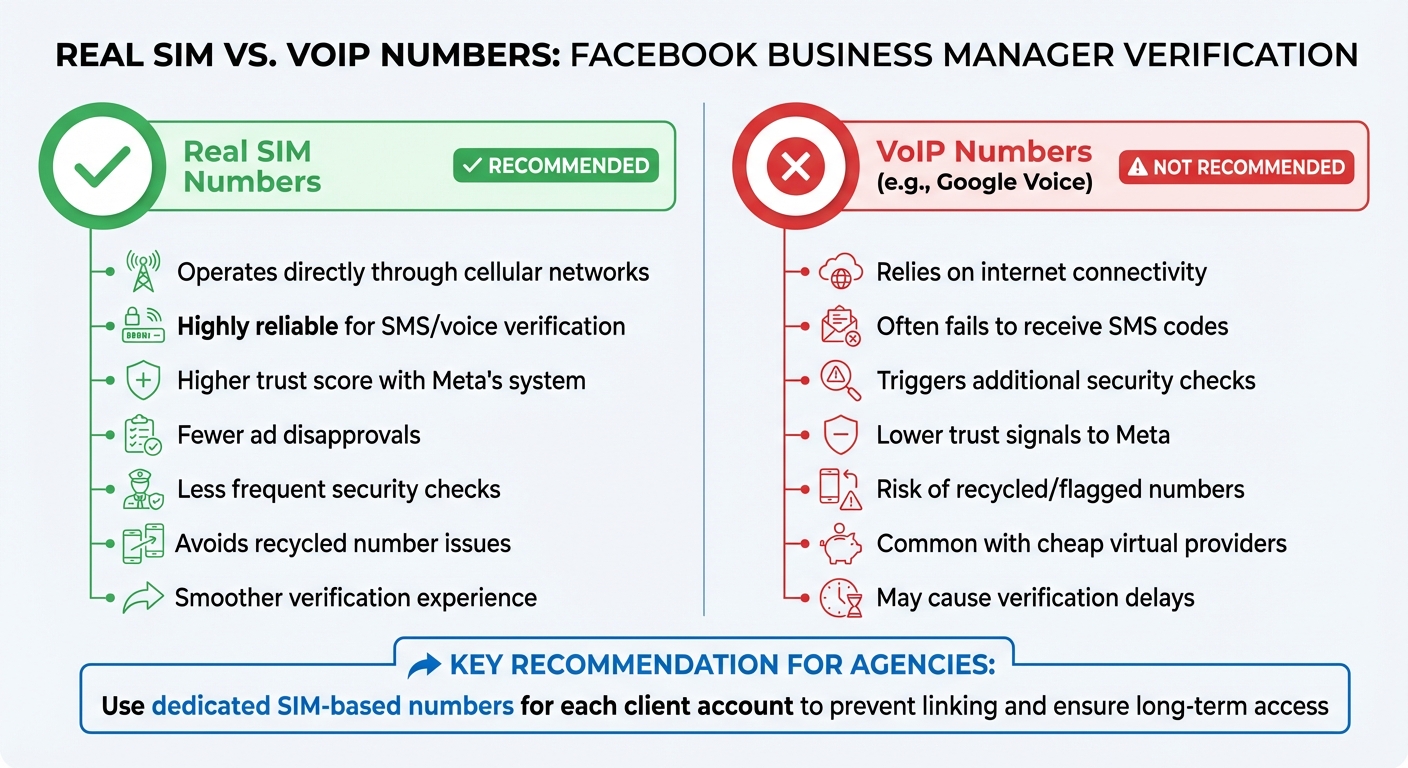
Real SIM vs VoIP Numbers for Facebook Business Manager Verification
Real SIM Numbers vs. VoIP Numbers
Not all phone numbers are treated equally when it comes to Facebook verification. Real SIM-based numbers, which operate directly through cellular networks, are far more reliable than VoIP numbers like Google Voice. VoIP numbers rely on internet connectivity, which can lead to issues like missed automated texts or calls. Even when they work, they may trigger additional security checks. Plus, real SIM numbers help avoid the problem of recycled numbers – something common with cheap virtual providers – which may have been flagged or banned by Facebook in the past.
"A verified account has a higher trust score within Meta’s system, which can lead to fewer ad disapprovals, less frequent security checks, and a smoother overall experience." – Graphed
Once you’ve chosen the right type of number, you can follow the steps below to complete your Facebook verification.
Steps to Verify Your Facebook Account
Facebook provides three ways to receive a verification code: text message (SMS), phone call, or WhatsApp message. For most users, SMS is the quickest option, while phone calls work better for landlines or if SMS fails. However, avoid using toll-free numbers (800, 888, 877, 866, 855, 844, 833), as Meta cannot send codes to these.
To verify your account in Business Manager:
- Go to Business Settings > Security Center and click "Start Verification."
- Enter your legal business name, physical address, business phone number, and an HTTPS-compliant website.
- If Meta cannot find your business record, upload official documents like a business license, certificate of incorporation, or tax registration. Make sure the information matches your documents exactly to avoid any delays or rejections.
Verification codes are time-sensitive and expire after 30 minutes, so act quickly. If you’re having trouble receiving the code, try adding +1-650-285-1001 as a contact in your phone to ensure the call isn’t blocked.
- For Google Voice users: Disable "Call screening" to allow the verification call to go through.
Meta typically reviews verification requests within 1 to 5 business days, though it may take up to 14 days in some cases. These steps not only help verify your account but also address potential issues like account linking or suspension.
Long-Term Phone Numbers for Agencies
For agencies managing multiple accounts, having long-term access to phone numbers is critical. Meta may trigger security checkpoints weeks or even months after the initial verification, and losing access to the original number can result in losing control of the account.
Long-term numbers for business verification are a practical solution. These numbers are available for rental periods of 7 to 90 days, with options to extend. For added security, match the phone number’s area code or country to your business’s legal address. This consistency strengthens trust signals during Meta’s verification checks and helps protect against unexpected account disruptions.
Phone Number Strategies for Agencies and Media Buyers
Given the risks associated with account linking and suspensions, having a solid phone number strategy is essential for agencies managing multiple client accounts. The isolation practices mentioned earlier serve as a starting point for implementing these advanced methods.
Using Separate Numbers for Each Client
Sharing phone numbers across multiple client accounts is a common mistake that can lead to Meta linking those accounts, potentially causing widespread issues.
To avoid this, every client should have a dedicated phone number that matches their business documents exactly. Any mismatch can delay the verification process – sometimes by as much as 14 business days – or even result in outright rejection.
Taking it a step further, using high-quality numbers can help reduce the likelihood of unexpected account shutdowns.
Preventing Account Shutdowns with Quality Numbers
Even after initial verification, shutdowns can occur during subsequent security checks. Losing access to the original phone number – due to subscription cancellations or recycled numbers – can make recovering the account extremely difficult.
Using quality phone numbers can help maintain a strong trust score within Meta’s system.
- Mobile SIM numbers are the preferred choice for receiving SMS and voice one-time passwords (OTPs). VoIP numbers, on the other hand, often face SMS delivery issues.
- If a corporate landline with an IVR system is in use, ensure that calls from Meta (e.g., +1-650-285-1001) are routed to a live person or monitored voicemail to avoid missed verifications.
Team Verification Management
To strengthen your phone number strategy, establish clear team protocols for managing verifications. Meta advises having at least two team members maintain full control of each Business Portfolio. This ensures access is not lost if one account is flagged. Additionally, enabling two-factor authentication for all team members can significantly reduce security risks.
For agencies handling large volumes of verifications, consider using dedicated long-term numbers for business verification. Services like MobileSMS.io offer premium options with integrations for Slack or Discord. These numbers can forward SMS verification codes directly to your team’s communication channels, streamlining the process. Premium plans, starting at $100 per month, include automatic SMS forwarding and unlimited messages, eliminating the hassle of manual activation whenever Meta sends a security code.
Conclusion: Protect Your Facebook Business Manager and Ads Accounts
Your phone number does more than just meet a verification requirement – it strengthens your account’s trustworthiness. Verified accounts with dependable numbers experience fewer ad disapprovals, fewer security checks, and smoother overall operations. For media buyers and agencies, proper phone verification is key to maintaining account integrity and keeping campaigns running without interruptions.
"If you don’t want to get shut down and experience issues such as ads randomly being disapproved, it’s critical to make sure that you verify your Business Manager." – BuyerBridge
This quote highlights how essential verified numbers are for avoiding costly disruptions.
Meta’s security system places a high priority on verification, and lapses can lead to serious consequences. Without proper verification, you may encounter spending limits, restricted ad delivery, or even account freezes during critical campaigns. Verified accounts not only avoid these issues but also gain access to advanced tools like Aggregated Event Measurement and Commerce Manager. Additionally, established businesses can manage up to 25 ad accounts per Business Manager, offering greater flexibility.
When it comes to verification, SIM-based numbers remain the best option. Unlike VoIP numbers, SIM-based options align seamlessly with business documents, avoiding the delays and complications that can derail time-sensitive campaigns.
Agencies, in particular, can benefit from using dedicated long-term numbers with SMS forwarding. These numbers ensure reliable code delivery and help isolate client accounts, reducing the risk of shutdowns. By choosing dedicated, long-term solutions, agencies can confidently manage accounts and keep their operations secure. For more information, check out long-term numbers for business verification.
FAQs
How many Facebook accounts can I verify with one phone number?
A single phone number can be used to verify multiple Facebook accounts. However, each account typically goes through its own verification process. Be aware that using the same number for multiple accounts might trigger restrictions or get flagged by Facebook’s system.
What should I do if I lose access to the number used for verification?
If you can’t access your verification number, start by checking for issues with receiving calls, texts, or WhatsApp messages as suggested by Meta. If the problem persists, you may need to update or re-verify your phone number through Meta’s support channels. Taking these steps helps keep your account secure and functional.
Why does Facebook keep asking for phone verification again?
Facebook might ask for phone verification multiple times to improve account security, comply with regulations, and safeguard the platform’s integrity. These requests are often triggered by unusual activity or potential misuse of an account. Keeping your account aligned with Facebook’s guidelines can help minimize these verification requests.