

Managing alerts across multiple accounts can quickly become overwhelming without a system in place. Multi-account alert systems bring all notifications into one centralized view, helping teams monitor activity, respond to incidents, and maintain compliance efficiently. Here’s what you need to know:
- Centralized Monitoring: Use tools like AWS CloudWatch Observability Access Manager (OAM) to consolidate alerts across accounts for a unified view. This reduces inefficiencies caused by switching between accounts.
- Fast Alert Delivery: Event-driven architectures, such as Amazon EventBridge, ensure low-latency notifications, enabling quicker responses to incidents.
- Role-Based Routing: Alerts should be routed by severity and responsibility, ensuring the right team handles the right issue without unnecessary disruptions.
- Audit Trails: Tools like AWS CloudTrail provide detailed logs for compliance and post-incident reviews, ensuring traceability for all actions taken.
For organizations managing 25+ AWS accounts, the stakes are high: an average of 223 high-risk security incidents occur monthly. A well-structured system ensures these incidents are addressed promptly while reducing noise and improving team efficiency.
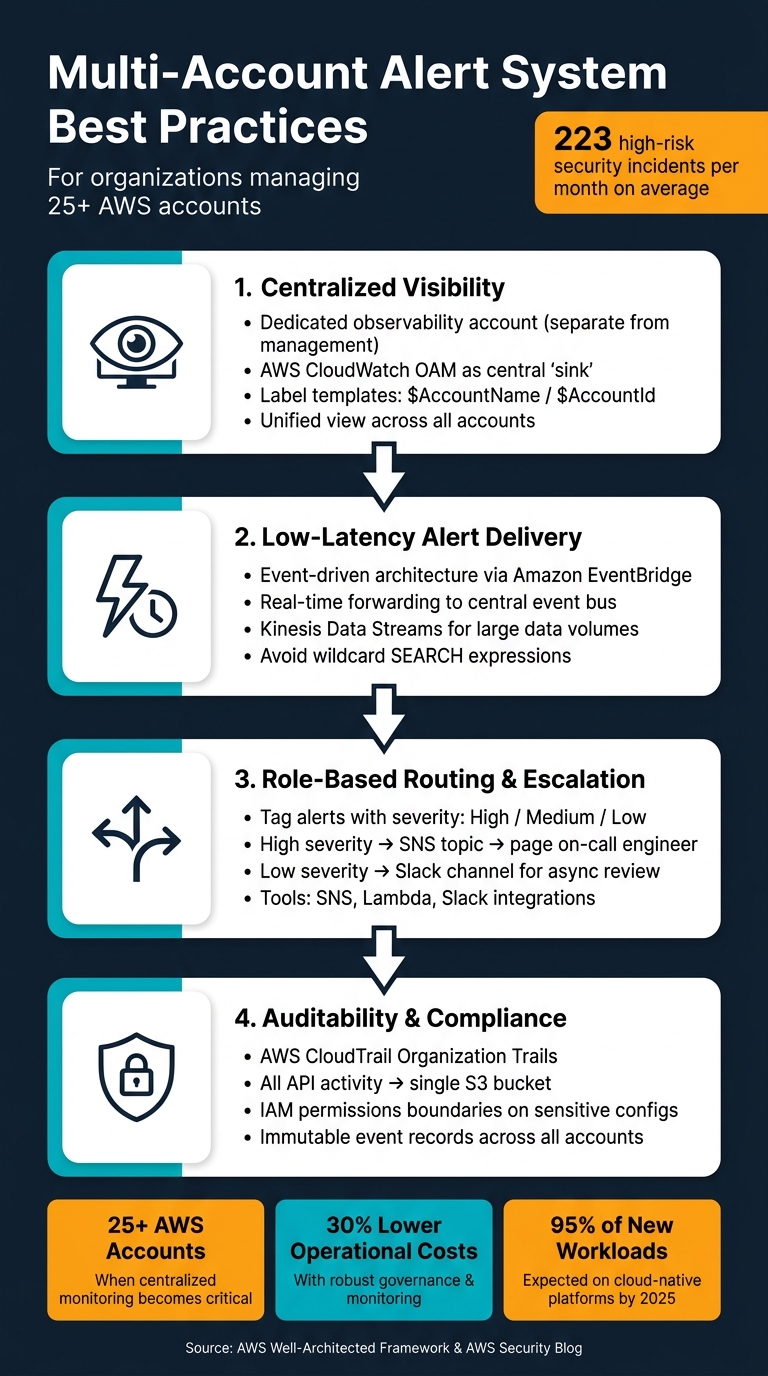
How to Build a Multi-Account Alert System: 4 Core Requirements
Core Requirements for Multi-Account Alert Systems
Creating a multi-account alert system that operates effectively at scale isn’t just about gathering data from various sources. The real challenge lies in transforming that data into actionable insights – quickly and consistently. To achieve this, there are four key requirements that your system must meet to support a growing infrastructure.
Centralized Visibility and Control
Switching between accounts to monitor activity can waste time and create inefficiencies. Without centralization, teams may struggle with multiple logins and fragmented views. A better approach is to establish a dedicated observability account, separate from your management account, to maintain a clean security boundary. Using AWS CloudWatch Observability Access Manager (OAM), you can set up a central "sink" in your monitoring account and create links to each source account. By applying label templates like $AccountName or $AccountId, telemetry data is tagged by its origin, making it easier to trace alerts. This centralized setup ensures alerts are delivered quickly and reliably.
"Platform teams should make it as simple as possible for developers to be able to create alerts. These alerts should be handled automatically and arrive at some common point where you can handle them." – Sandro Volpicella, Founder, AWS Fundamentals
Low-Latency Alert Delivery
Speed is critical when it comes to alert delivery. Even a brief delay can mean your team misses a crucial incident. In high-volume environments, slow notifications can lead to late responses. An event-driven architecture is essential to minimize latency. For example, Amazon EventBridge can capture CloudWatch alarm state changes from member accounts and forward them in real time to a central event bus in the observability account. For handling large data streams, Kinesis Data Streams offers an efficient solution. To further reduce latency, avoid wildcard SEARCH expressions in queries and focus on specific time ranges when working with large accounts.
Role-Based Routing and Escalation
Fast alerts are only part of the equation. Routing them to the right person or team is just as important. Not every alert calls for waking up a senior engineer in the middle of the night. Role-based routing ensures alerts are directed based on severity and responsibility. By tagging alerts with a severity level at the source, you can use tools like SNS topics, Lambda functions, and Slack integrations to manage notifications dynamically. High-priority incidents trigger immediate alerts, while lower-severity ones follow less urgent workflows. This setup allows platform teams to handle routing logic, leaving developers free to focus on defining meaningful alerts for their applications.
Auditability and Compliance
Beyond timely and accurate alerts, maintaining a detailed record of events is vital for both operations and compliance. Regulators and auditors often require proof of who was notified, when, and what actions were taken. Without comprehensive logs, meeting these demands becomes difficult. AWS CloudTrail Organization Trails can collect API activity from all accounts into a single S3 bucket, creating an immutable record of events. Combined with IAM permissions boundaries on sensitive configurations, this setup ensures a clear evidence trail and enforces consistent policies across your accounts. These measures not only enhance operational security but also lay the groundwork for more advanced alert routing and noise reduction strategies, which will be explored later.
sbb-itb-5a89343
How to Build an Effective Alert Routing System
To ensure alerts reach the right people quickly, you need a routing system that bridges raw telemetry with actionable insights across all your accounts. Here’s how to create a system that works seamlessly.
Normalizing Alerts from Multiple Sources
Once alerts are centralized, the next step is standardizing them. Without a consistent format, responding effectively can become a challenge. AWS Security Hub simplifies this for security-related alerts by serving as a normalization layer. It consolidates findings from tools like GuardDuty, Macie, and third-party integrations into a unified schema.
For custom application alerts, you can use EventBridge combined with Lambda for added flexibility. For example, a central Receiver Lambda can poll an SQS queue, normalize alert payloads, and send them downstream.
A consistent tagging strategy is essential to tie everything together. Tags like severity, team, and project help enable dynamic routing. Storing routing rules and team configurations in AWS Systems Manager (SSM) Parameters allows you to update these independently of your Lambda code, keeping your system adaptable.
Severity-Based Routing
After standardizing alerts, classifying them by severity helps streamline responses. By tagging alerts at their source with severity levels (e.g., High, Medium, or Low), you can automate routing through a central Lambda function.
- High-severity alerts might trigger an SNS topic to page an on-call engineer immediately.
- Low-severity alerts, on the other hand, could be routed to a Slack channel for review at a later time.
Store routing configurations, such as SNS ARNs or Slack channel IDs, in SSM Parameters for easy management. To ensure all accounts adhere to the same classification standards, deploy EventBridge rules and IAM roles across accounts using AWS CloudFormation StackSets. This setup ensures any new account added to an Organizational Unit automatically inherits the routing infrastructure.
Integration with Existing Tools
Your routing system’s effectiveness depends on how well it integrates with the tools your teams already use. With standardized and severity-tagged alerts, you can connect to various collaboration and incident management tools. Here’s how:
| Integration Target | Connection Method | Best For |
|---|---|---|
| Slack / Microsoft Teams | AWS Chatbot or Lambda webhook | Real-time collaboration and quick responses |
| Jira / ServiceNow | EventBridge API Destination | Formal incident tracking and audit trails |
| Email / SMS | Amazon SNS Topic | Direct notifications for on-call personnel |
| CloudWatch Logs | OAM (Observability Access Manager) | Centralized log analysis and troubleshooting |
For teams managing SMS verification across multiple accounts, tools like MobileSMS.io offer native Slack and Discord integrations, making processes more efficient while maintaining privacy.
To reduce noise and optimize efficiency, filter alerts at the source before they reach the central event bus. By configuring EventBridge rules in each account, you can forward only relevant alerts. This not only minimizes unnecessary data transfer costs but also ensures your routing system focuses on what matters most. A unified approach like this keeps your multi-account alert system efficient and responsive.
Cutting Alert Noise: Thresholds and Correlation
Even the best alert systems can overwhelm teams if they bombard engineers with excessive notifications. Alert fatigue is a serious issue – when too many notifications are irrelevant, the important ones can get lost in the shuffle. The goal isn’t to eliminate alerts but to ensure only the relevant ones trigger. Let’s break down how setting precise thresholds and correlating events can reduce unnecessary noise.
Setting Alert Thresholds
Many teams set arbitrary thresholds, like "CPU > 80%", without considering the actual business impact. Instead, thresholds should be tied directly to key performance indicators (KPIs). As the AWS Well-Architected Framework explains:
"Basing alerts on KPIs ensures that the signals you receive are directly tied to business or operational impact."
Static thresholds are effective for predictable limits – such as disk usage exceeding 90% – but they fall short for metrics that fluctuate, like request latency or API error rates. In these cases, CloudWatch Anomaly Detection can step in. It uses machine learning to understand your system’s normal behavior and alerts you only when something deviates significantly from expected patterns. This adaptability reduces false alarms during predictable events like traffic spikes.
For more nuanced scenarios, CloudWatch Metric Math lets you create complex threshold expressions. For instance, you can configure alerts to trigger only when both error rates and request volumes exceed their respective limits simultaneously.
| Alert Type | Best Used For |
|---|---|
| Static Threshold | Fixed limits (e.g., Disk Space > 90%) |
| Anomaly Detection | Dynamic metrics (e.g., Latency, API Error Rates) |
| Log Metric Filter | Specific patterns or error codes in logs |
| Composite Alarm | Combining multiple conditions into one alert |
Once thresholds are set, the next step is to minimize noise further by correlating and deduplicating events.
Event Correlation and Deduplication
A single issue can trigger multiple alarms across various services, overwhelming the on-call engineer with redundant notifications. Without correlation, it’s easy to miss the root cause amidst the noise.
CloudWatch Composite Alarms address this by grouping related alarms into a single parent alert. For example, instead of receiving separate alerts for latency and error rate spikes, you’ll get one notification only when both conditions are met simultaneously. This approach ensures that alerts are actionable and focused, reducing unnecessary distractions.
At the log level, subscription filters can help by excluding non-critical logs – like DEBUG, TRACE, and INFO entries – before they reach your central monitoring account. This not only reduces noise but also cuts down on CloudWatch log ingestion costs.
Reducing False Positives
False positives can erode trust in your alerting system and waste valuable time. To combat this, ensure every alert has a clear response plan. If an alert consistently gets ignored or doesn’t lead to actionable steps, it’s time to refine or remove it. As the AWS Well-Architected Framework advises:
"Reduced alert fatigue by only raising actionable alerts."
CloudWatch OAM (Observability Access Manager) can further enhance your monitoring by enabling a central account to query metrics and logs across all member accounts. This broader view helps teams identify whether an issue is isolated or part of a larger, systemic problem, allowing for more informed and efficient responses.
Cross-Account Incident Response Strategies
Once you’ve tackled alert noise and established proper routing, the next step is ensuring incidents are addressed quickly across all accounts. A streamlined response workflow is what separates teams that resolve issues in minutes from those that spend hours just identifying the responsible party.
Automated Response Actions
Start by designating a central security account to handle response actions across all member accounts. This eliminates the need to repeat remediation efforts in each account – everything is managed in one place.
"How quickly you respond to security incidents is key to minimizing their impacts. Automating incident response helps you scale your capabilities, rapidly reduce the scope of compromised resources, and reduce repetitive work by security teams." – AWS Security Blog
To set this up, configure member accounts to forward security findings from tools like GuardDuty and AWS Config to a central event bus using Amazon EventBridge. From there, automated actions can be executed by AWS Systems Manager (SSM) Automation runbooks for repeatable tasks, or AWS Lambda for custom cross-account logic.
| Finding Type | Automated Response |
|---|---|
| GuardDuty: Backdoor:EC2 | Isolate EC2 instance (remove all security groups, attach an empty security group) |
| GuardDuty: UnauthorizedAccess:IAMUser | Block IAM principal (attach Deny-All policy) |
| AWS Config: S3_BUCKET_PUBLIC_READ_PROHIBITED | Disable public access on S3 bucket via SSM document |
| AWS Config: SECURITY_GROUP_OPEN_PROHIBITED | Restrict security group to a predefined safe CIDR range |
For critical resources like production databases, use a SecurityException tag to bypass automation. These alerts can then be flagged for manual review. To prevent misuse, restrict the ability to apply this tag using IAM policies or Service Control Policies (SCP). Always test your automated responses in a staging environment before rolling them out to production.
When automation isn’t enough, manual intervention ensures incidents are addressed thoroughly.
Manual Escalation Workflows
Not every incident is straightforward enough for automation. Complex findings often require human judgment to determine the best course of action. Without a clear escalation path, these incidents can linger unresolved.
AWS Security Hub Custom Actions make escalation simple. Analysts can investigate findings in the console and trigger the same Lambda or SSM workflows used for automation with a single click. This combines the efficiency of automation with the critical thinking of human oversight.
Store escalation details – such as the responsible team, on-call rotation, or Slack channel – in SSM Parameter Store. This way, when an alert is escalated, it automatically reaches the right people without any manual effort. For compliance and post-incident reviews, log all manual actions in Systems Manager Automation logs.
Clear communication during this process ensures that the right teams remain informed and ready to act.
Notification and Communication Best Practices
Fast and clear communication is just as important as a quick response during an incident. Use an SNS topic to centralize notifications, providing a single, reliable channel for high-severity alerts via email or SMS. For real-time updates, integrate SNS alerts with Slack or Microsoft Teams using Lambda webhooks. This keeps everyone on the same page without needing a separate tool or dashboard.
To avoid confusion when investigating cross-account incidents, leverage CloudWatch OAM label templates. These templates can prefix metrics and logs with the source account name, making it clear where the data originated. This small step can save valuable time during investigations.
Monitoring and Governance of Alert Systems
Keeping an alert system running smoothly isn’t a one-and-done task – it needs constant attention. As your accounts grow and environments shift, regular checks are essential to ensure no gaps creep in. Without this, issues often only surface when something goes wrong.
Tracking Alert Delivery and Effectiveness
To ensure your alerts are doing their job, start by monitoring the Events tab in CloudWatch rules. This helps you verify that alerts from source accounts are successfully reaching your central monitoring hub. Add an extra layer of protection by setting up CloudWatch alarms to notify you if Lambda functions fail or if EventBridge rule invocations drop unexpectedly. Think of it as monitoring the system that monitors your alerts – it helps you catch delivery failures before they turn into blind spots.
Be aware that cross-account metric queries tend to run slower than single-account ones. While this might seem like a small issue during testing, it can create noticeable delays in real-time dashboards, especially for organizations managing over 25 accounts. And with an average of 223 high-risk security incidents per month at that scale, even minor delays can slow down your response time. These metrics are key for refining your policies as you go.
Policy and Rule Management
Alert rules aren’t static – they need to evolve with your business. A threshold that worked six months ago might now be too sensitive or not sensitive enough. Regularly revisit and adjust these configurations to align with your current business goals. If an alert doesn’t lead to a meaningful action, it’s just adding unnecessary noise.
Tools like CloudFormation StackSets can help you maintain consistency across accounts. They allow you to update, add, or remove rules across all accounts and regions from a single admin account. Additionally, services like GuardDuty and Security Hub should be set to automatically enroll new accounts as they’re added to your organization. Relying on manual setups for new accounts can leave you exposed to gaps in coverage.
Strong policy management also pairs well with thorough log retention to ensure comprehensive oversight.
Retaining Logs and Audit Trails
Every action triggered by an alert – whether automated or manual – should leave a clear record. AWS CloudTrail’s Organization Trail is a great way to centralize API activity from all accounts into a single S3 bucket. This setup makes compliance reviews and forensic investigations much easier down the line. For operational data, CloudWatch Logs is your go-to, with ingestion costs at $0.50 per GB and storage at $0.03 per GB – keeping compliance costs manageable.
For manual overrides, use resource tags like SecurityException: Jira-1234 to tie automated suppressions back to their approvals. This keeps your audit trail clean without the need for a separate database. If your logs cross regional boundaries, consider filtering sensitive fields with Lambda before they leave the region.
| Service | What It Logs | How It’s Stored |
|---|---|---|
| AWS CloudTrail | API activity and user actions across accounts | S3 bucket; supports cross-account logging |
| AWS Config | Resource configurations and compliance history | Aggregated across accounts and regions |
| CloudWatch Logs | Metrics, events, and operational data | Log Groups; centralizable in a receiver account |
| Systems Manager | Automation executions and runbook history | Documented per execution within the service |
Conclusion: Key Takeaways for Multi-Account Alert Systems
Let’s wrap up with the essential points from our deep dive into designing and managing multi-account alert systems.
A strong multi-account alert system hinges on three foundational principles: centralized visibility, well-structured alert design, and consistent governance. These elements ensure clear oversight, precise alert routing, and scalable governance – key to managing complex cloud environments effectively.
The numbers speak volumes: organizations with over 25 AWS accounts encounter an average of 223 high-risk security incidents each month. Without a structured system, this volume can spiral out of control. Implementing robust governance and monitoring practices can lower operational costs by as much as 30%, making it a solid investment for your cloud strategy.
"If an alert fires and the on-call engineer cannot take a specific action to resolve it, the alert should not exist." – Nawaz Dhandala, Author, OneUptime
This quote sums up the core idea: every alert should lead to a clear, actionable response. Alerts that lack purpose or actionable steps only contribute to unnecessary noise and hinder efficiency.
Here’s a quick summary of best practices to guide your approach:
| Area | Best Practice | Why It Matters |
|---|---|---|
| Deployment | CloudFormation StackSets | Ensures consistent rules across all accounts, eliminating manual errors |
| Alert Logic | Symptom-based, SLO-driven | Keeps the focus on user experience rather than internal metrics |
| Governance | Delegated Administrator account | Centralizes security while avoiding over-reliance on the management account |
| Response | Integrated runbooks per alert | Simplifies resolution and minimizes confusion during incidents |
As cloud environments continue to grow – especially with over 95% of new digital workloads expected to shift to cloud-native platforms by 2025 – automated onboarding, policy enforcement at the organizational unit level, and rigorous audit trails will be crucial for maintaining control. Start with these core principles, refine your system using incident data, and treat your alert framework as a living, evolving part of your operations.
FAQs
What’s the best way to centralize alerts across dozens of AWS accounts?
To bring alerts together across multiple AWS accounts, you can rely on AWS-native tools like CloudWatch. By using its cross-account features, such as Observability Access Manager (OAM), you can consolidate metrics and logs into a single monitoring account, making management much more straightforward.
Another option is setting up a centralized system using EventBridge, Lambda, and AWS Organizations. This approach helps unify alerts across accounts efficiently. Additionally, automation tools like CloudFormation can standardize deployments, ensuring that alert policies remain consistent across all accounts.
How can I route alerts by severity without disturbing the wrong team members?
Customizing alert severities is key to ensuring the right people get notified without overwhelming them with unnecessary disruptions. Assign lower severity levels to routine events that don’t require immediate action, while reserving higher severity levels for critical issues that demand urgent attention.
To make this process even more effective, use multi-threshold routing and correlation rules. These help filter out noise by ensuring notifications are limited to truly actionable alerts. Additionally, centralized tools like alert routing systems can streamline delivery, making sure that only the most critical alerts reach the appropriate team members – especially during off-hours.
How can I reduce alert noise without missing real incidents?
Managing alerts effectively is crucial to avoid drowning in unnecessary notifications while still catching real incidents. Tools like Amazon CloudWatch and EventBridge can help you centralize alert management for better control.
Here’s how you can cut through the noise:
- Consolidate alerts: Bring all your alerts into one system to streamline monitoring.
- Set precise thresholds: Fine-tune alert settings to ensure only meaningful events trigger notifications.
- Apply filters: Use filters to separate critical issues from less important ones.
Additionally, automated techniques such as anomaly detection and metric correlation can significantly improve accuracy. Centralized systems also allow you to create composite alarms, which combine multiple conditions into a single alert. This setup reduces false positives and keeps your team focused on real problems, helping to prevent alert fatigue.