

Managing multiple client accounts with SMS verification can quickly become overwhelming without the right system. Using long-term SMS numbers is a practical solution to avoid issues like number expirations, compliance risks, and platform suspensions. Here’s how agencies can simplify their SMS management:
- Assign one dedicated number per client to keep accounts separate and secure.
- Track numbers systematically using tools like spreadsheets or platforms to document details like client IDs, rental dates, and usage.
- Opt for long-term rentals for consistent access and fewer disruptions during campaigns.
- Monitor daily SMS activity to ensure smooth operations and compliance.
- Plan for client offboarding by saving records, disabling auto-renewals, and securely transitioning numbers.
How to Set Up an SMS Number Management System
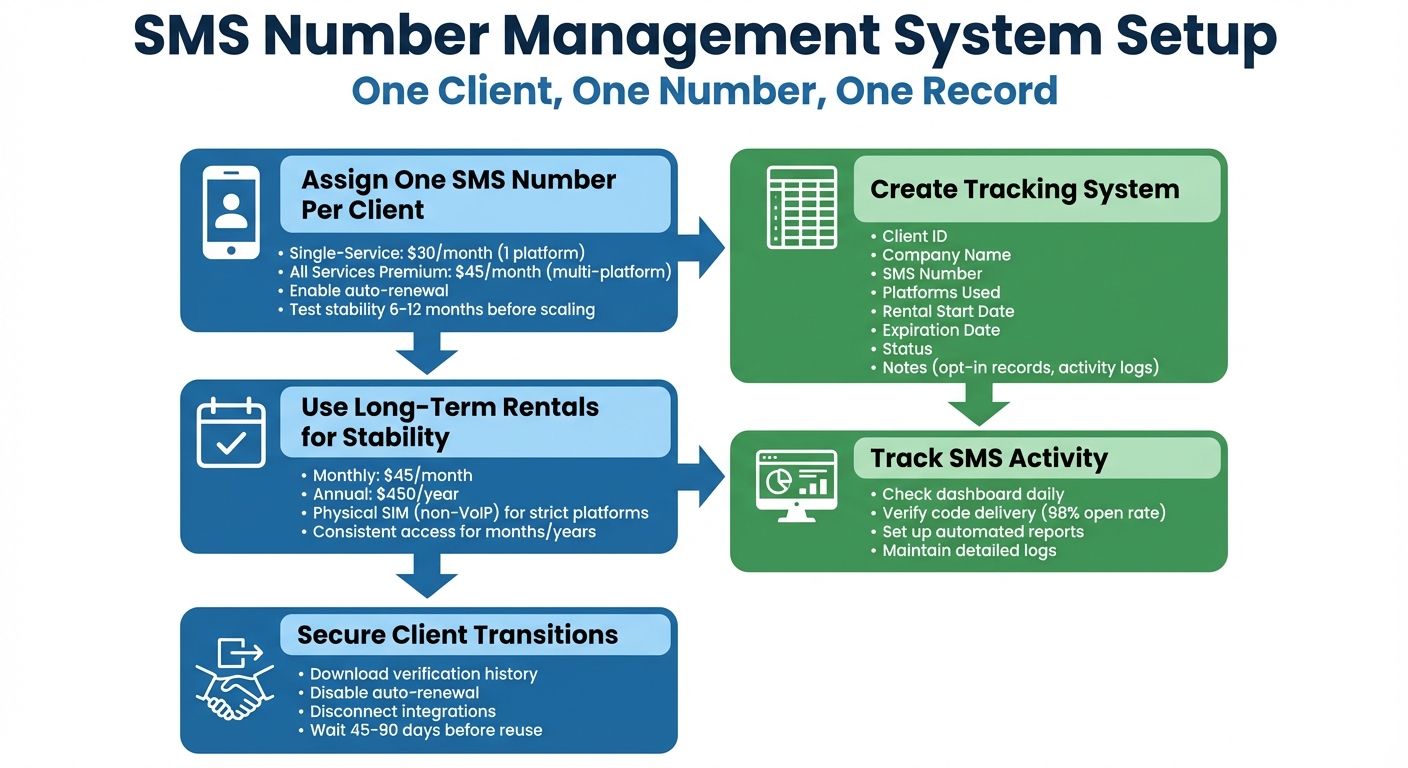
SMS Number Management System for Agencies: 5-Step Setup Process
Keeping your agency organized with a solid system for assigning and tracking SMS numbers is crucial. A simple rule to follow? One client, one number, one record. This avoids confusion and ensures that every team member knows exactly which number is tied to which account.
Assign One SMS Number Per Client
Assigning each client their own dedicated SMS number is key. Sharing numbers increases the risk of platform suspensions, which can disrupt workflows.
Here’s how you can structure it:
- Single-Service Rentals: $30 per month for clients using just one platform (like WhatsApp or LinkedIn).
- All Services Premium: $45 per month for clients who need multi-platform access.
Start by assigning numbers to your most important clients. Test the stability of these numbers over 6–12 months before scaling up. To avoid interruptions, always enable auto-renewal for these numbers. Once assigned, document every detail to keep things organized.
Track Which Number Belongs to Which Account
Managing dozens of numbers without proper documentation is a recipe for chaos. Use tools like Google Sheets, HubSpot, or Airtable to create a tracking system. Your tracking sheet should include these columns:
- Client ID
- Company Name
- SMS Number
- Platforms Used
- Rental Start Date
- Expiration Date
- Status
Add a notes section for specifics like usage details or platform quirks. For compliance, include fields for opt-in records and activity logs. Update this system anytime you assign, renew, or deactivate a number. This not only keeps you organized but also ensures you have an audit trail if questions about consent or ownership come up.
Use Long-Term Rentals for Stable Access
Short-term numbers can expire mid-campaign, creating unnecessary headaches as you scramble to update verification details across platforms. Long-term rentals are a smarter solution. Numbers from the long-term rental product page provide consistent access for months or even years. They’re perfect for handling re-verifications without the hassle of switching numbers.
Physical SIM numbers (non-VoIP) are especially useful for strict platforms like Google, WhatsApp, or banking apps, which often block virtual numbers. With All Services Premium numbers, you can even integrate them with Slack or Discord using webhooks, so verification codes are delivered directly to your team.
Pricing is flexible:
- Monthly Renewals: $45 per month.
- Annual Plans: $450 per year.
This setup ensures you can keep the same number for as long as your client needs – whether that’s one year or five.
sbb-itb-5a89343
Daily Management Tips for Multiple Client Accounts
Once your system is set up, the focus shifts to maintaining smooth daily operations. Handling multiple client accounts every day requires a structured approach to avoid security risks, quickly address potential issues, and ensure compliance. These habits help preserve the integrity of your daily processes.
Keep Client Accounts Separate and Secure
Always assign unique numbers to each client. Sharing numbers between accounts can lead to flags or suspensions, so it’s essential to use a dedicated, carrier-backed SIM number for every client.
Instead of sharing main credentials, grant team access through webhook integrations like Slack or Discord. This approach ensures security while allowing seamless collaboration.
Monitor SMS Activity and Usage
Make it a daily habit to check your dashboard for SMS activity. Confirm that SMS codes are being delivered as expected. If a number stops receiving messages, you’ll want to address the issue immediately to avoid disruptions to your client’s campaigns. With SMS boasting a 98% open rate, missing codes can spell trouble.
Set up automated reports to track SMS delivery and maintain detailed logs. Record when codes are received, the platforms they’re used for, and any opt-out requests. These records create a reliable audit trail, which is invaluable if questions about consent or account ownership arise. Centralizing these processes simplifies compliance and keeps everything running smoothly.
Use a Central Platform to Manage All Numbers
A centralized dashboard can save time and reduce errors. For example, MobileSMS.io offers a platform where you can oversee all your rented numbers, monitor credit balances, and track SMS activity in real time. For agencies managing large volumes, the API key feature is especially helpful. It automates SMS retrieval and integrates verification codes directly into your workflows, speeding up processes like client onboarding. These tools and routines are essential for maintaining the stability and security of your SMS operations.
How to Handle SMS Numbers When Clients Leave
Managing SMS numbers when a client departs requires a solid plan to avoid security risks and billing problems. If offboarding is a regular occurrence, having a detailed, documented process is essential.
Create a Standard Handover Process
Start by downloading the verification history before disabling auto-renewal. Once the account is closed, these records are permanently deleted, so it’s crucial to save them in advance. Then, turn off auto-renewal in the rental section to stop further billing immediately.
The next step is to disconnect all integrations. If you’ve set up Slack or Discord webhooks to receive SMS codes, remove those webhook URLs from the dashboard. This ensures that verification codes no longer flow into your internal systems, protecting the client’s privacy.
Be thorough in your handover notes. Clearly document:
- Which service the number was assigned to (for single-service rentals)
- The expiration date of the rental
- Whether the client requires the number to be transferred to their own account
If the client is creating their own MobileSMS.io account, inform them that assigning a new number typically takes 24 to 72 hours, depending on demand.
Once everything is secured and logged, you can move forward with reassigning numbers where necessary.
Reuse Numbers for New Clients
After completing the handover, you can consider reusing numbers for new clients, but only after clearing all previous integrations. For accounts that only need verification access, "All Services" numbers can be reassigned once the current rental period ends, following your standard process.
For sensitive accounts, wait for the carrier recycling period before reusing numbers. Carriers in the U.S. typically reassign released numbers after 45 to 90 days. With around 35 million phone numbers reassigned annually, there’s a risk that residual trust could lead to verification codes being sent to the wrong user. To avoid this, it’s safer to rent a fresh number for high-security clients rather than reusing one too soon.
Track these numbers using a spreadsheet to monitor their cooling-off period and determine when they’re ready for reassignment. This approach helps you avoid conflicts while maximizing the value of your rentals without sacrificing security.
Conclusion
Managing SMS numbers for multiple client accounts becomes far simpler when you focus on three essentials: assign each client a dedicated number, maintain centralized tracking, and establish clear handover protocols. These steps help improve security, ensure compliance, and make scaling more manageable.
Using a master inventory spreadsheet to track numbers, client names, and important dates ensures quick allocation and keeps things compliant. Monthly audits can catch discrepancies early, while role-based access controls protect sensitive client information.
Opting for long-term rentals offers stability, which is critical for consistent client service. Unlike short-term or shared numbers, dedicated long-term numbers help build sender reputation over time, improve message deliverability, and reduce the hassle of managing multiple expiration dates. With pricing designed for agencies (learn more here), you can offer predictable costs to clients while keeping operations efficient. These long-term rentals ensure stability throughout the client relationship, while a well-thought-out offboarding process secures smooth transitions when contracts end.
Speaking of offboarding, a solid handover process is essential when clients leave. A 30–60 day waiting period before reassigning numbers minimizes compliance risks and protects sender reputation.
FAQs
How do I choose between Single-Service and All Services numbers?
If you’re looking for a phone number dedicated to just one platform, go with Single-Service numbers. They’re perfect for handling specific tasks without any distractions. On the other hand, All Services numbers offer more flexibility since they work across multiple platforms and accounts. This makes them a great choice if you need to manage various tasks or accounts seamlessly.
What should I log in my SMS number tracking sheet to stay compliant?
To ensure compliance, make sure to document key details for each SMS number in your tracking sheet. Include the following:
- Assigned client or account name: Clearly identify who the number is linked to.
- Phone number or ID: Specify the exact number or identifier.
- Rental start and end dates: Track when the number was acquired and when it will no longer be in use.
- Purpose: Note why the number is being used (e.g., marketing campaigns, user verification).
- Platform/service associated: Record the platform or service tied to the number.
- Notes on status or issues: Include any relevant updates, such as technical problems or changes.
- Transfer details when contracts end: Log what happens to the number after the contract expires.
- Compliance notes: Add details about privacy policies or other regulatory requirements.
Keeping this information organized helps maintain proper management and ensures all policies are followed.
How long should I wait before reusing a number after a client leaves?
When a client leaves, it’s a good idea to wait at least 7 days before reusing their number. This buffer helps prevent any potential issues during the transition. For managing multiple accounts more efficiently, consider long-term rental options like 7, 30, 60, or 90 days. These options simplify account handling and ensure smoother transitions between clients.