

- Decentralized Network: Mastodon operates through independent servers (instances), each with its own privacy policies and moderation rules.
- Data Collected: Instances typically require minimal personal information like email, username, and password, but administrators can access server data, including private messages and IP addresses.
- Privacy Risks: Lack of end-to-end encryption and reliance on volunteer administrators pose potential risks to your data.
- Protect Yourself:
- Choose instances with clear, privacy-friendly policies.
- Use anonymous email addresses and usernames.
- Protect your IP address with a reliable VPN.
- Avoid sharing personal details in your profile or posts.
- SMS Verification: Some instances may require phone verification to combat spam. Use temporary phone number services like MobileSMS.io to maintain privacy.
Key Takeaway: Mastodon offers a more privacy-conscious alternative to traditional social media, but your privacy depends on the instance you choose and the precautions you take during and after registration.
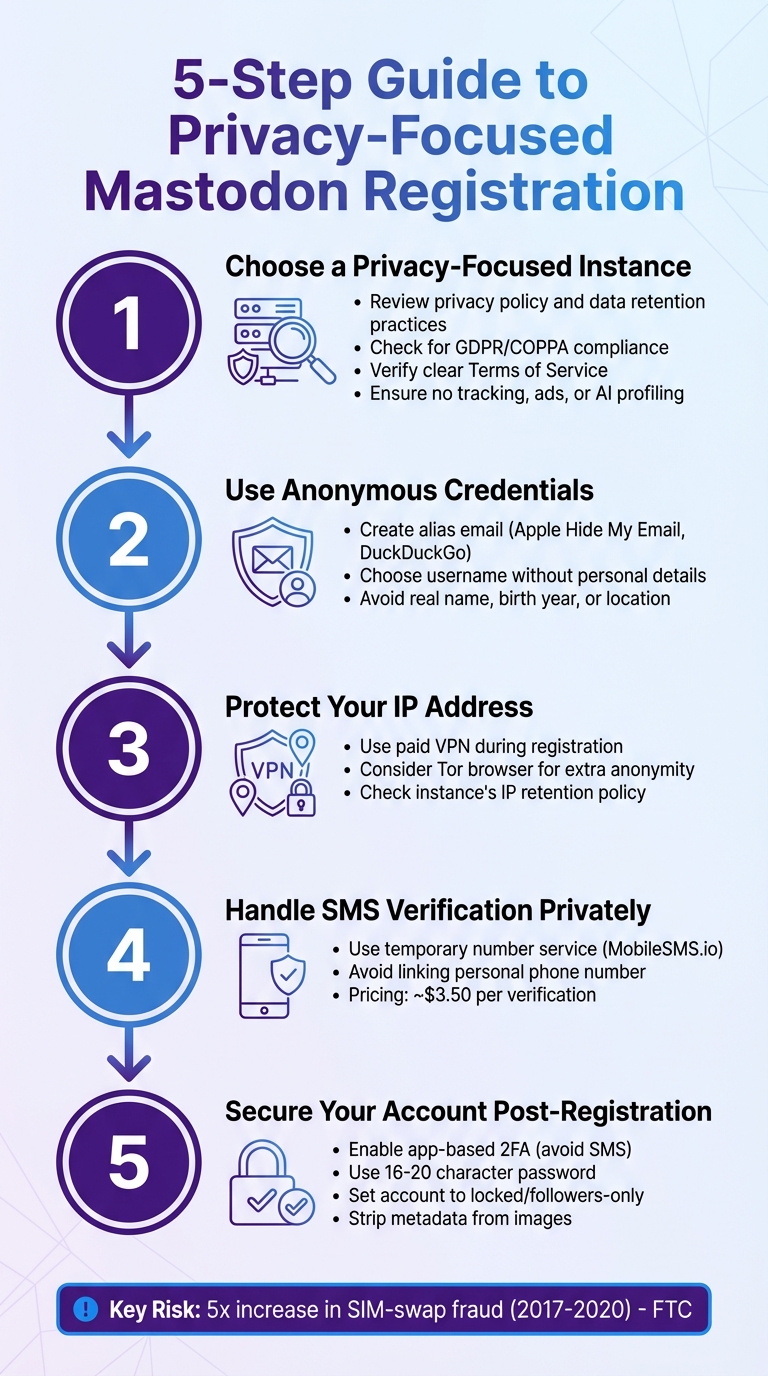
5-Step Guide to Privacy-Focused Mastodon Registration
Mastodon Instances and Registration Privacy Concerns
What Mastodon Instances Are
Mastodon instances are independent servers that come together to create the Fediverse. Each instance operates as its own community, managed by an administrator who sets the rules and oversees privacy policies. Unlike centralized platforms controlled by a single company, Mastodon’s decentralized approach gives each instance autonomy over data management, moderation, and security. Administrators rely on open-source software funded by donations, avoiding advertising or algorithm-driven feeds. This setup shapes not just the community experience but also the way personal data is handled during registration.
Data Collected During Account Creation
When you sign up for a Mastodon account, the information collected is fairly minimal. Typically, this includes your email address, username, and password. Some instances may also ask for your date of birth to comply with laws like COPPA. Beyond that, technical data such as your IP address, browser type, app details, and login history is logged. While Mastodon doesn’t require phone numbers, legal names, or government IDs, the data it does collect can still be used to identify you.
Privacy Risks During Registration
One of the biggest privacy concerns with Mastodon is that your data is managed by instance administrators – often volunteers who may not have legal expertise or resources. These administrators have access to all server data, including your email address, IP information, and even private messages, as Mastodon doesn’t offer end-to-end encryption. Logging IP addresses can expose your location and internet provider details, and if phone verification is used, it could link your real number to your account. This lack of encryption and reliance on individual administrators introduces potential risks to your privacy.
How to Choose a Privacy-Focused Mastodon Instance
Reviewing Privacy Policies and Server Rules
Before signing up, take the time to read the instance’s privacy policy thoroughly. Pay close attention to data retention practices. For example, mastodon.social keeps server logs, including IP addresses, for up to 90 days and registered user IP addresses for no longer than 12 months. Choose an instance that limits data collection, enforces clear moderation policies, and operates under privacy-friendly laws like GDPR or COPPA.
Check if the instance explicitly states it won’t use your information for tracking, ads, or AI profiling. Look for a clear Terms of Service (ToS) and note when it was last updated – Mastodon version 4.4, introduced in 2025, added optional ToS features for administrators. Transparency is key; ensure the instance explains how and when data might be shared, such as for legal reasons or enforcing policies. This step helps you confirm the instance aligns with your privacy needs.
Using Anonymous Email Addresses and Usernames
Once you’ve reviewed the policies, take steps to protect your identity. Since administrators can see your email address, consider using an anonymous forwarding service. Tools like Apple’s Hide My Email or DuckDuckGo Privacy Protection let you create forwarding addresses that shield your real email from instance operators.
Pick a username that doesn’t reveal personal details. Remember, your Mastodon username combined with the instance domain becomes your public identity. Avoid including your real name, birth year, location, or any other information that could tie your account to your real-world identity.
Safeguarding Your IP Address and Location
Protecting your digital footprint is just as important as reviewing policies and using anonymous credentials. Administrators can access your IP address, which can reveal your location and internet provider. Always use a reliable paid VPN during both registration and regular use. Paid VPNs are preferable to free ones, as free services often monetize user data.
Also, review the instance’s policies on IP and login data retention. Some instances might enforce geographic restrictions or block servers from certain regions. If you’re worried about government access to your data, choose an instance hosted in a privacy-conscious jurisdiction or managed by someone you trust. For added anonymity, consider using a privacy-focused browser or the Tor browser when signing up. These extra steps can go a long way in keeping your online presence secure.
SMS Verification Privacy: Problems and Solutions
When it comes to registration privacy, SMS verification brings its own set of challenges and potential solutions.
Why Some Mastodon Instances Require Phone Numbers
Certain Mastodon instances ask for phone verification as a way to combat spam, bots, and harassment. By requiring a phone number, admins introduce a small hurdle – both in cost and time – that makes mass registrations more difficult. This step often becomes necessary when CAPTCHA alone fails to block automated signups effectively. Instances particularly vulnerable to spam or coordinated attacks may rely on this extra layer of security. In some cases, phone numbers also serve as a backup contact option for high-risk accounts or moderators. However, Mastodon’s main software design focuses on email for verification and notifications, making phone verification more of a supplementary measure.
Privacy Problems with Phone Verification
A mobile number is more than just a contact method – it’s a long-term identifier often tied to your legal identity. In the U.S., carriers maintain detailed subscriber records, including your name, billing address, payment information, and sometimes even your Social Security Number or other forms of ID collected during account setup. If a Mastodon instance stores your phone number, it becomes vulnerable to risks like data breaches, misuse by insiders, or excessive data collection, especially if the server runs additional analytics tools.
Legal obligations could force admins to share logs, further exposing your phone number. Additionally, linking your Mastodon account to the same number used for other services makes it easier for malicious actors to track you across platforms, perform open-source intelligence (OSINT) searches, or even attempt SIM-swapping attacks. These attacks are particularly concerning because they target SMS-based two-factor authentication (2FA) on other accounts. The U.S. Federal Trade Commission noted a fivefold increase in SIM-swap fraud reports between 2017 and 2020, underscoring the risks of relying on phone numbers for authentication.
Using MobileSMS.io for Private SMS Verification

MobileSMS.io offers a privacy-friendly alternative by providing temporary SIM-based phone numbers for receiving one-time SMS codes. Instead of using your personal number – linked to your carrier account and legal identity – you can rent a MobileSMS.io number during registration. The process is simple: enter the temporary number, receive the verification SMS via their dashboard, and complete the signup without exposing your actual phone number.
This approach minimizes the risk of deanonymization through telecom records or consumer databases. Pricing starts at around $3.50 per successful verification, with options for longer-term rentals. Since these numbers are disposable, you can stop using them to prevent future tracking. Another key benefit is that MobileSMS.io numbers are SIM-based, not VoIP, making them more likely to be accepted by platforms that block virtual numbers. For Mastodon instances with strict anti-fraud measures, this can be a game-changer, allowing you to maintain privacy while adhering to their requirements.
sbb-itb-5a89343
Account Security and Privacy After Registration
Once you’ve signed up for Mastodon, your next step should be securing your account and minimizing privacy risks. Mastodon offers several tools to help protect your account, but it’s up to you to set them up correctly.
Password Security and Two-Factor Authentication
Start with a strong, unique password – ideally 16–20 characters – generated and stored using a trusted password manager like Bitwarden or 1Password. Then, enable two-factor authentication (2FA) using a time-based one-time password (TOTP) app, such as Aegis, Raivo, or Authy. Be sure to save your recovery codes securely in your password manager. Avoid SMS-based 2FA whenever possible, as app-based codes are more secure against SIM-swapping attacks and don’t expose your phone number to instance admins or potential breaches.
Taking these steps ensures your account has a solid foundation of protection.
Setting Up Private Account Recovery
For added security, use an alias email from a privacy-focused provider like SimpleLogin or Firefox Relay for account recovery. Make sure this email account has a strong password and 2FA enabled as well. If a phone number is required for recovery, consider using a dedicated virtual number from services like MobileSMS.io.
These precautions add an extra layer of security to your account, ensuring you’re prepared for any recovery scenarios.
Maintaining Privacy on Mastodon
To reduce data exposure, adjust your privacy settings as soon as possible. Set your account to locked, change the default post visibility to "followers-only" or "unlisted", and disable discoverability features. Avoid including personal details or identifiable information in your profile or photos. Before uploading images, strip metadata and steer clear of sharing real-time updates from easily recognizable locations. If posting links, remove tracking parameters like UTM codes to protect your privacy.
Stay alert to phishing attempts. Double-check the domain name of your Mastodon instance before entering your password – phishing sites often mimic popular instances with slight typos. Never share your password or 2FA codes through direct messages or emails. Always log in by manually typing your instance’s domain in your browser, rather than clicking on links in emails.
For ongoing security, regularly review your Active Sessions under security settings (if available) and log out of any sessions you don’t recognize. Revoke access for third-party apps you no longer use to limit data exposure. Additionally, keep your devices and browsers updated, enable full-disk encryption, and secure your screens with strong PINs or passwords to prevent unauthorized access to saved sessions.
Conclusion
Mastodon can offer a more privacy-conscious social networking experience, but it all starts with thoughtful choices about how you join and use the platform.
Begin by selecting a privacy-oriented instance – look for one with a clear privacy policy, well-defined data retention practices, and moderation rules that align with your preferences. Protect your identity by using an alias email and a username that doesn’t reveal personal information, and consider connecting through a VPN to keep your IP address and location private. If SMS verification is required, you can safeguard your U.S. phone number by using services like MobileSMS.io for a temporary number.
After registration, focus on securing your account. Use a strong, unique password, enable app-based two-factor authentication, and set up private recovery methods. Adjust your privacy settings to control who can see your posts, and stay vigilant against phishing attempts. Regularly check active sessions, remove unused third-party app access, and keep your devices updated with encryption enabled.
FAQs
How can I select a privacy-focused Mastodon instance?
To pick a Mastodon instance that values privacy, focus on those run by trusted administrators with a strong track record of protecting user data. Look for instances that clearly state their privacy policies and demonstrate a commitment to keeping your personal information safe.
For extra protection, use a VPN to hide your IP address. Keep in mind that direct messages on Mastodon are not end-to-end encrypted, so avoid sharing sensitive details through them. You can also boost your privacy by setting your account to private or locked, which restricts who can view your posts.
Don’t forget to regularly check the apps and services connected to your account. Removing outdated or unnecessary permissions is a simple way to stay in control of your data.
What privacy risks should I know about when using phone verification on Mastodon?
Using phone verification on Mastodon comes with potential risks, as it could reveal your phone number to instance administrators. This raises privacy and security concerns, as administrators might misuse the information or link it to your personal details.
Beyond that, it increases your exposure to threats like SIM swapping and identity theft – methods attackers use to gain unauthorized access to accounts. There’s also the possibility of targeted harassment or surveillance stemming from this information. For those prioritizing privacy, it’s crucial to consider these risks before deciding to share your phone number.
How can I keep my personal information secure when signing up for Mastodon?
To safeguard your identity on Mastodon, start by selecting a reliable server that meets your privacy standards. Be cautious about sharing sensitive personal details with servers or administrators unless you fully trust them. Activate two-factor authentication (2FA) using an authenticator app or a security key to add an extra layer of protection.
Use a strong, unique password for your account, and make sure to securely store your recovery codes in case you need to regain access. You might also want to adjust your account’s privacy settings to private or followers-only. This helps you control who can view your posts and engage with you.