

Moltbot is a personal AI assistant that automates tasks on platforms like WhatsApp, Telegram, and Discord. To function properly, it requires a dedicated phone number for SMS verifications. Using your personal number can lead to spam, account risks, and platform blocks. Free VoIP numbers are not reliable, as most services reject them. Instead, services like MobileSMS.io provide Non-VoIP SIM-based numbers, which are accepted by platforms and ensure smooth operation.
Key Takeaways:
- Why a Dedicated Number? Avoid spam, protect personal accounts, and comply with platform requirements.
- Why Not VoIP? VoIP numbers are often blocked by messaging apps like WhatsApp and Telegram.
- Solution: MobileSMS.io offers real SIM-based numbers from major carriers, starting at $45/month for the All Services Premium plan, which supports unlimited SMS across 1,200+ platforms.
To set up, create an account on MobileSMS.io, add credits, and rent a number. Match your IP location with the number’s country to avoid verification issues. For Moltbot users, the All Services Premium plan is the most reliable option for seamless multi-platform use.
Why Moltbot Needs a Dedicated SIM Number
Verification Triggers and Risks of Using Your Personal Number
Moltbot sets up accounts on platforms like WhatsApp, Telegram, Discord, and Slack. These platforms require SMS verification when creating accounts and during security checks.
Re-verification can be triggered by changes in IP address, location, or any activity deemed suspicious. For Moltbot running on a VPS or home server, these checks can occur unexpectedly – and often enough to become a hassle.
Using your personal phone number for this creates several problems. Your inbox gets flooded with verification codes meant for the bot, making it harder to manage personal messages. Mixing your personal number with the bot’s activities can also raise red flags with platforms, especially if the bot’s behavior seems out of the ordinary. Worse, if the bot account gets flagged or restricted, your personal number becomes tied to the issue. This lack of separation between personal and bot accounts is something Moltbot’s documentation strongly advises against.
To avoid these complications, a dedicated Non-VoIP SIM-based number is the way to go.
Why VoIP Numbers Are a Poor Choice for Moltbot
Free VoIP numbers might seem like an appealing option, but they’re not reliable for Moltbot. Platforms like WhatsApp, Telegram, and Discord actively block these numbers because they’re virtual and often recycled. Many VoIP numbers are already blacklisted, making them unusable for verification.
Non-VoIP SIM-based numbers are the solution. These numbers come from real mobile carriers, the same networks that power everyday cell phones. Platforms recognize them as legitimate, making them far less likely to trigger security filters. Unlike VoIP numbers, real SIM cards allow consistent SMS reception for verifications, maintain stable sessions with Moltbot’s credentials, and eliminate the need for constant re-verification. Moltbot’s documentation highlights physical SIM or eSIM numbers as the most reliable choice for smooth operation and avoiding blocks.
Services like MobileSMS.io provide Non-VoIP SIM-based numbers, ensuring your bot runs without interruptions.
sbb-itb-5a89343
What You Need Before Starting
Required Tools and Accounts
To set up a Moltbot phone number using MobileSMS.io, you’ll need a few essentials. First, create a MobileSMS.io account – this only takes a few minutes with an email address and password. The platform operates on a credit-based system, so you’ll need to deposit at least $5 in credits before renting any numbers. Payments can be made via credit card or cryptocurrency.
It’s crucial to match your IP location with the country of the rented number (you can check your IP location using ipinfo.io). A mismatch – like renting a US number while using a European IP – can trigger security blocks. If your IP doesn’t align with your intended rental country (the USA is recommended for compatibility), set up a VPN to match the region.
In addition to your MobileSMS.io account, you’ll need Moltbot installed and running on your device or server, a web browser to access the MobileSMS.io dashboard, and a secure place to store recovery details. If you’re running Moltbot on a VPS, ensure SSH access is configured before moving forward.
Once you’ve got these basics covered, you’re ready to choose the best plan for your Moltbot setup.
How to Pick the Right Plan
MobileSMS.io offers three main options for renting numbers:
- One-time numbers starting at $3.50 per SMS
- Single-service rentals ranging from $15 to $100, depending on the rental period
- All Services Premium plan at $45 for 30 days or $450 for 12 months
For most Moltbot users, the All Services Premium plan is the best choice. It provides a dedicated US Non-VoIP SIM that works across 1,200+ platforms, with unlimited SMS and instant code delivery. This is especially important for re-verification checks on platforms like WhatsApp, Telegram, or Discord SMS verification, which often flag accounts due to IP changes or unusual activity.
While single-service rentals are an option, they limit flexibility. Since Moltbot is designed to manage multiple messaging channels at once, being tied to one service can undermine its functionality. The Premium plan also includes Slack and Discord webhook integration, which is a handy feature for team setups where verification codes need to be shared in group channels.
To avoid losing your number mid-month and risking account lockouts, enable auto-renewal. MobileSMS.io also offers a 7-day money-back guarantee in case the rented number doesn’t work for your intended platform. Just be sure to contact support within that timeframe.
Once you’ve selected your plan, you can move on to activating your dedicated number.
How to Set Up a Moltbot Phone Number
Create Your Account and Add Credits
Start by heading over to MobileSMS.io and creating an account. Sign up with your email and password, then log in to access your dashboard. This is where you’ll manage your credits and transactions.
The service uses a credit-based system, and you’ll need to make a minimum deposit of $5 to get started. You’re only charged when an SMS is successfully received (for one-time numbers) or when you activate a long-term rental. Payments can be made via card (with 3D-Secure) or cryptocurrency. Keep in mind that auto-renewal is only available for card payments.
Once you’ve added credits, you’re ready to rent your dedicated number.
Rent an All Services Premium Number
In your dashboard, go to the Long-Term Rentals section and choose the All Services Premium option. This plan is designed to work across more than 1,200 platforms without requiring you to manually activate it every time a code arrives.
Next, select your country. USA numbers are highly recommended for the best compatibility. They’re priced at $45 for 30 days or $450 for 12 months. If you prefer UK or Netherlands numbers, they cost $40 for 30 days. Choose the 30-day rental option and complete your payment.
Once your number is activated, it will appear in your dashboard. These numbers are always active, so verification codes are delivered instantly without any extra steps. The Premium plan also supports Slack and Discord webhook integration, making it a great choice for team setups.
With your number ready, you can immediately start using it for SMS verification.
Use the Number for Verification
When setting up a service for Moltbot – such as WhatsApp, Telegram, Discord, or Slack – enter the rented phone number exactly as it’s shown in your MobileSMS.io dashboard, including the country code. The service will send an SMS verification code to that number.
Check your dashboard for the real-time code, then enter it into the service’s verification field. Your account will be verified, and you’re good to go. The same number can be used across multiple platforms, as the Premium plan supports unlimited SMS.
After verification, follow the specific steps for linking the account to Moltbot. For WhatsApp, this usually involves scanning a QR code through the Settings > Linked Devices menu. For Telegram, Discord, and Slack, you’ll need to use API keys or bot tokens, depending on their setup process.
Troubleshooting Verification Issues
If you don’t receive a code, check to make sure your IP address matches the country of the rented number. If the issue persists, try renting a new number, as some numbers may be flagged by platforms due to prior use.
MobileSMS.io offers a 7-day money-back guarantee if the number doesn’t work for its intended purpose. Be sure to contact support within that timeframe if you encounter ongoing issues. To avoid further problems, consider using a clean browser profile or a stable proxy setup. Services like WhatsApp and Telegram are particularly sensitive to mismatched IP addresses or device fingerprints, so keeping a consistent environment can help prevent re-verification headaches.
All Services Premium vs Other Number Options
MobileSMS.io Number Options Comparison for Moltbot Users
Feature and Price Comparison Table
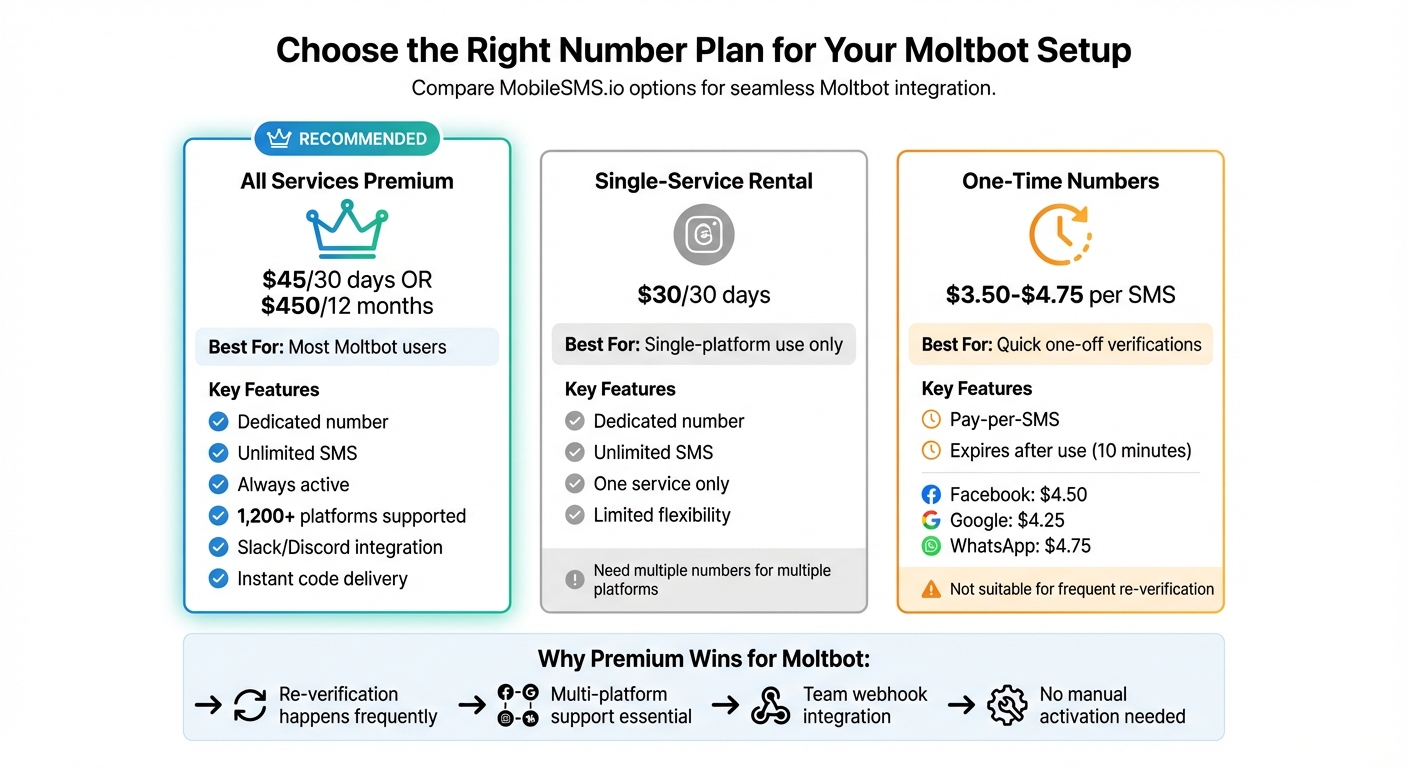
When tackling verification hurdles with Moltbot, it’s essential to understand how the available number options stack up. MobileSMS.io offers three choices: All Services Premium, Single-Service Rentals, and One-Time SMS-based numbers. Each serves distinct needs, but the Premium plan stands out for its versatility and reliability.
The All Services Premium plan costs $45 for 30 days (or $450 annually) and provides a dedicated, always-active number. It supports unlimited SMS across over 1,200 platforms, ensuring instant code delivery and seamless multi-platform verification. This makes it ideal for Moltbot users managing complex setups.
Single-Service Rentals are priced at $30 per month and cater to users sticking to one platform, like WhatsApp or Telegram. While it’s a cost-effective option for single-platform use, you’ll need to rent additional numbers if you expand to other services, potentially increasing costs.
One-Time Numbers are perfect for quick, one-off verifications, starting at $3.50 per SMS. For instance, a Facebook code costs $4.50, Google is $4.25, and WhatsApp is $4.75. These numbers expire within 10 minutes, making them unsuitable for platforms that frequently require re-verification, especially those used with Moltbot.
| Option | Best For | Key Features | Price (US) |
|---|---|---|---|
| All Services Premium | Most Moltbot users | Dedicated number, unlimited SMS, always active, supports 1,200+ platforms, Slack/Discord integration | $45/30 days or $450/12 months |
| Single-Service Rental | Single-platform use | Dedicated number, unlimited SMS for one service | $30/30 days |
| One-Time Numbers | Quick one-off verifications | Pay-per-SMS, expires after use | $3.50–$4.75 per code |
This table highlights why the Premium plan is the go-to choice for users with diverse Moltbot needs.
Why Most Moltbot Users Choose All Services Premium
For Moltbot users, re-verification is a frequent reality, triggered by bot activity, IP changes, or extended downtime. The Premium plan is designed to handle these demands without breaking a sweat. With unlimited SMS, users are covered no matter how often platforms like WhatsApp or Telegram send security codes.
The always-active status of Premium numbers is a game-changer. It eliminates manual steps and ensures codes are delivered instantly – critical for bots that operate without human involvement.
For teams managing shared Moltbot setups, the Slack and Discord webhook integration is invaluable. Verification codes are forwarded directly to team channels in real time, allowing anyone to address account issues immediately. This feature is exclusive to the Premium plan, making it the only practical solution for collaborative environments.
Conclusion
Using Moltbot on platforms like WhatsApp, Telegram, and Slack requires a dedicated phone number that can handle frequent verifications without jeopardizing your personal contact information. MobileSMS.io offers a solution with its Non-VoIP SIM numbers – real, carrier-backed numbers that are accepted by these platforms, unlike VoIP alternatives that often face instant blocking. This ensures smooth verifications and uninterrupted bot operations.
For $45 per month (or $450 annually), the All Services Premium plan provides a dedicated U.S. number with unlimited SMS and instant code delivery. The always-active status means you won’t need to manually activate the number, and the Slack and Discord webhook integration allows your team to receive verification codes in real time – a crucial feature for collaborative bot management.
This approach keeps bot-related activities separate from personal ones, minimizing security risks and spam. Since Moltbot often requires re-verifications due to IP changes or security sweeps, having a number that’s always ready ensures you won’t get locked out when a code is sent unexpectedly.
Getting started is quick and easy – just sign up at MobileSMS.io, fund your account, and activate your Premium number to begin setting up your Moltbot channels right away. Plus, their priority support is available to resolve any verification issues you might encounter.
FAQs
Why is a Non-VoIP SIM-based number the best option for Moltbot?
A Non-VoIP SIM-based number is the top choice for Moltbot because it’s dependable and works seamlessly with over 1,200 platforms, including big names like WhatsApp, Google, and Facebook. Unlike VoIP numbers, which are frequently flagged or blocked due to their connection to spam or misuse, Non-VoIP numbers offer greater compatibility and a higher level of trust.
On top of that, opting for a Non-VoIP number makes account verification smoother and significantly lowers the chances of rejection during platform checks. This makes it a smart option for setting up and managing bot-owned accounts across multiple services.
How can I make sure my rented phone number works seamlessly with Moltbot?
To keep Moltbot running smoothly, go for the All Services Premium plan. For $45 every 30 days, you’ll get a dedicated, real SIM-based number that stays active and can handle unlimited SMS messages. This makes it perfect for verification purposes.
Here’s how to set it up: use the rented number during the verification process and track incoming SMS codes in real-time through your dashboard. To avoid any hiccups, make sure the location matches the number’s country (the USA is a solid choice), securely save recovery details, and renew your rental before it expires. If you run into problems, double-check that the platform supports one-way SMS, try a different number if the current one gets blocked, and always stick to the platform’s rules. By following these tips, you’ll ensure reliable performance with Moltbot.
What makes the All Services Premium plan the best choice for Moltbot users?
The All Services Premium plan is designed for Moltbot users who need a dependable, dedicated phone number. It includes an always-on SIM with unlimited SMS reception, ensuring smooth verification across various platforms. This plan also works seamlessly with team tools like Slack and Discord, making it a great choice for collaborative environments. And with automatic renewal, you’ll never have to worry about service interruptions – keeping your Moltbot operations running smoothly and hassle-free.