

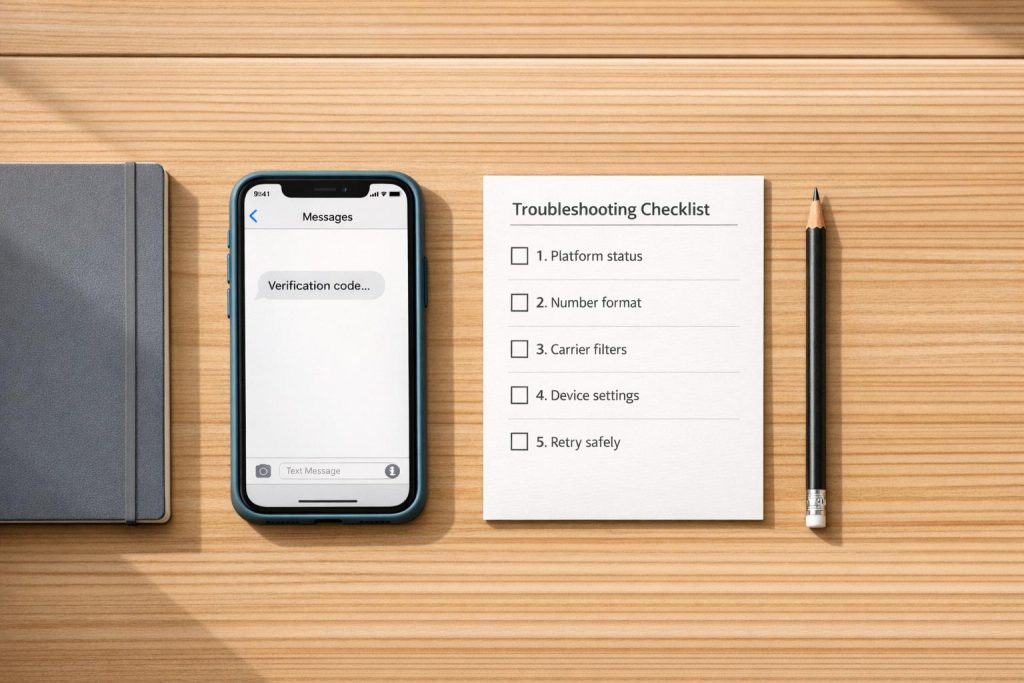
If you’re not receiving SMS verification codes, the issue could stem from platform glitches, carrier blocks, or device settings. Repeated attempts can worsen the problem by triggering security cooldowns. Here’s how to fix it:
- Check Platform Status: Look for service outages or restrictions on their status page.
- Use Correct Number Format: Include the country code (e.g., +1 for the U.S.).
- Verify Number Type: Avoid VoIP or virtual numbers; use real SIM-based numbers to bypass verification.
- Review Device Settings: Clear storage, check spam folders, and disable filters.
- Address Carrier Issues: Contact your carrier to enable short-code messaging and remove spam filters.
- Retry Carefully: Wait 5–10 minutes between requests to avoid rate limits.
- Switch Numbers if Needed: Use a reliable number from a different country with fewer restrictions.
For consistent results, consider using long-term, SIM-based numbers. These are compatible with most platforms and reduce verification delays. Avoid rushing retries to prevent account lockouts. Follow these steps to receive your code without unnecessary frustration.
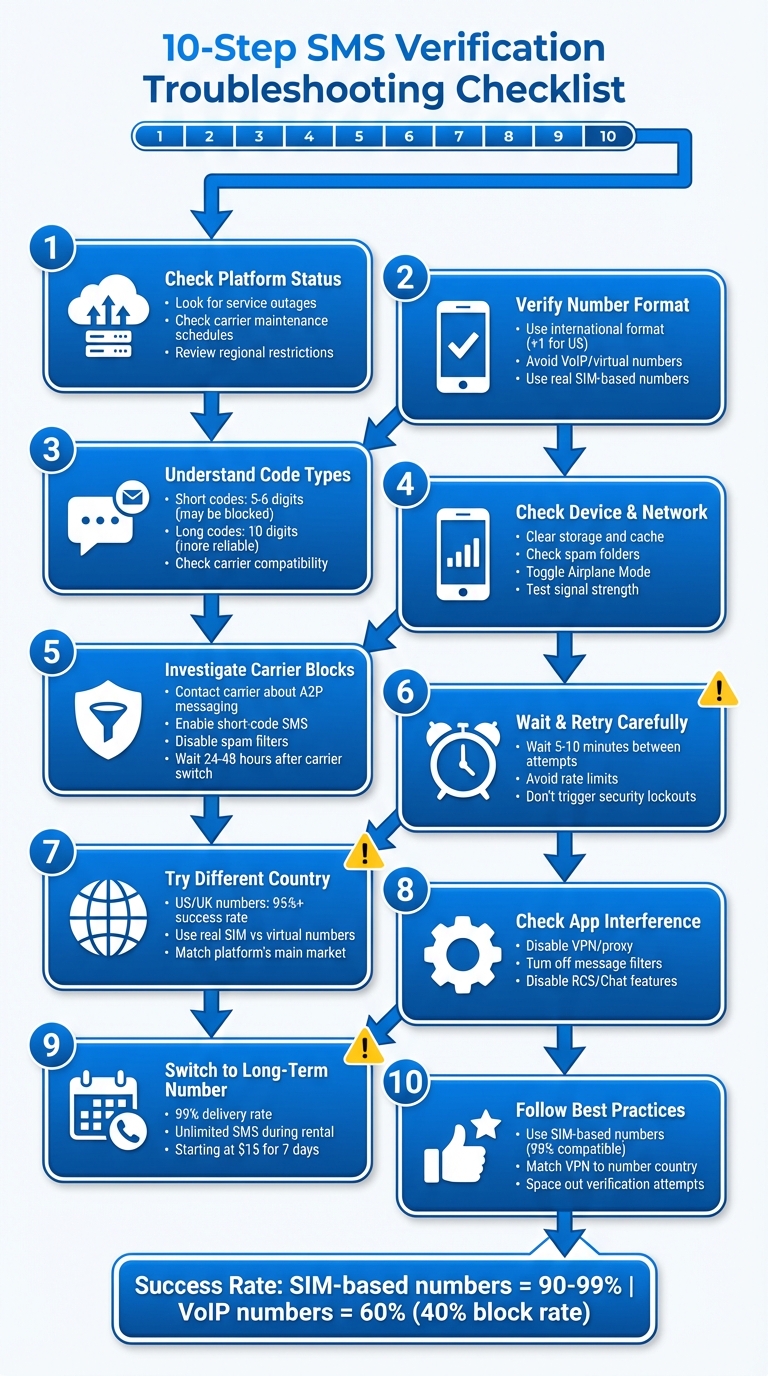
10-Step SMS Verification Troubleshooting Flowchart
Step 1: Check if the Platform is Having Issues
Before diving into your device settings, take a moment to confirm whether the platform itself is experiencing technical problems. This step helps you rule out any broader service disruptions that might be causing verification failures, saving you unnecessary troubleshooting on your end. Many issues with SMS verification stem from temporary outages or platform-level restrictions.
Look for Service Outages
Most major platforms offer real-time status pages that monitor SMS delivery and overall service health. Simply search for "[Platform Name] Status" to locate these dashboards. For instance, Twilio reported an impressive 99.98% uptime for its Programmable Messaging API over the 90 days leading up to March 23, 2026. However, even with such high reliability, occasional disruptions can occur.
When checking the status page, don’t just stop at the main dashboard. Look for additional sections, such as carrier network or external connectivity updates, where specific issues may be listed. For example, scheduled carrier maintenance – like T-Mobile US’s downtime from 8:00 PM to 4:00 AM on March 22–23, 2026 – can delay SMS delivery.
Also, pay attention to incidents in your region. As of March 23, 2026, SMS delivery in the United Arab Emirates had been unreliable for over five weeks due to ongoing issues with Du and Etisalat networks affecting Alphanumeric Sender IDs. Similarly, Vodafone UK experienced API request failures during maintenance on March 22–23. If your carrier or country is flagged with "Degraded Performance" or "Partial Outage", you might need to wait it out or try using a number from a different region.
If the status page doesn’t indicate any current outages, the problem might be related to platform-specific restrictions on certain phone numbers.
Check Platform Number Restrictions
Some platforms restrict specific types of phone numbers or certain regions from receiving verification codes. For instance, financial apps and banking services often block VoIP or virtual numbers altogether, while social media platforms may allow them but monitor for suspicious activity like repeated verification attempts. If you see an "Invalid Phone Number" error, it’s likely that your number type isn’t supported.
Here’s a quick breakdown of common restrictions and recommendations:
| Platform Type | Typical Number Restrictions | Recommended Number Type |
|---|---|---|
| Social Media (Instagram, TikTok) | Often allow virtual numbers but monitor frequent attempts | New or unflagged mobile numbers |
| Messaging Apps (WhatsApp, Telegram) | Frequently block VoIP and virtual numbers | Non-VoIP / Real SIM |
| Financial/Banking | Strict rules; often require specific carriers | Private Dedicated / Long-term SIM |
| International Services | May block certain country codes or regions | USA or UK Mobile Numbers |
If you’re using a short code number (those 4–6 digit numbers), make sure it matches the platform’s country code. Twilio highlights this limitation clearly:
Short code numbers are always country-specific and can only communicate with numbers from the same country.
For example, a U.S. short code won’t work with a UK mobile number. While this might seem like a platform restriction, it’s actually a technical limitation of short codes themselves.
sbb-itb-5a89343
Step 2: Verify Your Number Format and Type
Once you’ve ruled out platform outages, the next step is to make sure your phone number is entered correctly and meets the platform’s requirements. Even a small formatting mistake can prevent SMS delivery, and some types of numbers are automatically blocked by verification systems.
Use the Correct International Format
When entering your phone number, always include the country code. For U.S. numbers, this means starting with +1, followed by the 10-digit number, with no spaces, dashes, or parentheses. For example, write it as +12125551234 instead of (212) 555-1234. Missing the country code or adding unnecessary zeros at the start of the local number can disrupt international SMS routing entirely.
If you’re using a dual-SIM phone, double-check your default SIM settings to ensure that messages are sent and received on the active line.
Once you’ve confirmed the format, it’s time to ensure the platform supports your number type.
Verify Number Type Compatibility
Even if your number is formatted correctly, it might not be supported. Certain number types – like VoIP or virtual numbers – are often rejected by platforms as a fraud prevention measure. Platforms typically prefer SIM-based mobile numbers, as they have the highest success rate for verification. As PagerDuty explains in their documentation:
PagerDuty does not have full control over the deliverability of SMS notifications… we are not able to guarantee delivery of SMS notifications to numbers that are: Landlines… Voice Over Internet Protocol (VoIP) or virtual numbers.
If you see an error message, it may be because your number is non-mobile. Landlines, for example, are rarely accepted for verification. Additionally, some pre-paid or business-registered mobile plans may block the 5-6 digit short code messages that most platforms use for verification. If you suspect this is the issue, reach out to your carrier to confirm that your plan allows short code messaging.
Step 3: Understand Short Code vs Long Code Delivery
Once you’ve confirmed your number’s format and compatibility, it’s time to consider the SMS delivery method. If verification codes still aren’t coming through, the issue could stem from the type of code being used. SMS codes are typically sent via short codes (5–6 digits) or long codes (10 digits), and each has its own set of challenges. Let’s dive into how these methods interact with carrier-level filters, which often cause delivery problems.
Short Code Blocking Issues
Short codes are built for high-volume automated messaging, making them ideal for mass notifications. However, many carriers and mobile plans block these codes by default to cut down on spam. When this happens, the messages can vanish without any error notification.
Switching carriers or activating a new eSIM can also disrupt short-code delivery temporarily until the system completes provisioning. Additionally, some regions don’t support A2P (Application-to-Person) short codes at all. As Vanda Williams from Software Essentials points out:
Standard long codes were built for personal messaging. When you use them for business traffic without registration, carriers flag high-volume patterns as suspicious.
If you think short codes are being filtered, reach out to your carrier to ensure that short-code SMS or premium messaging is enabled on your plan.
Why Long Codes Work Better
Long codes, the standard 10-digit phone numbers, tend to face fewer restrictions and are more widely accepted internationally. Because they resemble personal messages, they’re less likely to get caught in spam filters. That said, long codes aren’t designed for high-volume messaging – they’re generally limited to sending 1–10 messages per second. Still, for individual verification purposes, they’re often more reliable.
Another advantage of long codes is their global usability. Unlike short codes, which may require separate numbers for different countries, long codes work across borders seamlessly. To avoid repeated compatibility issues, consider using a dedicated long code rather than relying on one-time numbers, or compare SMS verification services to find the most reliable provider for your needs. This approach can provide more consistent results for verification needs.
Step 4: Check Your Device and Network
Once you’ve confirmed the platform and number details are correct, it’s time to focus on your device and network settings. These factors can often block verification codes from reaching you. A full inbox, spam filters, or poor signal strength are common culprits. Addressing these issues before requesting a new code can save you time and frustration.
Clear Storage and Review Settings
Free up storage space. A full message inbox can prevent new SMS messages from being delivered. Delete old message threads or unnecessary media files, and consider enabling auto-delete for OTPs (One-Time Passwords) on Android to avoid clutter. If you’re using Android, clearing the messaging app’s cache can also help resolve minor glitches. Go to Settings > Apps > Messages > Storage > Clear Cache to perform this step. Don’t worry – clearing the cache won’t delete your messages.
Check your spam folder. Both Android and iOS devices have spam filters that might redirect short-code messages. On Android, open the Messages app, tap the menu, and check "Spam & blocked" for intercepted codes. On iPhones, go to Settings > Messages and disable "Filter Unknown Senders" while waiting for the code. Also, check Settings > Messages > Blocked Contacts to ensure you haven’t accidentally blocked short-code numbers. A Verizon user shared this tip:
"On my iPhone, I solved this by going to settings and blocked phone numbers – then ‘unblock’ any 5-digit short number. I had 15 short numbers in my blocked list, and once I unblocked them, the resend request for the code came through immediately!"
- STrimalo, Verizon Community Member
Adjust messaging features. On Android, temporarily disable "RCS/Chat features" in the Messages settings to ensure SMS is used instead of advanced messaging protocols. For iPhones, toggle iMessage off and back on in Settings > Messages to ensure the code routes through your carrier’s SMS system. If you’re using a mobile browser to request codes, clear cookies and cache to avoid issues caused by previous failed attempts.
Once your device settings are optimized, it’s time to look at your SIM card and network connection.
Test Your SIM and Network Connection
Reset your network. Start by toggling Airplane Mode on for 30 seconds, then turn it off. This simple step refreshes your network connection. For a more thorough reset, reboot your phone to reload its modem and clear any temporary software issues. If you’re using Wi‑Fi calling, disable Wi‑Fi temporarily and rely on mobile data instead. Some verification systems don’t deliver codes over Wi‑Fi networks.
Check signal strength. Poor signal can block SMS delivery. If your phone shows only one bar or is in "SOS" mode, move to an area with better cellular coverage. If you’ve recently ported your number, keep in mind that short-code SMS delivery might take a few days to fully activate. To rule out hardware problems, try inserting your SIM card into another device to see if the issue persists.
Step 5: Investigate Carrier Blocks and Filters
If you’ve ruled out issues with your platform, number, device, and network, the next logical step is to look into potential carrier blocks. Even when everything else seems fine, carrier-level filtering could be stopping your verification codes from getting through, especially on platforms like Google.
Carriers often use strict filters to prevent SMS scams, but these filters can sometimes block legitimate messages, including verification codes. If you’re receiving regular texts from friends but not automated codes, there’s a strong chance carrier-side filtering is the culprit.
Contact Your Carrier
Reach out to your carrier’s support team and ask specifically about short-code and A2P (Application-to-Person) messaging on your account. These terms refer to the types of automated messages often used for verification codes. Many support representatives won’t check these settings unless you specifically ask, so be clear in your inquiry.
If you recently switched carriers or activated a new eSIM, ask if the short-code routing has fully settled. It can take 24–48 hours after a carrier switch or SIM change for everything to work correctly.
"After a carrier switch, short-code delivery can be inconsistent until routing fully settles. That’s especially true if the number was recently ported or the SIM profile changed."
- Steve H., SMS/Phone Verification Expert
Ask the representative to whitelist common verification senders and remove any blocks for "premium SMS" or "marketing" messages that might be interfering. Additionally, confirm that your mobile plan allows international and automated messages, as some prepaid or roaming plans restrict these services.
Once you’ve addressed short-code provisioning, you can move on to checking if spam filters are playing a role.
Disable Spam Filters
Carrier spam filters can sometimes delay or block verification codes entirely. Ask your carrier to temporarily disable aggressive spam filtering while you troubleshoot. If you’re noticing that codes arrive too late to use, spam filtering could be the problem.
Also, take a look at any third-party spam-blocking apps on your phone, like Hiya or Truecaller. These apps can mistakenly mark short codes as spam and block them without notifying you. Temporarily pausing these apps can help determine if they’re causing the issue.
| Issue | Symptom | Action |
|---|---|---|
| Short-Code Block | Regular texts arrive, but all OTPs fail | Ask carrier to enable "Premium/Short-code SMS" |
| Porting Delay | Problem started after switching carriers | Wait 24–48 hours for routing to settle |
| Spam Filtering | Codes are delayed and expire before use | Ask carrier to disable aggressive spam filters |
| Roaming/Plan Limits | Codes fail while traveling or on a prepaid plan | Check if your plan supports international A2P SMS |
Step 6: Wait for Delays and Retry Carefully
Once you’ve checked carrier filters, it’s time to focus on how you pace your verification attempts. Timing is key here – rushing through retries can backfire. Take it slow when retrying to avoid triggering additional blocks. SMS delivery isn’t always instant, as delays can happen due to carrier routing, network congestion, or short-code filtering.
If you send multiple requests before the first code has a chance to arrive, you might accidentally trigger temporary account lockouts. Platforms often use these blocks to prevent abuse, and repeated requests can make your account look suspicious. A patient, deliberate approach can help you avoid unnecessary system flags.
Avoid Platform Rate Limits
Sending too many SMS requests in a short span can activate rate limiting, which temporarily blocks further requests to protect the platform from misuse. If you hit this limit, the system may stop delivering codes altogether until the cooldown period ends – this could take anywhere from a few minutes to several hours, depending on the platform’s security settings.
If you see a message like "try again in X seconds", follow it. Ignoring such timers will only extend the cooldown period. Repeated failed attempts could even trigger stricter security measures, halting code delivery entirely.
Wait 5–10 Minutes Between Attempts
Give the system enough time to send the SMS before requesting another code. If you haven’t received the code after 5–10 minutes, it might be delayed in transit or blocked by carrier filters. Requesting another code too soon can overload the system, potentially causing both the old and new messages to fail.
"I’m telling you to slow down because it usually speeds things up. Constant retries create more delay."
- Steve H., Expert Technician, Whizz-Experts
Try toggling Airplane Mode for 10 seconds or restarting your device to refresh your cellular connection. Also, double-check that your phone’s time and time zone settings are set to "Automatic." Even a slight mismatch can cause a valid code to be rejected as expired. If codes are arriving late or in batches, it’s likely a network issue, and retrying won’t solve it.
| Issue | Impact of Rapid Retries | Recommended Action |
|---|---|---|
| Rate Limiting | Temporary account lockout or extended delay | Respect on-screen timers and wait 5–10 minutes |
| System Overload | Both old and new codes fail to deliver | Send one request and wait before trying again |
| Security Checks | Account flagged as suspicious | Clear cookies, use incognito mode, or switch devices |
Step 7: Try a Number from a Different Country
If you’ve been waiting for your code and it still hasn’t shown up, the issue might be tied to your region. Some platforms prioritize SMS delivery based on agreements with carriers or fraud prevention measures. This means numbers from certain countries may face delays or stricter filtering, while others receive messages more consistently.
Switching to a phone number from another country can help you work around these regional barriers. This isn’t about gaming the system – it’s about finding a reliable route when your current one isn’t working. By using a different country code, you can often sidestep local filtering issues and improve your chances of receiving the verification code.
Which Countries Have Better SMS Delivery?
Numbers from the US, UK, and Netherlands often see SMS success rates above 95%, while regions with less developed telecom systems may only hit 70–85%. Many platforms favor US numbers because they’re less likely to trigger fraud detection systems. For account verification on services like social media, fintech apps, or ride-hailing platforms, US and UK numbers tend to work more reliably and quickly.
When possible, match your number to the platform’s main market. For example, US-based services usually work best with US numbers, while European platforms are more compatible with EU numbers.
Use Real SIM Numbers Instead of Virtual Ones
The type of number you use matters just as much as the country it’s from. Real SIM-based numbers from physical carriers outperform virtual or VoIP numbers. Platforms often use HLR (Home Location Register) lookups to check if a number is tied to an actual SIM card or a virtual line. Real SIM numbers typically achieve success rates of 90–99%, while VoIP numbers may face block rates as high as 40%.
When selecting an international number, ensure it comes from a legitimate mobile carrier rather than a virtual provider. Real SIM numbers behave like genuine user accounts, making it easier to avoid fraud detection systems. To get the best results, choose providers offering non-VoIP numbers with direct connections to mobile operators. This ensures your verification code request is routed through reliable carrier networks instead of third-party aggregators, which are often flagged or blocked.
Step 8: Check for App Interference
VPNs, proxies, and messaging filters can sometimes block or delay verification codes. While these tools are great for privacy and spam control, they can unintentionally interfere with the systems platforms use to confirm your identity.
Turn Off VPNs and Proxies
If your IP address and phone number’s country don’t match, verification attempts might get flagged. For instance, using a US phone number while your VPN shows an Indian IP address could look suspicious to the platform, potentially stopping the code from being sent. Many VPNs use data center IPs, which are often blacklisted to prevent fraud.
To avoid this, disable any active VPN or proxy service before requesting a verification code. If you must use a VPN, select a server location that matches your phone number’s country (e.g., a UK server for a UK number). Alternatively, switch to mobile data instead of Wi-Fi for a direct connection through your carrier. You can also refresh your network connection by toggling Airplane Mode on and off for about 30 seconds.
Review Messaging App Filters
Your phone’s messaging app settings might be hiding verification codes. For example, iPhones have a "Filter Unknown Senders" feature that can move texts from unrecognized short codes into a separate folder. Similarly, Android devices often redirect such messages to a "Spam & blocked" folder.
For iPhone users, head to Settings > Messages and disable Filter Unknown Senders. Also, check Settings > Messages > Blocked Contacts to ensure you haven’t accidentally blocked service short codes. On Android, open your messaging app and check the Spam & blocked folder. If you’re still not receiving codes, try turning off RCS/Chat features in your Messages app settings – this will force your phone to rely on standard SMS, which tends to work better for verification codes. Additionally, ensure your messaging app has permission to Use Premium text message services under Settings > Apps > Special access.
Once you’ve ruled out app interference, you’re ready to explore long-term number solutions in Step 9.
Step 9: Switch to a Long-Term Number
Why Long-Term Numbers Are More Reliable
Once you’ve resolved issues with platforms, devices, and networks, making the switch to a long-term number is a smart move to avoid recurring verification headaches. A long-term rental number eliminates the constant need for troubleshooting and ensures smoother verification processes. Unlike disposable numbers that expire after one use or can raise red flags, long-term rentals act like real, permanent numbers. This consistency builds trust with platforms, reducing the likelihood of being flagged as suspicious.
Long-term numbers boast delivery rates of up to 99%, thanks to stable carrier relationships. They’re perfect for tasks like login re-verifications, two-factor authentication, or updating account details – without triggering spam filters or rate limits. For example, fintech companies in Nigeria saw a 22% drop in sign-up abandonment rates after switching to localized long-term numbers. Similarly, gaming platforms in Latin America reduced user drop-offs by 19% by opting for renewable rentals instead of temporary ones.
Additionally, these numbers help prevent account lockouts by ensuring continuous access for re-verification. During your rental period, you can receive unlimited SMS codes from any registered service, making it easy to troubleshoot issues or manage multiple accounts without wasting numbers. This reliability makes long-term rentals an ideal choice for uninterrupted access.
Get a Long-Term Number
If you’re ready to enjoy these benefits, MobileSMS.io offers renewable long-term numbers starting at $15 for 7 days or $30 for 30 days for single-service rentals. Need something more versatile? The All Services Premium plan at $100/month includes features like automatic SMS forwarding and Slack or Discord integration for team use. These plans utilize real SIM-card numbers compatible with over 1,200 platforms, and 30-day rentals can be renewed indefinitely with auto-renewal.
Check out get a more reliable long-term number to explore your options and put an end to verification troubles for good.
Step 10: Follow Best Practices for Better Results
Once you’ve tackled platform, device, and network issues, it’s time to apply some tried-and-true practices to ensure your SMS verification process runs as smoothly as possible.
Use High-Quality Numbers and Avoid Rate Limits
When it comes to verification, the type of phone number you use can make or break your success. Opt for high-quality, SIM-based numbers instead of virtual or VoIP numbers. Why? SIM-based numbers are compatible with 99% of services, including platforms like WhatsApp, Telegram, and banking apps, which often block virtual numbers. Plus, these numbers are dedicated to a single user, reducing the chances of being flagged as suspicious – unlike overused "public inbox" numbers that are shared among multiple users.
Here’s another reason to stay cautious: text-based scams cost consumers $470 million in 2024, prompting carriers and platforms to crack down on SMS by implementing stricter filtering systems. To avoid issues, make sure your VPN or proxy IP address matches the country – and ideally, the city – of the phone number you’re using. Avoid free VPNs, as their IP addresses are frequently blacklisted by major platforms.
To steer clear of rate limits, space out your verification attempts. Always wait for the countdown to finish before requesting another code. Keep in mind that "too many attempts" errors can be tied to your IP address or device fingerprint, not just the phone number.
If you don’t receive a code, try toggling Airplane Mode for 10 seconds or restarting your phone. On Android devices, you can also temporarily disable RCS/Chat features to ensure the code arrives via plain SMS instead of being intercepted by messaging app filters.
Read More Tips
Looking to dive deeper? Check out our guide on improving SMS verification success rates. It covers everything from fine-tuning your digital fingerprint to selecting the best number type for specific platforms.
Conclusion
Getting SMS verification codes to arrive reliably involves understanding the interaction between platforms, carriers, and the types of numbers you use. By addressing common issues – like carrier spam filters, device blocks, and platform restrictions – you can significantly improve your chances of receiving codes without unnecessary delays.
With fraud on the rise, carriers have tightened their security measures, which can unintentionally block legitimate verification messages. Choosing SIM-based numbers from trusted providers can help you avoid these issues. These numbers are less likely to get flagged by spam filters and are compatible with 99% of platforms, even those that reject VoIP numbers.
For a cost-effective and dependable solution, MobileSMS.io offers a pay-per-success model for one-time verifications, ensuring you’re only charged when a code successfully arrives. If you need ongoing access, long-term rental numbers are available starting at $50 for 30 days. These rentals include features like Slack and Discord integration, along with a 7-day money-back guarantee.
By fine-tuning your approach – such as aligning your VPN with your number’s country, waiting 5–10 minutes between attempts, and using high-quality SIM-based numbers – you can save time, reduce frustration, and enjoy a smoother verification process.
Tired of dealing with verification headaches? Secure a reliable long-term number and simplify your experience today.
FAQs
How can I tell if the platform is down or my phone is the problem?
If you’re having trouble with your network, start by testing it. Make a phone call or send a standard SMS to see if they go through. If they don’t, the problem might lie with your carrier or your device.
Here are a few quick fixes to try:
- Switch on airplane mode for about 10 seconds, then turn it off.
- Restart your phone to refresh its connection.
- Check that messages aren’t being blocked, your signal is strong, and the number you’re using is formatted correctly.
Still stuck? Use a different device or SIM card to help figure out whether the issue is with your phone or your network provider.
Why do verification texts fail on VoIP or virtual numbers?
Verification texts often struggle to reach VoIP or virtual numbers because many platforms block these types of numbers to prevent spam or fraudulent activity. Virtual numbers are generally more susceptible to manipulation and are considered less dependable compared to traditional carrier-based mobile numbers.
On top of that, delivery problems can occur due to carrier restrictions, regional limitations, or mismatched protocols. Opting for carrier-based mobile numbers, like long-term mobile numbers, can improve message reliability and minimize the chances of texts being blocked.
What should I do if I keep getting “too many attempts” or cooldown errors?
If you run into a “too many attempts” or cooldown error, the best approach is to wait until the cooldown period ends before trying again. These errors typically happen because platforms enforce security limits on verification attempts.
To avoid this, make sure your phone number is entered correctly, don’t repeatedly request verification codes in quick succession, and use a reliable SIM-based number. If the issue continues, it’s worth checking your device and network settings. You can also enable backup options like authenticator apps or recovery emails to ensure smoother verification in the future.