

Starting a Substack newsletter often requires phone verification, especially if you enable paid subscriptions. Using your personal number for this can expose you to risks like spam, data breaches, and SIM-swapping attacks. Instead, services like MobileSMS.io offer a safer alternative with real SIM-based numbers for temporary or long-term use, starting at $3.50. These numbers work with Substack and Stripe, keeping your personal information private while meeting verification requirements. Here’s how to protect your privacy and manage multiple accounts securely:
- Why Substack Requires Verification: To prevent spam, ensure legitimate users, and comply with Stripe’s financial regulations.
- Risks of Using Personal Numbers: SIM-swapping, data breaches, and exposure on subscriber receipts.
- MobileSMS.io Solution: Disposable and rental SIM-based numbers accepted by Substack, with pricing from $3.50 to $30/month.
This approach keeps your identity separate from your publication, offering privacy and flexibility for writers managing one or multiple newsletters.
How Substack Phone Verification Works

When you sign up for a Substack account, phone verification isn’t always required right away. However, if you plan to enable paid subscriptions, phone verification becomes mandatory. This is because Substack uses Stripe as its payment processor, and Stripe requires verified personal details – including a phone number – to meet financial regulations. This ensures that only legitimate users link bank accounts and receive payments, reducing the risk of bots or fraudulent activity. In essence, this process helps secure your account while complying with financial rules.
Your phone number ties your identity to your account. It’s also used for accountability and can act as a key component in SMS-based multi-factor authentication (MFA), adding an extra layer of protection against unauthorized access. However, this also means your personal contact information becomes permanently linked to your publication.
Why Substack Requires Phone Verification
Substack has several reasons for implementing phone verification. First, it helps prevent spam and bot accounts. By requiring a verified phone number, Substack ensures that users are real people, not automated systems creating fake accounts or spamming the platform.
Second, enabling paid subscriptions triggers Stripe’s regulatory compliance requirements. Financial institutions demand identity verification to combat fraud and money laundering. Your phone number becomes part of this process, helping Stripe confirm you’re a legitimate user eligible to receive payments.
While these measures are designed to ensure security and compliance, they can also introduce privacy concerns for users.
Privacy Risks of Using Your Personal Number
Using your personal phone number for Substack verification can expose you to several risks. One of the most serious is SIM-swapping attacks, where hackers trick your mobile carrier into transferring your number to their device. Once they have control of your number, they can potentially access your accounts, including Substack and Stripe.
"Your phone number and email address are more than just contact details; they are valuable pieces of your digital identity!" – Tate Jarrow
Another issue is that your phone number might appear on subscriber credit card statements if you don’t adjust your Stripe settings. This visibility could lead to unwanted contact, spam calls, or even harassment from subscribers. Additionally, bad actors may cross-reference your number with leaked data from other platforms to create detailed profiles for phishing or targeted scams.
"SMS-based authentication, where you receive a text message from your carrier, is the least secure method because hackers can easily intercept them." – Lance Whitney, Contributor, PCMag
Which Number Types Substack Accepts
Stripe requires a valid phone number for verification, but for public-facing communications, Substack recommends using an alternate VoIP number, such as Google Voice. These VoIP numbers can appear on receipts and invoices, keeping your personal number private.
Real SIM-based numbers are also accepted, as they are tied to mobile carriers. Some virtual numbers may not meet platform requirements, but this flexibility allows you to comply with regulations while safeguarding your personal contact information from subscribers.
How to Verify Substack with MobileSMS.io

Verifying your Substack account with MobileSMS.io is straightforward and quick. The platform operates on a credit-based system: you add funds in US dollars and use credits to purchase numbers for SMS verification. The minimum deposit is $5.00, which is enough for several verification attempts if needed.
Setting Up Your MobileSMS.io Account
To get started, head over to MobileSMS.io and click on the Sign Up button. Enter your email address and create a secure password. Once registered, check your email inbox for a verification link to activate your account. After activation, log in and navigate to the "Top-Up" section in your dashboard to add credits. You can pay using credit or debit cards through Stripe with 3D-Secure protection, or opt for cryptocurrencies like Bitcoin and Ethereum.
Adding $10–$15 is a good starting point, as it allows for multiple verification attempts in case the first number doesn’t work. MobileSMS.io only charges when a verification code is successfully received, so you won’t waste credits unnecessarily.
Once your account is funded, you’re ready to select a number for Substack verification.
Choosing a Number for Substack Verification
MobileSMS.io provides two types of numbers: one-time disposable numbers and long-term rentals.
- Disposable numbers are ideal for one-time verifications and start at $3.50. These numbers remain active for about 10 minutes, making them a cost-effective choice for quick tasks.
- Long-term rentals are better suited if you manage multiple Substack publications or frequently log in from new devices, which can trigger security checks. A single-service rental costs $30 for 30 days and allows unlimited SMS codes from Substack during that period, ensuring uninterrupted access.
For the best results, choose a US-based mobile number. MobileSMS.io provides real SIM-card numbers – not VoIP – making them more likely to be accepted by platforms like Substack and Stripe. If you don’t see "Substack" listed in the service dropdown, select "Other" to receive the SMS.
Once you’ve chosen a disposable or long-term number, follow the steps below to complete the verification process.
Completing the Verification Process
- Open both your MobileSMS.io dashboard and Substack’s verification page in separate tabs.
- In the MobileSMS.io dashboard, select the United States as your country, choose the service type, and reserve a number.
- Copy the full number exactly as displayed, including the country code (e.g., +1 for US numbers).
- Paste the number into Substack’s phone verification field and click to send the verification code.
- Return to your MobileSMS.io dashboard and monitor the SMS inbox for the reserved number. The code typically arrives within 2–3 minutes.
- Once the code appears, copy it and paste it into Substack’s verification box.
If the code doesn’t arrive, ensure you’re checking the correct inbox and that the number is still active. You can request Substack to resend the code, but avoid making too many requests in a short time to prevent hitting rate limits. If repeated attempts fail, try another MobileSMS.io number, possibly from a different region, as network routing issues can sometimes occur.
This simple process ensures that your Substack account is verified without any unnecessary hassle.
Managing Multiple Substack Accounts with MobileSMS.io
If you’re juggling multiple Substack newsletters, keeping them separate is key. Assigning a unique phone number to each account ensures privacy and avoids any risk of account lockouts. With a distinct number for each publication, you can prevent identities from being linked and maintain smooth operations.
When to Use Long-Term Rental Numbers
Once you’ve set up secure verification, managing your numbers effectively becomes crucial for keeping your accounts running seamlessly. Long-term rental numbers are a smart choice for any newsletter that’s generating revenue, building a loyal subscriber base, or representing a brand you plan to sustain over time. At $30 per month for a single-service rental, the cost is small compared to the potential loss of access to your account and its subscribers. These numbers are especially useful if you’re using multiple devices, as changing IP addresses can often trigger re-verification.
For experimental or short-term newsletters, disposable numbers might suffice – especially if you’re okay with walking away from the account if needed. But once you notice growth, like higher open rates or early paid signups, it’s time to switch to a long-term rental. And if you’re working with a team, a long-term number is a must. Multiple editors logging in from different locations will almost certainly prompt re-verification requests, so having a stable number ensures uninterrupted access and reinforces your privacy.
Tips for Tracking Your Numbers
Once you’ve chosen the right type of number, keeping track of them is essential. Use a central spreadsheet or a password manager to document each MobileSMS.io number alongside its corresponding Substack email, publication name, URL, and renewal date. For instance, you could label entries like "US-Substack-CryptoNews-001" for quick identification. Set calendar reminders a few days before a rental expires so you can renew or update the number in Substack’s settings without risking access issues.
If you’re managing multiple newsletters – anywhere from three to ten – assign a unique long-term U.S. number to each project. Clearly document who on your team is responsible for retrieving verification codes from the MobileSMS.io dashboard. For shared projects, store this information in a secure, shared password manager to ensure smooth transitions if team roles change. Also, avoid using the same number across different platforms; dedicating each number solely to Substack improves both privacy and account recovery. Proper tracking not only simplifies renewals but also protects your publishing efforts from unnecessary disruptions.
sbb-itb-5a89343
Personal Numbers vs MobileSMS.io for Substack
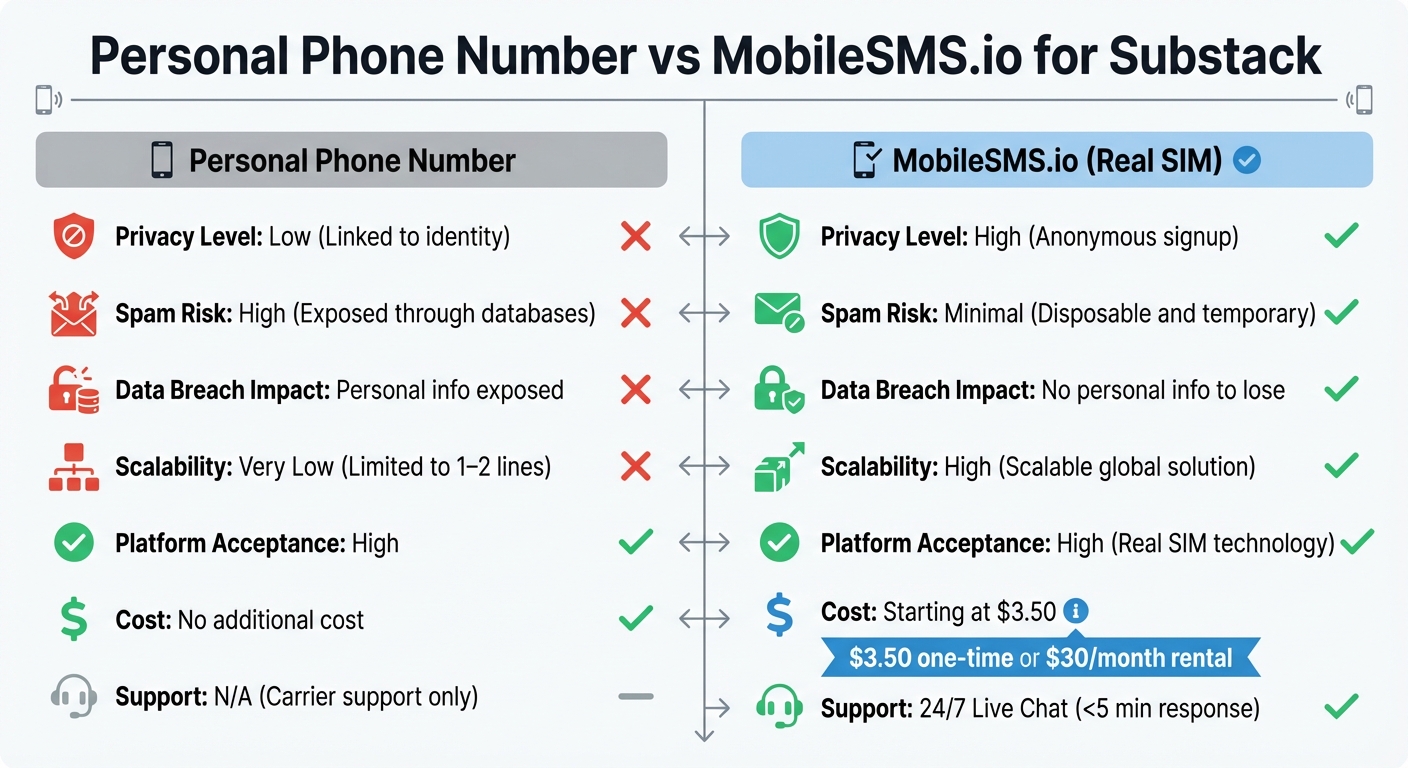
Personal Phone Number vs MobileSMS.io for Substack Verification Comparison
Using your personal phone number for Substack ties your identity directly to your newsletter, which can leave you vulnerable to data breaches and spam. Substack stores this information, and if you enable paid subscriptions, your number is also shared with Stripe for regulatory purposes. In the event of a data leak, your personal contact details could end up in the hands of spammers or marketers – or worse.
MobileSMS.io offers a safer alternative. It allows you to sign up anonymously with a real SIM number that platforms like Substack accept, all while keeping your personal phone number completely separate. The service uses disposable numbers, eliminating any long-term connection to your newsletter. Plus, if you manage multiple Substack accounts, you can assign a unique number to each one – a feature not possible with a single personal line.
Privacy and Security Advantages
When you use your personal number, it becomes permanently linked to your email, your Substack publication, and even your Stripe records if you’re monetizing. MobileSMS.io, on the other hand, provides encrypted message delivery and doesn’t require any personal information to sign up. Even if a security issue arises, there’s no way to trace it back to your Substack account.
Spam protection is another key benefit. Personal numbers exposed in data leaks can end up on marketing lists, leading to endless unwanted messages. With MobileSMS.io, any spam sent to a disposable number can be abandoned without hassle. For writers who prioritize anonymity, even Substack recommends using dedicated, non-personal accounts – a practice that naturally includes phone verification.
These privacy perks go hand-in-hand with the service’s cost and convenience benefits, which are outlined below.
Cost and Convenience Comparison
While using your personal number might seem free, it comes with hidden risks like identity exposure, spam, and limited flexibility. MobileSMS.io offers a more secure option, starting at $3.50 for one-time verification or $30 for a 30-day rental dedicated to Substack. The rental includes unlimited SMS for the platform and integrations with tools like Slack or Discord, so you can receive codes easily without needing to check a dashboard constantly.
| Feature | Personal Phone Number | MobileSMS.io (Real SIM) |
|---|---|---|
| Privacy Level | Low (Linked to identity) | High (Anonymous signup) |
| Spam Risk | High (Exposed through databases) | Minimal (Disposable and temporary) |
| Data Breach Impact | Personal info exposed | No personal info to lose |
| Scalability | Very Low (Limited to 1–2 lines) | High (Scalable global solution) |
| Platform Acceptance | High | High (Real SIM technology) |
| Cost | No additional cost | Starting at $3.50 |
| Support | N/A (Carrier support only) | 24/7 Live Chat (<5 min response) |
If you’re running a single newsletter as a side project and don’t mind the privacy risks, your personal number might work fine. But if you value protecting your identity, managing multiple accounts, or avoiding spam caused by data leaks, MobileSMS.io is the better choice. With a 7-day money-back guarantee and a pay-per-success model that only charges when a verification code is received, you can try the service without any risk.
Conclusion
Maintaining your privacy on Substack doesn’t have to come at the cost of convenience. Using your personal phone number can expose you to spam, data breaches, and intrusive marketing. That’s where MobileSMS.io steps in, offering real SIM-card numbers that Substack accepts. Pricing starts at just $3.50 for a one-time verification or $30 for a 30-day rental.
This service supports over 1,200 platforms and provides numbers from more than 100 countries, making it an excellent choice whether you’re launching your first newsletter or managing multiple. MobileSMS.io uses genuine mobile carrier numbers that reliably pass verification. Plus, you only pay when you successfully receive a code, and there’s a 7-day money-back guarantee if you’re not satisfied. It’s an easy and secure solution for protecting your identity.
For those seeking even more privacy, MobileSMS.io accepts cryptocurrency payments, so you can skip linking a credit card. If you’re managing team accounts or juggling multiple newsletters, their long-term rentals include integrations with platforms like Slack and Discord, letting you receive codes without constantly monitoring a dashboard. This service is designed to meet the needs of both individual creators and teams, offering a seamless and private way to verify your accounts.
FAQs
How does MobileSMS.io protect my privacy when using Substack?
MobileSMS.io offers a simple way to protect your personal phone number by providing disposable, real-SIM (non-VoIP) numbers for verifying your Substack account. This means your actual number stays private, shielding you from spam, phishing scams, and potential data leaks.
With a real-SIM number, you can securely verify your Substack account while keeping your identity protected and your privacy intact.
What are the risks of verifying your Substack account with a personal phone number?
Using your personal phone number for Substack verification comes with several risks that could compromise your privacy and security. For instance, it opens the door to spam, data breaches, and even identity theft. Beyond that, it makes you more susceptible to SIM-swap attacks, phishing scams, and vulnerabilities tied to older systems like SS7.
Another concern is that your phone number could show up on payment receipts, such as those handled by Stripe, potentially exposing your private information. Safeguarding your personal details is crucial to reducing these risks.
How does MobileSMS.io help with Substack’s phone number verification?
MobileSMS.io makes Substack’s phone number verification a breeze by offering real SIM card numbers, not VoIP ones. These numbers are accepted on more than 1,200 platforms, including Substack, ensuring you can receive verification codes without a hitch.
By using MobileSMS.io, you can keep your personal phone number private while still meeting Substack’s verification needs. It’s a simple and secure way to add an extra layer of privacy and convenience.