


Every time you stream on Netflix, Hulu, or Disney+, your activity generates data – what you watch, search for, or even how long you hover over a title. This data is shared with advertisers, data brokers, and analytics firms to refine recommendations and deliver targeted ads. Here’s what you need to know:
- What’s Collected: Personal info (name, email, payment details), viewing habits (searches, watch history), and device/location data (IP address, device type).
- Who Gets It: Ad networks, data brokers, device makers, and platform owners use this data to build detailed digital profiles and monetize your activity.
- Why It Matters: This tracking fuels ad revenue but raises privacy concerns, as seen in lawsuits like Texas vs. Netflix in 2026 over alleged data misuse.
- How to Protect Yourself: Adjust privacy settings, disable tracking features like Automatic Content Recognition (ACR), use disposable phone numbers for account setup, and limit cross-platform tracking.
Streaming services collect a lot more than you might think, but small actions can help you regain control over your privacy.
What Data Do Streaming Apps Share?
Streaming apps collect and share data in three key areas: personal details, viewing habits, and device/location information. Here’s a closer look at what this means for you.
Personal Identifiers and Account Information
When you sign up for a streaming service, you provide details like your name, email address, phone number, and payment information. These details help platforms personalize your experience and deliver targeted ads. For example, your email or temporary phone number can be used to connect your streaming activity with other online platforms. Understanding what personal information is shared allows you to better manage your privacy settings.
Viewing and Interaction Data
Streaming services don’t just track what you watch – they also log your searches, ratings, and how long you watch. According to Justin Basilico, Netflix’s Director of Machine Learning and Recommender Systems, over 80% of what users watch on Netflix stems from its recommendation system. This data is crucial for tailoring recommendations and targeting ads. Knowing how your viewing behavior is tracked gives you the tools to adjust your privacy preferences.
Device and Location Data
The devices you use to stream also play a role in data collection. Every time you open a streaming app, it gathers your IP address, device type, operating system, and approximate location. Smart TVs, which are now in 77% of U.S. households, go even further by tracking content from connected non-smart devices and even audio through voice-enabled remotes. As Or Goren, Editor-in-Chief of Cord Busters, explains:
"We still think of them as passive devices: We sit, we watch, that’s about it. We don’t really grasp the TV as something that can follow us around and learn about us."
This device and location data is combined with your viewing habits, social media activity, and mobile usage to create an in-depth profile of your behavior. Being aware of this extensive data collection is a critical step toward regaining control over your privacy settings.
sbb-itb-5a89343
Who Receives Your Streaming Data?
Your streaming data doesn’t just stay with the service you use – it moves through a network of third parties, each using it for their own purposes. Let’s break down who gets access and why.
Advertising and Analytics Partners
Ad networks and data brokers like Experian and Acxiom are some of the main recipients of your streaming data. They collect detailed information – things like your search terms, location, ratings, and viewing history – to create what experts call "digital dossiers." These profiles are then used to target you with ads.
For example, in May 2026, Texas Attorney General Ken Paxton filed a lawsuit against Netflix. The lawsuit alleged that Netflix recorded billions of user interactions – such as clicks, search terms, and location data – and shared this information with commercial data brokers to support its advertising business. Paxton criticized Netflix, stating:
"Netflix’s years-long bait-and-switch has led the company right to where it promised never to be: addicting children and families to its platform, mining those users for data, and then converting that data into lucrative intelligence for global advertising juggernauts."
And it’s not just ad networks. Other tech giants also collect and use your data, adding more layers to the trail and increasing the risks of sharing your real phone number and other personal identifiers.
Device Makers and Platform Owners
Smart TV manufacturers, like Samsung and Vizio, and platform owners, such as Amazon and Google, also gather your data. They track details like session lengths, IP addresses, and even what you watched before and after. Casey Oppenheim, CEO of Disconnect, explains:
"A native TV app tells you the device type, session length, IP address, and even the context of what was watched before and after. Casting relinquishes these detailed session metrics."
To further tighten control, many platform owners now limit "sideloading", which is the ability to install apps from outside their official app stores. By keeping users within their ecosystems, they can track every interaction and monetize it. This centralized data collection also makes users more vulnerable if a platform is compromised, making it essential to protect your online accounts from potential breaches. This data doesn’t just drive targeted ads – it also influences the content you’re shown.
Content and Recommendation Engines
Your streaming habits also feed into analytics tools and recommendation systems. These systems don’t just track what you watch – they analyze how you watch. Metrics like hover time, pauses, and skips help platforms fine-tune content recommendations. This behavioral data shapes what gets suggested to you and even what gets produced, all with the goal of keeping you watching longer and generating even more data.
How to Adjust Privacy Settings on Streaming Apps
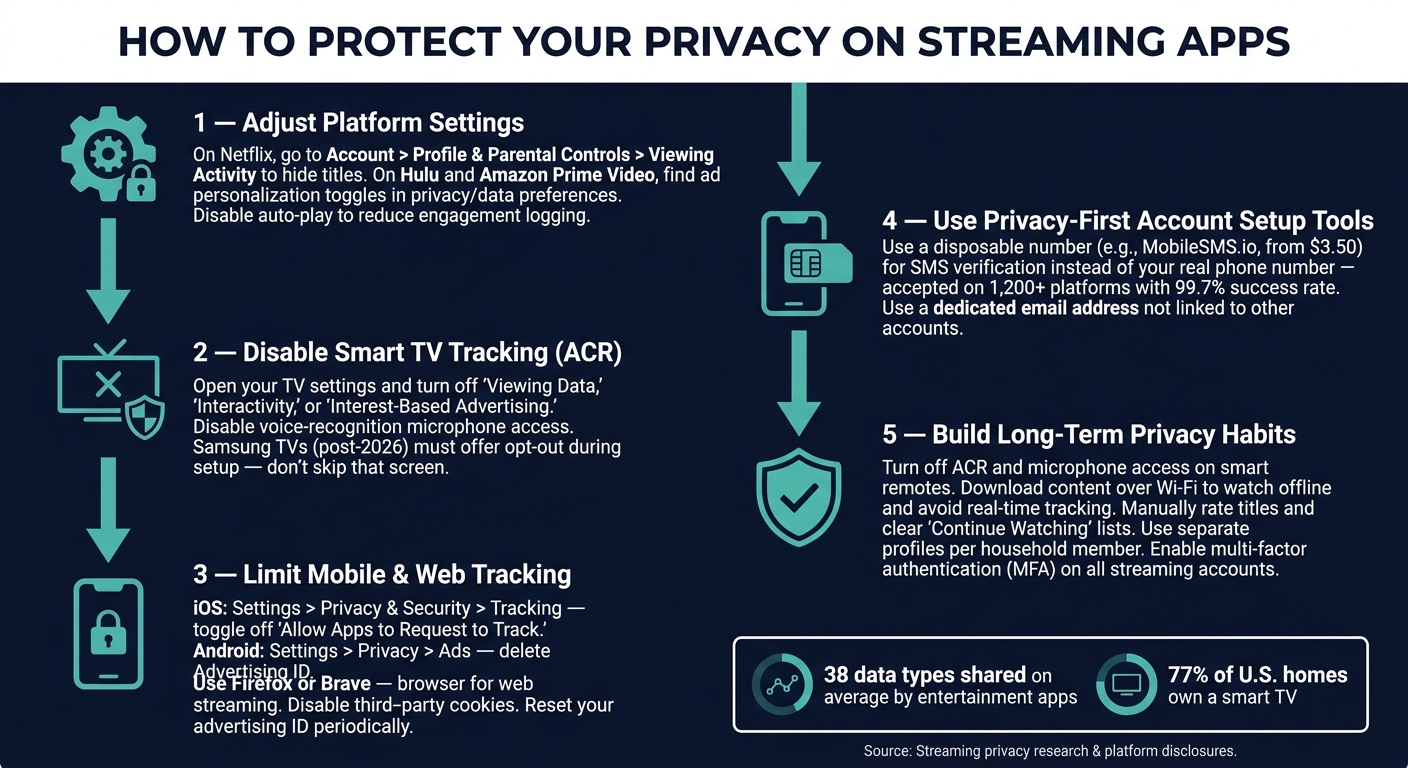
How to Protect Your Privacy on Streaming Apps
Understanding how your data is collected is just the beginning – taking steps to safeguard your privacy is the next crucial move. Many streaming platforms and devices tuck privacy controls away in their settings menus, but a little digging can reveal them. Here’s a guide to help you adjust privacy settings on popular platforms, smart devices, and mobile or web environments.
Privacy Settings on Popular Streaming Platforms
Adjusting your account settings is one of the easiest ways to control how streaming platforms handle your personal data. On Netflix, you can manage your viewing history directly through a web browser. Log in, go to Account > Profile & Parental Controls > Viewing Activity, and click the hide icon next to any title you don’t want influencing your recommendations. Netflix also has a "Get My Info" page, where you can request a complete record of the data the platform has collected about you.
For Hulu and Amazon Prime Video, head to your account’s privacy or data preferences to adjust ad personalization settings. These platforms often include toggles to limit how your viewing data is used for targeted advertising, though these options may not be easy to find.
Another simple tip: disable auto-play across streaming services. Not only does this stop the endless playback loop, but it also reduces the constant logging of your engagement data.
Smart TV and Device Privacy Controls
Smart TVs track a lot of data, often through features like Automatic Content Recognition (ACR). This technology monitors everything you watch – whether it’s from a streaming app, cable, or even DVDs. To curb this tracking, open your TV’s settings and look for options such as "Viewing Data", "Interactivity", or "Interest-Based Advertising." Turning these off can help limit how much data is collected for advertising purposes.
If your TV has voice-enabled features, there’s more to consider. Many remotes include microphones, and some devices may listen even when not manually activated. Check your TV’s voice-recognition settings to ensure it only listens when you want it to.
Samsung, for example, faced legal action in Texas and agreed in 2026 to clearly explain its tracking practices to buyers and offer an opt-out option during setup. While these measures help, larger data breaches can still expose your personal information across various platforms. If you have a newer Samsung TV, pay close attention to these setup screens instead of skipping through them.
Ad and Tracking Settings on Mobile and Web
Your mobile devices also offer tools to limit cross-platform tracking. On iOS, go to Settings > Privacy & Security > Tracking and toggle off "Allow Apps to Request to Track." For Android, navigate to Settings > Privacy > Ads and either "Delete Advertising ID" or "Opt Out of Ads Personalization."
Resetting your advertising identifier on both platforms every so often can disrupt long-term profiling. While this won’t completely stop data collection, it makes it harder for advertisers to build a detailed profile over time.
For web streaming, consider using browsers like Firefox or Brave, which come with built-in tracker blocking. Disabling third-party cookies in your browser settings can also significantly cut down on the behavioral data shared across platforms. Combining these measures with mobile and platform-specific controls can give you a stronger grip on your privacy.
Ways to Protect Your Privacy While Streaming
Once you’ve adjusted your privacy settings, it’s time to adopt habits that ensure long-term data security. Small, consistent actions can go a long way in safeguarding your information.
Turn Off Unnecessary Data Collection
Start by disabling features you don’t need. One major offender is Automatic Content Recognition (ACR), which quietly records what you’re watching and sends that data to advertisers. You can turn it off in your TV’s hardware settings. While you’re at it, disable microphone access on voice-enabled remotes. Many smart remotes can pick up audio passively, and that data often ends up in advertising databases.
Another effective step? Download content to watch offline. By downloading shows or movies over Wi-Fi and viewing them offline, you eliminate real-time tracking during playback. This simple habit complements other strategies for managing your accounts securely.
Use Privacy-First Tools for Account Setup
Your phone number is a goldmine for data brokers. When you use it to sign up for a streaming service, it often gets shared with third-party advertisers. In fact, 50% of apps share contact details, including phone numbers, with outside parties.
To keep your personal number private, consider using a disposable phone number for SMS verification when setting up accounts. Services like MobileSMS.io offer real SIM-card-based numbers starting at $3.50 for a single use. These numbers are accepted on over 1,200 platforms with a 99.7% success rate and ensure your personal number stays out of the streaming platform’s database. Pair this with a dedicated email address you don’t use for other purposes, and you’ll significantly reduce your digital footprint right from the start. These steps lay a solid foundation for better privacy before you even begin fine-tuning your settings.
Balancing Privacy and Personalization
Cutting back on data collection might affect how accurate your recommendations are. Netflix, for instance, reports that over 80% of what users watch is influenced by its recommendation system, according to Justin Basilico, the company’s Director of Machine Learning and Recommender Systems.
But you don’t have to sacrifice privacy for a good streaming experience. You can take control by manually rating titles and regularly clearing your "Continue Watching" list. This reduces the need for the platform to rely on passive tracking to improve suggestions. Another tip? Use separate profiles for each household member. This prevents the algorithm from blending everyone’s viewing habits into one confusing profile. These small changes let you guide the algorithm on your own terms while keeping your data private.
Conclusion: Taking Control of Your Streaming Data
Streaming services collect a surprising amount of personal data. Entertainment apps, for instance, share an average of 38 different data types with third parties, ranking just behind social media in data collection. This trend affects a large portion of households, with 77% of U.S. homes projected to own a smart TV by 2026.
Thankfully, there are practical steps you can take to protect your privacy. Start by requesting your data report from platforms like Netflix (check their "Get My Info" page) to understand what they’ve collected. Clearing your viewing history regularly is another simple yet effective habit – most platforms remove hidden titles from their recommendation algorithms within 24 hours. For extra security, make sure to enable multi-factor authentication (MFA) on all your streaming accounts to shield against credential stuffing attacks.
Keep in mind, ad-supported subscription tiers often come with increased data sharing. If privacy is a priority, this might be something to reconsider.
"The system is so extensive, it’s impossible for the average person to opt out of [all tracking]." – Jeff Chester, Executive Director, Center for Digital Democracy
While Chester’s observation highlights the challenges, it doesn’t mean you’re powerless. Actions like disabling Automated Content Recognition (ACR) or using privacy-focused tools to unlock accounts when setting up services can significantly reduce the amount of data collected. Each step you take helps limit the scope of data profiling and puts you back in control of your streaming data.
FAQs
Can streaming apps link my viewing to my real identity?
Streaming apps have the ability to tie your viewing habits directly to your personal identity. They gather details like your viewing history, personal information, and how you use your device. This information is often used for tracking and creating personalized experiences, which can potentially be linked back to you.
Does casting to a TV share less data than using a TV app?
When you cast content to your TV, the data shared is generally minimal. Only the content stream itself is transmitted, keeping additional data sharing to a minimum. On the other hand, using TV apps can involve more extensive data collection. These apps often gather and share extra information, such as your viewing habits and personal details, with third parties.
Will turning off ACR and ad tracking stop targeted ads?
Turning off ACR (Automatic Content Recognition) and ad tracking can help limit the number of targeted ads you see, but it won’t eliminate them entirely. Advertisers may still personalize ads using other data, such as the content you’re watching or your approximate location.