

Your phone number is more than just a contact – it’s a digital ID that can link your activity across apps, platforms, and databases. Messaging apps like WhatsApp, Telegram, and Signal rely on phone numbers for signups and building connections, but this convenience comes with risks. From data breaches to SIM-swapping attacks, your phone number can expose you to privacy and security threats.
Key Points:
- Phone numbers are permanent identifiers tied to your social, financial, and personal data.
- Apps collect metadata (e.g., timestamps, contact lists) that reveal communication patterns.
- Security risks include preventing SIM-swapping, phishing, and doxxing.
- Recycled numbers can lead to privacy leaks and account takeovers.
- Organizations face risks like employee enumeration and compliance issues.
How to Protect Yourself:
- Limit sharing your primary phone number – use secondary or disposable numbers for non-essential accounts.
- Disable contact syncing and review app permissions regularly.
- Strengthen account security with two-step verification and privacy settings.
Takeaway: Treat your phone number as sensitive information. Use disposable numbers for signups, adjust privacy settings, and secure your accounts to minimize exposure.
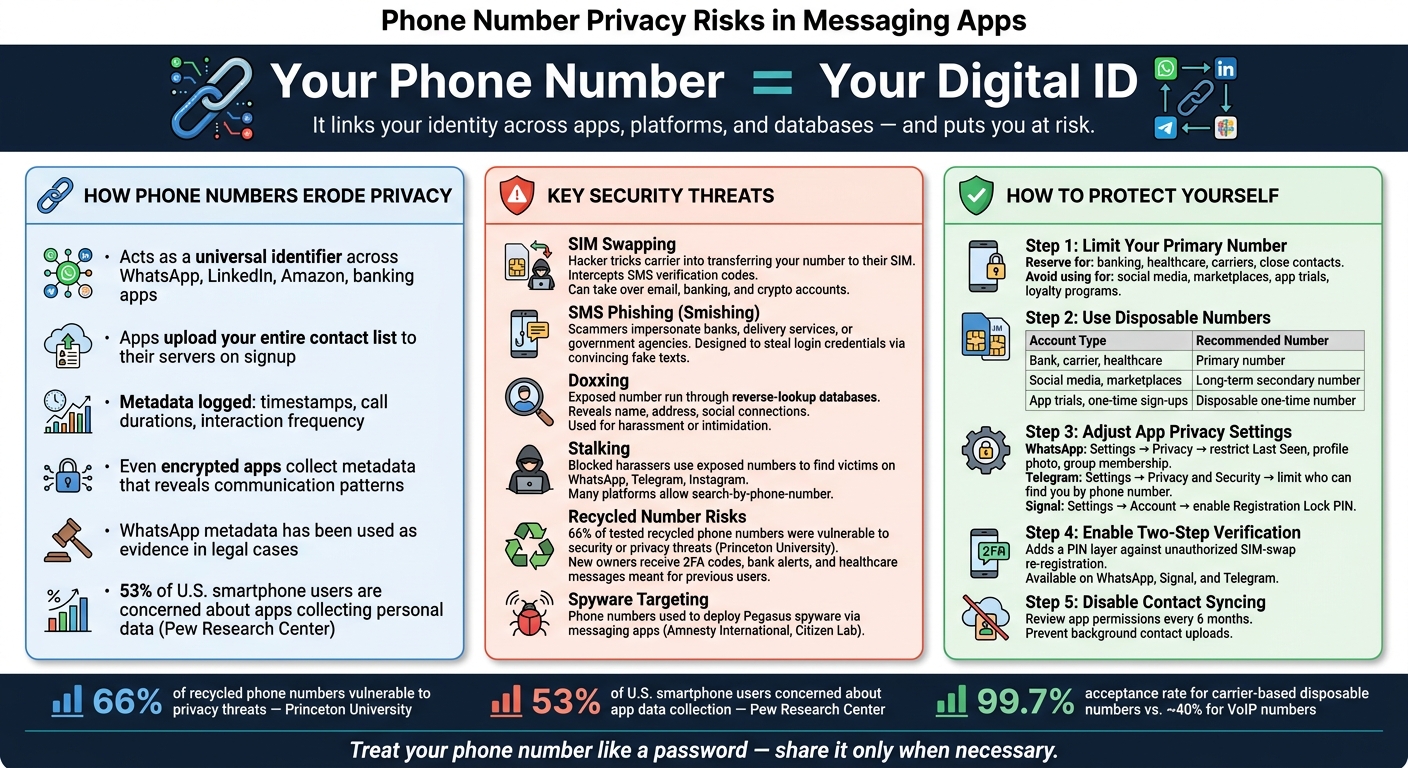
Phone Number Privacy Risks & Protection: Messaging App Security Guide
How Phone Numbers Erode Your Privacy
Phone Numbers Link Your Identity Across Platforms
Using your phone number to sign up for various services might seem convenient, but it comes at a cost to your privacy. Your phone number acts as a universal digital ID, tying your identity together across platforms like WhatsApp, LinkedIn, Amazon, and even your bank. This creates a trail that’s easy to follow. If your number gets exposed in a data breach, bad actors or data brokers can cross-reference it with other databases to build a detailed profile about you – complete with your name, employer, social media accounts, shopping habits, and financial activities. Since phone numbers rarely change due to long-term carrier contracts, they serve as a stable and reliable tracking tool. Apps also use this persistent identifier to gather metadata about your interactions, further eroding your privacy.
How Messaging Apps Collect Metadata
Even apps that promise encryption collect more data than you might realize. When you sign up, many of these apps upload your entire contact list to their servers, mapping out your social connections before you’ve even sent a message. They also log metadata, such as timestamps, call durations, and how often you interact with others. This metadata can paint a surprisingly detailed picture of your communication patterns, even if the content of your messages stays encrypted. For example, WhatsApp metadata has been used in legal cases to prove interactions between individuals. Privacy researcher Alex Linton of Session explains:
"Phone numbers are one of the most valuable pieces of metadata that services can store. Using nothing but phone numbers, apps that might seem private become extremely vulnerable."
Security Attacks That Target Phone Numbers
The risks don’t stop at tracking and metadata collection. Your phone number can also make you a target for direct security threats. One notorious attack is SIM swapping, where a hacker tricks your carrier into transferring your number to a new SIM card they control. With access to your number, they can intercept SMS verification codes and take over accounts linked to it, including email, banking, and crypto wallets. Another common threat is SMS phishing, or "smishing." In these attacks, scammers send texts pretending to be from trusted sources – like your bank, a delivery service, or even a government agency. These messages often include links designed to steal your login details. Because these scams use the same SMS channel as legitimate verification codes, they can be surprisingly convincing.
sbb-itb-5a89343
What Can Go Wrong: Privacy and Security Risks in Practice
Risks to Personal Privacy
Privacy breaches can have serious real-world consequences, and one of the most alarming outcomes is doxxing. Attackers often exploit exposed phone numbers by running them through reverse-lookup databases, uncovering personal details like names, addresses, and social connections. This information can then be weaponized for harassment or intimidation.
Stalking is another significant risk. A persistent harasser, even if blocked on one platform, can use an exposed phone number to track someone down on apps like WhatsApp, Telegram, or Instagram. Many platforms allow users to search for others by phone number, turning a single exposed number into a stalking tool that bridges the gap between online and offline harassment. This is why many experts recommend disposable numbers for social media accounts to maintain a layer of separation.
For journalists, activists, and public figures, the stakes are even higher. For example, a journalist who publicly shares a WhatsApp number for tips could inadvertently expose their entire contact network. Hostile actors or state-sponsored groups can exploit this by downloading and analyzing contact lists, identifying confidential sources, or mapping activist networks. In some documented cases, such as those reported by Amnesty International and the Citizen Lab, phone numbers have been used to target individuals with advanced spyware like Pegasus, delivered through messaging apps.
Everyday users aren’t immune either. Research from Princeton University revealed that 66% of tested recycled phone numbers were vulnerable to security or privacy threats, such as account hijacking and identity exposure. When carriers reassign phone numbers, the new owners may receive sensitive information like two-factor authentication codes, bank alerts, or healthcare messages intended for the previous user. It’s a quiet but serious privacy failure that affects many.
Risks to Organizations
Organizations face similar vulnerabilities, but on a larger scale. When employees use personal phone numbers for work, they open the door to risks like employee enumeration. Attackers can upload batches of phone numbers to messaging apps to identify which ones belong to staff at a specific company. By combining this with LinkedIn data, attackers can map internal teams, pinpoint key personnel, and launch targeted spear-phishing campaigns.
Another major issue is shadow IT – when employees use personal-number-linked apps like WhatsApp for work-related tasks. Client conversations, shared files, and other sensitive data stored in these apps fall outside company-controlled systems. If an employee leaves, their personal account – and the associated data – goes with them, creating a gap in organizational oversight and security.
Compliance is a growing concern as well. Under regulations like GDPR, phone numbers are considered personal data. Companies that allow unmanaged use of phone-number-based messaging for tasks like customer support or HR communications could face legal consequences if this data is mishandled. Something as simple as a misconfigured WhatsApp group could lead to a breach of data protection laws, highlighting how phone number vulnerabilities can undermine both individual and corporate privacy.
How to Protect Your Privacy in Messaging Apps
The risks tied to messaging apps are real, but they don’t have to be overwhelming. A few mindful practices, especially around sharing your phone number, can go a long way toward reducing your exposure and keeping your personal information safe.
Limit How Often You Share Your Phone Number
Your primary phone number should be reserved for essential purposes – like banking, healthcare, mobile carriers, and close personal connections. For everything else, such as social media accounts, online marketplaces, app trials, and loyalty programs, consider using a separate number.
Why? Using the same number across multiple platforms creates a unique identifier that companies and data brokers can cross-reference to piece together a detailed profile of your activities. Worse, a single data breach could expose far more than you realize. To mitigate this, disable automatic contact syncing in messaging apps and regularly review which apps have access to your address book. Many apps upload your contacts in the background without your explicit consent.
For less critical accounts, a secondary or disposable number can add an extra layer of protection.
Use Disposable Numbers for Account Verification
When creating accounts that don’t need to be tied to your permanent identity, disposable numbers are a smart choice. These temporary numbers act as a buffer, ensuring that breaches or spam incidents won’t compromise your primary phone number.
However, not all disposable numbers are created equal. Popular platforms like WhatsApp, Telegram, Google, and Facebook often block VoIP numbers due to spam concerns. Real SIM-card-based numbers are usually required for successful verification. Services like MobileSMS.io offer carrier-based disposable numbers that work across more than 1,200 platforms, boasting a 99.7% acceptance rate compared to roughly 40% for typical VoIP numbers. Pricing starts at $3.50 for one-time verifications, while long-term rentals range from $15–$100 per month for accounts requiring ongoing access.
Here’s a quick guide to help decide which type of number to use:
| Account Type | Recommended Number |
|---|---|
| Bank, carrier, healthcare | Primary number |
| Social media, marketplaces | Long-term secondary number |
| App trials, one-time sign-ups | Disposable one-time number |
Strengthen Accounts That Use Your Primary Number
If you need to use your primary number, take extra steps to secure those accounts. Enabling two-step verification is a key measure that adds another layer of protection.
Most messaging apps include features that enhance privacy. For instance, apps like WhatsApp, Signal, and Telegram allow you to set account PINs and enable two-step verification to guard against unauthorized re-registration through SIM swaps. You can also adjust privacy settings to control who sees your profile photo, last seen status, and group memberships.
Here’s how to tweak privacy settings in some popular apps:
- WhatsApp: Go to Settings → Privacy and restrict visibility of your last seen status, profile photo, and group membership to contacts only.
- Telegram: Navigate to Settings → Privacy and Security and limit who can find you by phone number.
- Signal: Enable the Registration Lock PIN under Settings → Account to prevent unauthorized access.
These small but powerful changes can block common attack methods that rely on phone number exposure, keeping your information safer.
Conclusion: Setting Up a More Private Messaging Experience
Phone number exposure comes with a range of privacy risks. Achieving better privacy in messaging apps isn’t about relying on a single tool – it’s about limiting the identifying information you share, starting with your phone number.
Key Takeaways
Your phone number acts as a persistent identifier, connecting different parts of your digital life. This makes it a prime target if compromised. A study by Pew Research Center found that 53% of U.S. smartphone users are concerned about apps collecting personal data – and they have a good reason to be. Even if message content is encrypted, metadata can still reveal patterns of communication, making it a critical aspect of any privacy strategy.
The takeaway? Reduce where your primary number is visible to limit your exposure. Using a combination of a disposable number for sign-ups, stricter app privacy settings, and app-based two-factor authentication can create a stronger, layered defense than any single measure alone.
Next Steps to Improve Your Setup
Start by checking which messaging and social apps are linked to your primary number. Apps like WhatsApp, Telegram, Instagram, and Facebook are common examples. Choose one or two of your most public-facing accounts and switch them to a secondary or disposable number.
For platforms that don’t accept VoIP numbers – a growing trend – carrier-based disposable numbers are a more reliable option. Services like MobileSMS.io provide real SIM-based numbers that work with over 1,200 platforms. One-time verifications start at $3.50, while long-term rentals range from $15 to $100 per month for accounts needing ongoing access. Plus, their pay-per-success model ensures you’re only charged when a code is successfully received.
Lastly, make this a regular habit, not a one-time effort. Every six months, review your accounts: update linked numbers as needed and check settings for contact syncing. Small, consistent actions can go a long way in protecting your privacy.
FAQs
How can someone identify me using just my phone number?
Your phone number can act as a key to your personal information. Through data matching, scammers or spammers can connect it to your identity. Many platforms link phone numbers to personal details or track online activity, especially when numbers are used for account verification. If you’re using your personal number, the chances of privacy breaches grow significantly.
What metadata can messaging apps collect even if messages are encrypted?
Even though messaging apps use encryption to protect the content of your messages, they still collect metadata. This includes details like the sender and recipient’s phone numbers, timestamps, the size of messages, and delivery status. While metadata doesn’t reveal the actual message, it can still expose patterns and connections between users.
How can I prevent account takeover if my phone number is SIM-swapped or recycled?
To keep your accounts safer from potential takeovers, consider using disposable, real SIM-based numbers from a reliable provider like MobileSMS.io. These numbers come directly from mobile carriers, which helps lower the chances of SIM swapping and number recycling. Make it a habit to rotate these disposable numbers regularly and combine them with extra security tools like authenticator apps. By frequently updating and keeping your verification numbers separate, you can add an extra layer of security to your accounts.