


Cross-browser tracking can link your multiple accounts across devices and browsers, even if you clear cookies or use separate logins. This poses serious risks for users managing multiple accounts on platforms like social media, e-commerce, or advertising. Here’s what you need to know:
- What It Is: Cross-browser tracking uses browser fingerprints, hardware identifiers, and behavioral patterns to identify users across browsers and devices.
- Who’s at Risk: Multi-account users are more vulnerable due to shared IPs, devices, or login behaviors, which can create detectable patterns.
- Key Risks:
- Account linkage leading to bans across all accounts.
- Detailed profiling combining personal and business data.
- De-anonymization through reused phone numbers or other identifiers.
- How It Works: Platforms use deterministic methods (e.g., logins, phone numbers) and probabilistic methods (e.g., fingerprints, IPs) to connect accounts.
- Prevention: Use tools like antidetect browsers, residential proxies, and disposable phone numbers for each account. Ensure geo-matching between proxies and account locations.
To protect your accounts, focus on isolating browser environments, using separate IPs, and maintaining strict phone number hygiene. Platforms are sophisticated, so regular updates to your setup are necessary to stay ahead of tracking systems.
How Cross-Browser Tracking Works
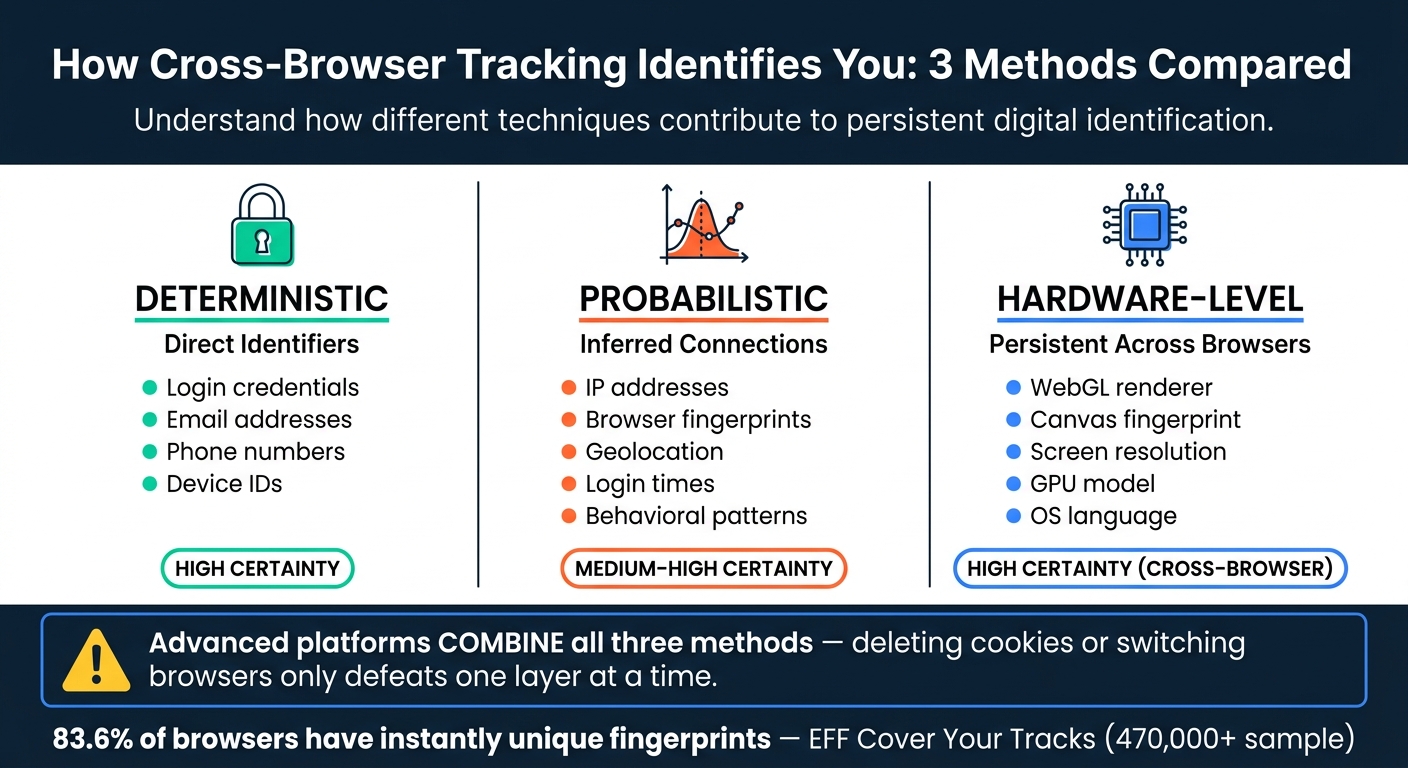
Cross-Browser Tracking: Deterministic vs. Probabilistic vs. Hardware-Level Methods
How Browser Fingerprinting Works
Every time you visit a website, your browser shares a lot of information about itself. Browser fingerprinting takes advantage of this by collecting details like your user agent string, screen resolution, time zone, installed fonts, language settings, and even the output from APIs like Canvas and WebGL. These details are pieced together to create a profile that often uniquely identifies your device.
For example, Canvas fingerprinting works by asking your browser to render hidden data. Differences in your GPU, drivers, and fonts result in unique pixel outputs, even if you’ve cleared your cookies. According to the EFF’s Cover Your Tracks project, 83.6% of browsers in a sample of over 470,000 had instantly unique fingerprints using just a small set of attributes.
This browser-specific data forms the basis for tracking, but cross-browser tracking takes it a step further.
What Makes Cross-Browser Tracking Different
While traditional fingerprinting stays confined to a single browser, cross-browser tracking digs deeper by focusing on signals tied to your device and operating system – elements that stay consistent no matter which browser you’re using.
For instance, your GPU model, CPU architecture, display scaling, OS language, and WebGL rendering behavior remain stable across browsers on the same device. So, even if Chrome and Firefox show different user agent strings, they’ll still reveal the same GPU renderer string, screen dimensions, and audio subsystem traits. A 2016 academic study on cross-browser fingerprinting demonstrated that hardware- and OS-based features can reliably link sessions across multiple browsers, even when browser-specific details differ.
These persistent hardware and OS signals make it possible to identify your device regardless of which browser you use.
Deterministic vs. Probabilistic Tracking Methods
Tracking platforms often combine device-level and session-level signals to build detailed user profiles. They rely on two main approaches: deterministic and probabilistic tracking.
- Deterministic tracking depends on clear identifiers like logins, email addresses, phone numbers, or device IDs. For example, if you log into the same service on two browsers, the platform can directly link those sessions without any uncertainty.
- Probabilistic tracking uses less direct signals, such as IP addresses, browser fingerprints, geolocation, login times, and behavioral patterns, to infer connections between sessions.
The most advanced tracking systems blend these methods. For instance, a platform might use deterministic signals like a login or phone number to establish a base identity, then reinforce it with probabilistic signals that persist even after you log out or delete cookies. The table below highlights the differences between these methods:
| Tracking Method | Data Points Used | Certainty Level |
|---|---|---|
| Deterministic | Login data, phone numbers, device IDs | High |
| Probabilistic | IP address, browser fingerprint, behavior | Medium–High |
| Hardware-level | WebGL, Canvas, screen resolution, OS | High (cross-browser) |
For users managing multiple accounts, this means there’s no single solution to avoid tracking. Deleting cookies might help at one level, and switching browsers might help at another. However, device-level signals and shared deterministic identifiers, like phone numbers for SMS verification, can still connect everything.
sbb-itb-5a89343
Risks for Multi-Account Management
How Accounts Get Linked Across Platforms
Platforms have become incredibly sophisticated at connecting accounts, even when they use different browsers, logins, or email addresses. Their tracking systems rely on a mix of signals such as shared IP addresses, similar browser fingerprints, and non-VoIP phone numbers or payment methods. If two accounts share enough of these signals, anti-fraud systems often link them and treat them as part of the same operation. In some cases, even shared device signals alone – without any overlapping logins – can trigger this connection.
Another key factor is behavioral patterns. Consistent login routines can create a unique behavioral fingerprint that’s just as revealing as hardware-based signals. These techniques are used across various platforms, directly impacting how accounts function.
Impact on Social Media, E-Commerce, and Ad Accounts
The risks of account linkage vary by platform but tend to escalate quickly once a cluster is flagged.
On social media platforms like Instagram and Facebook, Meta’s systems can link a personal profile to a business or client account if they’re accessed using the same device or IP. If one account gets flagged – say, for spam – this can lead to restrictions on all linked accounts. For instance, a social media manager handling 15 Instagram accounts from one laptop, even with different browsers, could see all accounts disabled if one triggers a flag. Meta’s systems classify them as a coordinated cluster.
E-commerce platforms like Amazon take an even stricter approach. Operating multiple seller accounts without explicit approval violates Amazon’s policies. If their anti-fraud systems detect matching device fingerprints or overlapping IP histories between accounts, they flag them as "related." This means that if one account faces issues like chargebacks or policy violations, all linked accounts can be suspended – even if the others have spotless records.
For ad platforms like Google Ads and Meta Ads, the risks are equally severe. Opening a new ad account from a laptop or VPN previously associated with a banned account can lead to instant suspension. Google’s anti-fraud systems recognize the shared fingerprint or IP region and classify the new account as an attempt to bypass prior penalties, even if it uses a new Gmail address.
How Anti-Fraud Systems Use Cross-Browser Tracking
Anti-fraud systems have evolved to combine deterministic and probabilistic signals, leveraging cross-browser tracking to enforce penalties on entire account clusters. These systems collect data like browser fingerprints, network characteristics, and user behavior, feeding it into machine-learning models that calculate risk scores. These scores are based on device reputation, account connections, and behavioral anomalies. Once the risk score crosses a certain threshold, the system acts against the entire cluster, not just the flagged account.
| Risk Level | Typical Trigger | Platform Response |
|---|---|---|
| Low | Clean signals, no cluster matches | Normal access |
| Medium | Partial fingerprint overlap, shared IP range | CAPTCHA, SMS verification, spending limits (often requiring secure account unlocking methods) |
| High | Strong cluster match, prior violations in graph | Auto-suspension, manual review, permanent ban |
This cluster-level enforcement makes cross-browser tracking particularly dangerous for those managing multiple accounts. One problematic account can jeopardize an entire operation, even if the other accounts have no violations. Platforms view the shared technical environment as evidence of a coordinated effort, applying penalties across the board.
How to Reduce Cross-Browser Tracking Risks
Using Antidetect Browsers and Fingerprint Management
To avoid account linkage, treat each profile as if it’s a completely separate device. This approach counters the persistent hardware and OS signals that can expose connections between accounts. Tools like Multilogin and X-Browser help by isolating cookies, local storage, and cache for each profile. They also disguise deeper signals like User-Agent, screen resolution, fonts, WebGL, and Canvas. For instance, Canvas and WebGL spoofing work by adding random noise to rendering, ensuring the fingerprint changes with each session.
Two essential settings to configure are WebRTC spoofing and DNS leak protection. Without these, your real IP address could leak through STUN requests, even if you’re using a proxy. Always double-check your setup with tools like CreepJS or BrowserLeaks before logging into any sensitive accounts.
"Anti-detect browsers counter this by falsifying or controlling those fingerprint data. Essentially, they ‘lie’ to websites about your environment." – BrowserCat
Network Separation Techniques
Even the best browser setup can fail if multiple accounts share the same IP address. The golden rule? One account per IP. And that IP should be residential, not from a data center.
Residential proxies, such as those from Bright Data or Smartproxy, route your traffic through real consumer ISPs. This makes your connection look like it’s coming from a genuine home user. On the other hand, data center IPs are often flagged by anti-fraud systems because they’re commonly linked to automation and bulk activities.
Geo-matching is another critical factor. Your proxy location must match the country of the verification phone number (comparing providers like Textverified vs MobileSMS.io). For instance, accessing a US-registered account through a UK IP can instantly raise a red flag. This alignment is crucial from the very first login.
Configuration Checklist for Multi-Account Users
To get everything set up properly, you need to manage multiple layers of configurations. Here’s a quick breakdown of the key areas and best practices:
| Configuration Area | Recommended Action | Why It Matters |
|---|---|---|
| Browser Environment | Use antidetect browsers like Multilogin | Keeps cookies, cache, and local storage isolated |
| Canvas & WebGL | Enable noise injection or spoofing | Prevents fingerprinting based on hardware information |
| WebRTC | Disable or route through a proxy | Stops IP leaks via STUN requests |
| IP Address | Assign a residential proxy per account | Mimics real home-user traffic |
| Geo-Matching | Match proxy country to verification number | Avoids location mismatches that trigger security flags |
| SMS Verification | Receive SMS online via real SIMs | Bypasses VoIP detection and links to specific regions |
| Account Warm-Up | Start with low activity for a few days | Mimics natural user behavior and avoids bot detection |
| Data Hygiene | Clear cookies and cache before every session | Removes traces from previous sessions or failed logins |
In addition to technical measures, pay attention to behavioral consistency. Platforms monitor things like mouse movements, typing speed, and navigation habits. Keep each account’s behavior unique and natural by varying login times, session durations, and interaction patterns.
"Consistency is key and any deviation may give the trackers a hint that it may be spoofed." – Karl Jones, Technical Writer, Axiom.ai
Managing Phone Verification Without Linking Accounts
Why Phone Number Hygiene Matters
Using the same phone number for multiple accounts can compromise browser isolation. Platforms often view phone numbers as highly reliable, persistent identifiers – stronger than cookies, browser fingerprints, or even IP addresses. Sharing a single number across accounts provides clear proof that they belong to the same individual, which can lead to anti-fraud systems linking behaviors and enforcing bans across all connected profiles.
A 2021 study from Princeton University highlighted this issue: 66% of recycled phone numbers tested were still tied to existing accounts on major platforms like Google and Facebook. Some even allowed complete password resets via SMS[1].
To avoid these risks, practice good phone number hygiene. Treat each cluster of accounts as a separate identity by using unique numbers for different purposes. Reserve your main personal number for critical activities like banking, government services, and trusted communication. For other accounts – such as marketing profiles, seller accounts, or test personas – use isolated numbers that can be discarded without affecting your primary identity.
Using Real SIM-Based Disposable Numbers
Maintaining good phone number hygiene requires choosing numbers that platforms recognize and trust. Not all secondary numbers are created equal. Virtual numbers from VoIP or app-based services are often flagged or outright blocked by platforms like Google, WhatsApp, Facebook, and Instagram. These numbers are frequently associated with spam and automated activity, making them unreliable for account verification.
SIM-based numbers from mobile carriers are a better option. They pass carrier validation checks, rank lower on fraud risk models, and reliably receive shortcode messages that VoIP numbers may miss. Using a blocked or unreliable number can lead to failed account setups, wasted proxy costs, and potential flags on your activity.
The type of number you choose depends on the account’s purpose. For short-term needs like a test profile, a one-time disposable number is sufficient and minimizes lingering connections if the account gets banned. On the other hand, accounts that require periodic re-verification – like revenue-generating seller or ad accounts – benefit from long-term rental numbers. These numbers provide a consistent identity signal while keeping your personal line separate. Opting for verified SIM-based disposable numbers is key to maintaining clear boundaries between account clusters.
How MobileSMS.io Supports Multi-Account Users
MobileSMS.io is a service built with privacy-focused account management in mind. It provides carrier-based SIM numbers – not VoIP – from over 100 countries, offering a 99.7% acceptance rate across more than 1,200 platforms, including Google, WhatsApp, Telegram, Facebook, Instagram, X (Twitter), Amazon, eBay, and Tinder.
For simple, one-time setups, MobileSMS.io offers single-use verification starting at $3.50 per successful SMS code. For accounts requiring ongoing access, long-term rentals are available, ranging from $15 to $100 per month based on duration and features. The Premium All Services plan, priced at $100 per month, includes extras like automatic SMS forwarding and Slack/Discord integration – perfect for teams managing multiple accounts without relying on physical devices.
| Use Case | Recommended Option | Starting Price |
|---|---|---|
| One-time account creation | Single-use disposable number | $3.50 per verification |
| Ongoing seller or ad account | Single Service rental | $15 for 7 days |
| Multi-platform team management | Premium All Services rental | $100/month |
Each number is geo-matched to its carrier region, aligning with proxy geo-matching best practices. For instance, pairing a U.S. number with a U.S. residential proxy ensures a consistent identity, helping to avoid mismatches and reducing the risk of platform friction.
Conclusion
Cross-browser tracking connects sessions by piecing together browser fingerprints, IP addresses, user behavior, and persistent identifiers like phone numbers. For anyone juggling multiple accounts, even one shared signal can link everything and expose your entire setup.
The financial risks are serious. For U.S.-based marketers, e-commerce sellers, and ad managers, linked accounts can lead to frozen balances, suspended campaigns, or permanent bans. These setbacks can cost hundreds – or even thousands – of dollars daily. No single solution can completely eliminate this risk. Instead, reducing exposure requires a combination of strategies.
This layered approach relies on three key practices: isolating browsers and devices, using network connections that match account regions, and maintaining strict phone number practices. Neglecting any one of these creates an easy-to-spot link for anti-fraud systems to exploit.
Phone numbers, in particular, are long-lasting identifiers. Reusing a personal number across accounts almost guarantees cross-account linking. Opting for real SIM-based numbers – such as those from MobileSMS.io – provides each account with a unique, carrier-verified identity that platforms trust, while keeping your personal number out of the equation.
Managing multiple accounts isn’t a one-and-done task. Detection methods evolve constantly, so it’s crucial to review your setup every 30–60 days. Regularly updating your browser settings, network configurations, and phone number practices ensures your defenses stay effective. The goal isn’t to achieve perfection – it’s to make your accounts difficult enough to link that automated systems move on to easier targets.
FAQs
Can sites still link my accounts if I use different browsers and clear cookies?
Yes, websites can still connect your accounts across different browsers by using cross-browser fingerprinting. This technique works by analyzing a mix of device characteristics, user behavior, and technical data. Even if you clear cookies or switch browsers, these signals can help identify and track you.
What are the easiest signals that get my accounts linked?
Platforms can easily link your accounts through consistent digital fingerprints. For instance, using the same browser, device, or IP address across multiple accounts often raises red flags. This type of activity is typically flagged as suspicious, making it easier for platforms to connect your accounts.
How do I set up one account per IP and phone number without getting flagged?
To minimize the risk of getting flagged, it’s important to give each account its own unique digital identity and IP address. Tools that manage browser profiles can help, especially when paired with an IP location that matches the country of your MobileSMS.io number.
Here are some tips to follow:
- Use residential proxies to ensure IPs appear authentic.
- Switch devices and clear cookies regularly when managing multiple accounts.
- Avoid creating multiple accounts in quick succession from the same setup.
By taking these precautions, you can lower the chances of detection.