

Want to use WhatsApp without exposing your personal phone number? Here’s the deal: WhatsApp still requires a valid number for account verification in 2026, but you don’t have to use your real one. Options like disposable SIMs, temporary rentals, landlines, or WhatsApp Companion Mode can help protect your privacy.
Key Takeaways:
- Disposable SIMs: Quick, one-time use for $5.50 (U.S. numbers).
- Temporary Rentals: Longer-term use, starting at $15 for 7 days.
- Landlines: Use the "Call Me" option for verification.
- Companion Mode: Link multiple devices to an existing account without a new number.
For maximum security:
- Enable two-step verification (PIN) immediately.
- Avoid syncing contacts to keep your identity private.
- Use numbers backed by real carriers, not VoIP services.
With these methods, you can keep your WhatsApp activity private while staying compliant with its verification requirements.
What WhatsApp Requires for Account Verification in 2026
WhatsApp has stuck to its core rule: every account must have a valid phone number. There’s no option for signing up with just an email or username. The phone number you use during registration becomes your permanent account identifier, stored in Meta’s systems indefinitely.
How WhatsApp’s Verification Process Works
When you input your phone number, WhatsApp sends you a 6-digit code via SMS. If the SMS doesn’t arrive within 60 seconds, you’ll see an option for a voice call. Interestingly, about 10% of virtual number verifications only work through the voice call method, making it a critical fallback.
Before sending the code, WhatsApp performs a carrier lookup to identify whether the number is mobile, landline, or VoIP. Numbers flagged as VoIP are automatically rejected. On top of that, WhatsApp collects device-specific signals like IMEI and IMSI, tying the verification process to your specific device.
Only numbers linked to physical SIM cards, full-service eSIMs, traditional landlines, or high-quality paid rental numbers meet WhatsApp’s criteria. Free VoIP services and public SMS receiver sites are almost always blocked. Success rates for verification vary by region – countries like the US, UK, and Netherlands see rates above 90%, while some regions face lower rates due to stricter spam filters.
"WhatsApp’s verification system now uses device-level signals, specifically your phone’s IMEI and IMSI, to create a unique fingerprint of your hardware and SIM card combination." – Lianne Laroya
These technical hurdles heavily influence the strategies covered in the next sections.
What This Guide Covers
This guide explains four practical methods that work within WhatsApp’s strict verification rules: real SIM-card phone numbers for temporary setups, temporary SIM rentals for accounts you want to keep running, traditional landlines for business purposes, and WhatsApp Companion Mode for linking an existing account to another device without needing a new number. Each option varies in cost, privacy, and longevity, so the best choice depends on your specific needs. Below, we’ll break down these methods to help you stay compliant while protecting your privacy.
sbb-itb-5a89343
Methods for Using WhatsApp Without Your Real Number
There are several ways to set up WhatsApp without tying it to your personal number. Each method works differently, comes with varying costs, and is suited to specific needs. Let’s break them down.
Using Disposable Real SIM Numbers
A disposable number is a valid SIM-based number provided by an actual carrier (not VoIP), used exclusively to receive the WhatsApp verification code. Since it’s from a legitimate carrier, WhatsApp accepts it without issues. Once the code is received, the number is released and can’t be reused for verification.
This option is quick and offers several benefits for your privacy. Pricing depends on the provider and country. For example, MobileSMS.io offers U.S. disposable numbers for WhatsApp verification starting at $5.50, and you’re only charged if the verification code is successfully delivered.
Renting a Temporary SIM Number for Extended Use
If you need a number for a longer period – whether for business, travel, or privacy – a rental number is a better choice. These are also real SIM-based numbers, but you can keep them for a set duration, such as days or weeks, allowing you to receive SMS and re-verify as needed.
"The single most common way people lose these accounts is letting the underlying rental lapse." – nadanada.me
If your rental expires and the number is recycled, you’ll lose access to your WhatsApp account. To avoid this, set a reminder to renew your rental before it expires. MobileSMS.io offers rentals starting at $15 for 7 days, with premium options like automatic SMS forwarding and Slack/Discord integration for managing multiple accounts. For longer-term needs, pricing can go up to $100 for 30 days.
Using a Landline Number for Verification
If you have a traditional landline (not VoIP), you can use it for WhatsApp verification. After the SMS attempt fails (usually after 60–120 seconds), you can select the "Call me" option. WhatsApp will then send a voice call with the verification code.
This method works well for small businesses that want their WhatsApp Business account tied to an office number instead of a personal mobile. Just ensure your landline is from a trusted provider to avoid potential issues.
Using WhatsApp Companion Mode on an Existing Account
If you already have a WhatsApp account, Companion Mode lets you link up to four additional devices – like tablets, laptops, or even another phone – without needing a separate number. This option doesn’t create a new account but extends your existing one across multiple devices.
Linked devices work independently, so you can send and receive messages even if your main phone is offline. It’s a convenient way to access WhatsApp on another device without dealing with additional SMS verifications.
Choosing the Right Number Type for Your Situation
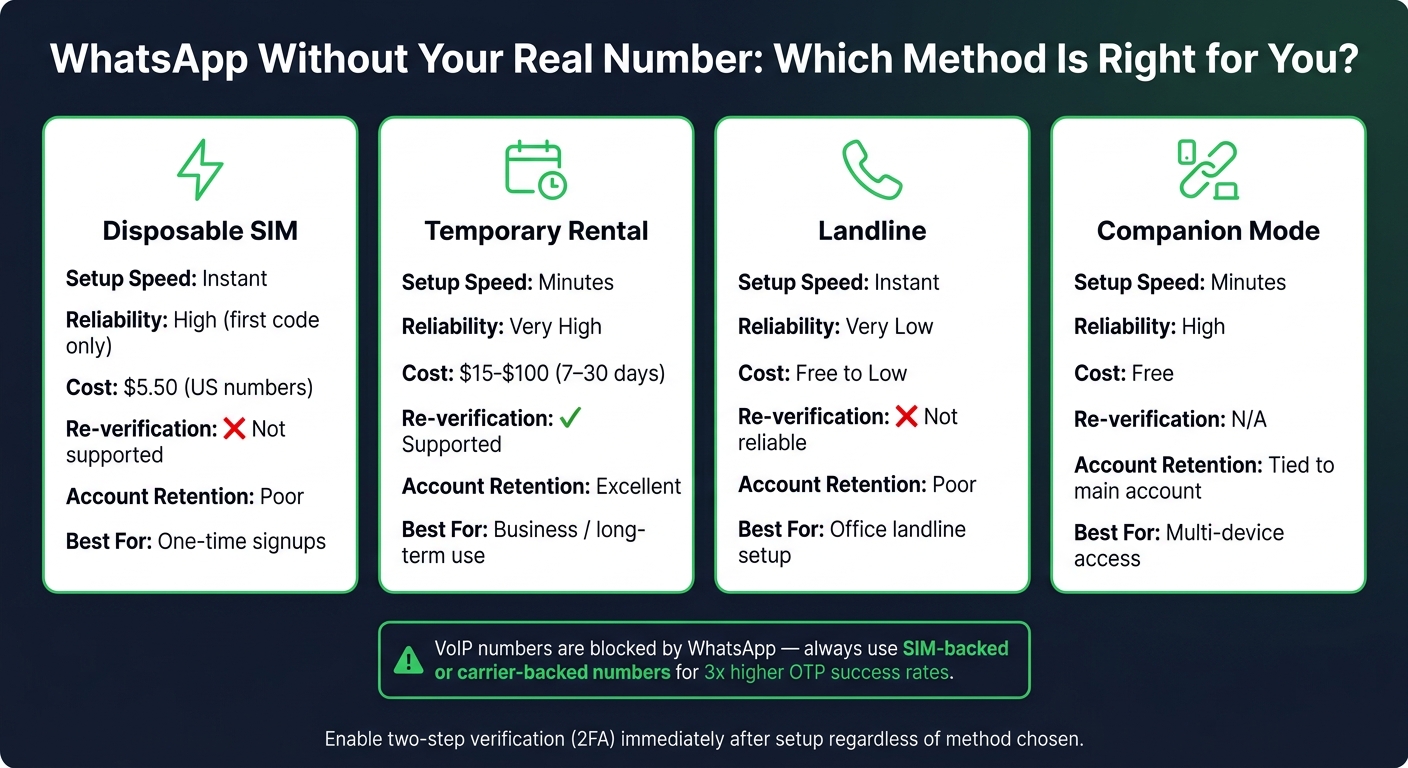
WhatsApp Alternative Number Methods: Side-by-Side Comparison 2026
When it comes to picking the right number type, it all boils down to your specific needs. Factors like how long you’ll need the number, your budget, and whether you might need to re-verify later are key in making the best choice.
One-Time Use vs. Long-Term Rentals
If you only need a number for initial verification – say, signing up for an app – and don’t plan to reinstall or switch devices, a disposable number is the way to go. It’s quick, affordable, and gets the job done. However, disposable numbers deactivate after their initial use, meaning you can’t rely on them for re-verification down the road.
On the other hand, if you’re dealing with something more serious, like a business account or anything requiring long-term access, a rental number is a smarter choice. These numbers stay assigned to you for the rental period, offering peace of mind.
"The cost difference between Activation and Rental is small compared to the cost of losing access to an account you needed to keep." – Alex Carter, Digital Privacy Writer, PVAPins
Key Factors to Consider
WhatsApp compatibility is non-negotiable. The number you choose must be SIM-backed and not VoIP-based (carrier-backed). Since 2016, WhatsApp has aggressively blocked VoIP numbers, and most major platforms now detect and reject them during SMS verification. Numbers linked to real cellular carriers perform significantly better, with roughly three times higher success rates for OTP delivery compared to VoIP or recycled numbers.
Cost is another critical factor. Check the pricing details from earlier sections to understand the differences between disposable and rental options.
Secure your account with two-step verification immediately after setup. Adding a 6-digit PIN ensures your account stays protected, even if the number gets recycled later. Also, avoid giving the app access to your contacts – this could compromise the anonymity of your number by linking it to your actual social network.
Here’s a quick comparison to help you make your decision:
Number Type Comparison Table
| Feature | Disposable SIM | Temporary Rental | Landline | Companion Mode |
|---|---|---|---|---|
| Setup Speed | Instant | Minutes | Instant | Minutes |
| Reliability | High (first code only) | Very High | Very Low | High |
| Cost | Low ($5.50 for US) | Moderate ($15–$100) | Free to Low | Free |
| Re-verification | Not supported | Supported | Not reliable | N/A |
| Account Retention | Poor | Excellent | Poor | Tied to main account |
| Best For | One-time signups | Business / long-term use | Office landline setup | Multi-device access |
With this breakdown, you’re ready to move on to the step-by-step guide for setting up WhatsApp based on your chosen number type. This clarity will make sure you pick the option that aligns with your privacy and usage goals.
Step-by-Step Guide: Setting Up WhatsApp with an Alternative Number
Once you’ve chosen the type of alternative number you want to use, here’s how to set up WhatsApp. The steps vary slightly depending on whether you’re using a disposable or rental number versus a landline, so follow the instructions that fit your situation.
Setting Up with a Disposable or Rental Number
First, sign up on MobileSMS.io and deposit at least $5.00. The credits you add will remain valid for 12 months. From the dashboard, select WhatsApp as the service you want to activate and choose your country. Indonesia and the UK tend to have the highest success rates, but US numbers are also reliable, though they cost a bit more (around $5.50 for WhatsApp activation).
Next, open WhatsApp and enter your chosen number, including its country code. Wait for the verification code, which usually appears on your provider dashboard within 5–30 seconds. Be sure to enter the code into WhatsApp within 10–30 minutes.
"If the SMS does not reach you in 60 seconds, click ‘Resend code’ on WhatsApp and select the voice call method." – MoreMins
After verifying your number, immediately enable two-step verification in Settings > Account. This is crucial – if the number is ever recycled, your PIN will protect your account. Also, during setup, avoid syncing your contacts. Letting WhatsApp access your contacts defeats the purpose of using an alternative number.
For those using rental numbers, set a reminder a few days before the rental period ends to avoid losing access to your account unexpectedly.
If you’re setting up WhatsApp with a landline, follow the steps in the next section.
Setting Up with a Landline Number
If you’re using a landline, the process is straightforward. Enter your full landline number on WhatsApp’s registration screen, including the country and area codes. Remember to leave out any leading 0 in your area code. For instance, a UK number starting with 044… should be entered as +44…
Once you’ve entered the number, let the 60-second timer run out since landlines can’t receive text messages. After the timer expires, tap "Call Me" to get a voice call with a 6-digit verification code. Be ready to answer immediately, as the call comes through quickly. Enter the code into WhatsApp to complete the verification.
Just like with disposable numbers, enable two-step verification right away. This extra layer of security is particularly important for landlines since carriers can reassign these numbers over time.
Keeping Your Account Active and Fixing Common Issues
Keeping the Number Active After Setup
Once your WhatsApp account is verified, it stays active without needing constant access to the original number. This is key for maintaining your alternative identity and ensuring your privacy remains intact.
However, there are instances when WhatsApp may ask for re-verification – like switching devices, reinstalling the app, or after extended inactivity. If you used a one-time disposable number, re-verification becomes impossible since those numbers can’t receive another code.
"The verification number is only needed at signup."
To avoid issues, set a reminder before your rental number expires, and enable two-step verification under Settings > Account. This PIN adds an extra layer of protection, even if the number gets recycled later.
Also, disable cloud backups to Google Drive or iCloud. These backups can unintentionally link your anonymous WhatsApp account to your real identity, which defeats the purpose of using an alternative number.
If you still experience verification problems, check out the troubleshooting tips below.
Fixing Common Verification Failures
Even with an active number, verification issues can sometimes pop up. One common issue is accidentally adding a duplicate country code. As of 2026, WhatsApp automatically includes the country prefix based on your selection, so avoid manually adding it again.
If you don’t receive an SMS, wait 60–90 seconds before using the "Resend" option. Requesting codes too quickly can trigger WhatsApp’s abuse detection system. If SMS verification still fails after two attempts, try switching to the voice call option.
In cases where WhatsApp says the number "isn’t valid" or the code never arrives, the number might have been flagged due to misuse by a previous user. Providers like MobileSMS.io often offer replacement numbers or refunds in such situations, as they work on a pay-per-success model. Lastly, if your IP address doesn’t match the country of your number, use a VPN set to that country to prevent blocks.
Conclusion: Best Practices for WhatsApp Privacy in 2026
Using WhatsApp with an alternative, verified number continues to be a smart way to protect your privacy in 2026. The type of number you choose at registration has a lasting impact – it determines your account’s stability, your ability to re-verify, and how well your identity stays under wraps.
To build on the earlier verification steps, there are a few key practices to keep in mind. The most important one? Enable two-step verification (2FA) immediately after setting up your account. As privacy researcher nadanada explains:
"The phone number you register with becomes the permanent identifier of your account, stored forever in Meta’s systems alongside everything else they know about you."
This makes your 2FA PIN a critical layer of protection.
In addition to 2FA, tweak your settings to further safeguard your privacy. Turn off cloud backups and contact syncing to avoid linking your anonymous account to your personal identity. Adjust your "Last Seen", profile photo, and "About" visibility to "My Contacts" or "Nobody" – this minimizes how much personal information is visible to others. Stick to using genuine SIM-backed numbers instead of free public SMS services or VoIP lines, ensuring better account security and reliability. For long-term accounts, rental numbers can be a budget-friendly option for re-verification when needed.
Finally, be cautious in how you use your account initially. Avoid sending bulk messages or adding a large number of contacts within the first 24–48 hours, as this could trigger automated flags. Give your account time to establish itself before using it regularly. These steps will go a long way in keeping your WhatsApp account secure and your privacy intact.
FAQs
Will I lose my WhatsApp account if my rental number expires?
If your rental number expires, you risk losing access to your WhatsApp account. WhatsApp relies on the linked number for verification codes, security checks, and two-factor authentication. Using a disposable or temporary number can make re-verification impossible. To avoid this, consider choosing a long-term rental plan with auto-renewal to ensure the number remains active and assigned to you.
What triggers WhatsApp to ask for re-verification later?
When you switch phones, log out of WhatsApp, or lose access to the number tied to your account, WhatsApp might ask you to re-verify your account. This happens more often with rented or virtual numbers since they can expire or get reassigned. Other reasons include flagged activities like using VoIP numbers, frequent number changes, or irregular verification patterns.
How can I keep WhatsApp private even after verifying with an alternative number?
After verifying your WhatsApp account with a non-VoIP number, it’s crucial to take extra steps to secure it. Start by enabling two-step verification. This involves setting up a personal PIN, which acts as an added layer of protection. If your number ever gets reassigned, this PIN helps keep your account secure from unauthorized access.
Additionally, consider opting for a rental plan that gives you exclusive access to the number. Avoid using shared or public numbers, as they can put your privacy at risk and make it easier for someone else to take over your account. Prioritizing these measures ensures your WhatsApp account stays safe and private.