

Contrary to popular belief, blockchain transactions are pseudonymous, not anonymous. Your identity can be linked if you connect your wallet to platforms requiring personal details like emails or phone numbers. To maintain privacy, you need the right tools, habits, and wallet setup.
Key Steps to Anonymity:
- Use a dedicated device: Avoid using your everyday phone or laptop.
- Mask your IP: Use Tor or a trusted VPN to hide your location.
- Create burner emails: Use privacy-focused services like ProtonMail.
- Choose the right wallet: Non-custodial wallets (e.g., Monero, Wasabi) ensure you control your keys.
- Avoid KYC platforms: Stick to decentralized exchanges and privacy coins.
- Secure your seed phrase: Store it offline, never digitally.
- Use disposable phone numbers: Real SIM-based numbers work better than VoIP for verifications.
Pro Tip:
Regularly clear cookies, rotate wallet addresses, and review accounts for potential leaks. Services like MobileSMS.io offer disposable SIM-based numbers, starting at $3.50, for secure verification.
By following these steps, you can keep your blockchain activity private and separate from your identity.
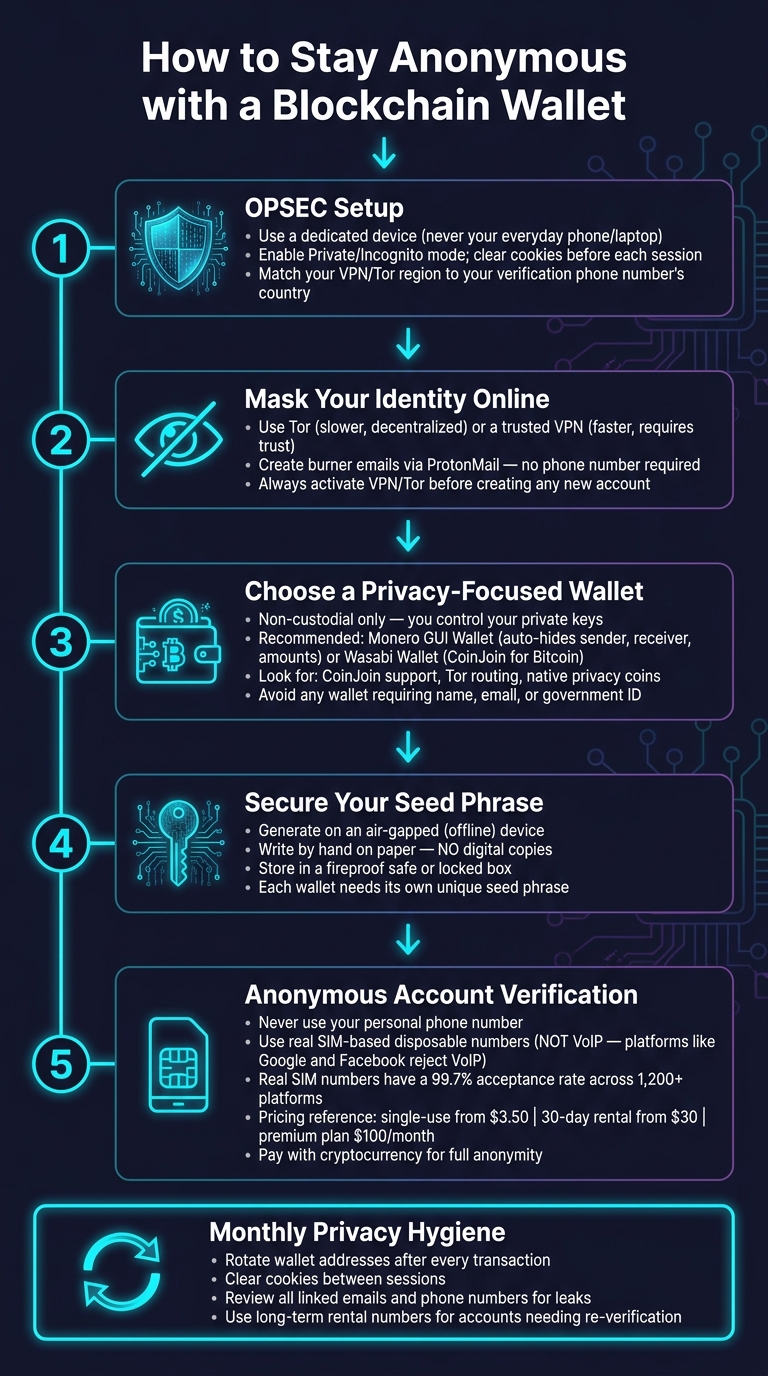
How to Stay Anonymous with a Blockchain Wallet: Step-by-Step Guide
Operational Security (OPSEC) Preparations
Before you dive into creating any accounts, it’s crucial to secure your environment first. The habits and tools you set up now will play a big role in maintaining your anonymity down the road. Skipping this step is one of the most common pitfalls.
Using a Dedicated or Hardened Device
Stick to a device that’s used only for anonymous activities. Your everyday laptop or phone is packed with years of browsing history, saved logins, and device fingerprints – exactly the kind of data platforms use to track and identify users. Starting with a secondary device gives you a clean slate.
Make sure your device is fully updated with the latest security patches. Before each session, clear your browser’s cookies and cache, or stick to Private/Incognito mode to keep sessions from being linked. If two accounts ever share the same browser profile, hardware ID, or login history, they could be flagged as connected – even if the email addresses and phone numbers are completely different.
Masking Your IP Address with Privacy Network Tools
Your IP address is one of the easiest ways to trace your activity back to you. Tools like Tor or a privacy-focused VPN can mask your real location by routing your traffic through different servers. Each option has its trade-offs: Tor is slower but decentralized, while VPNs are faster but require trust in the provider.
Here’s a practical tip: match your IP region with the phone number you’re using for verification. For example, if you’re verifying with a US-based number, set your VPN to a US server. Mismatched regions can trigger fraud detection systems, leading to failed verifications or account blocks.
"Using a VPN can help bypass restrictions and improve verification success. Failure to do this can result in issues like non-receipt of SMS or ‘invalid number’ errors." – MobileSMS.io
If you’re blocked, switch to a fresh IP and a new browser profile before trying again. Platforms track repeated failed attempts from the same setup and will continue blocking them.
These tools work hand-in-hand with your device security to keep your activities unlinked.
Creating Non-Identifiable Email Accounts
The privacy of your burner email depends on how it’s created. Always set up new email accounts from a clean browser session – no saved cookies, no logged-in accounts in other tabs – and make sure your VPN or Tor is active while doing so. Services like ProtonMail let you create accounts without requiring a phone number upfront, making them a good option for wallet-related communications.
If a phone number is needed during email signup, opt for a real SIM-card-based disposable number instead of a typical VoIP number. Platforms like Google and Facebook often filter out VoIP numbers, resulting in failed SMS attempts and wasted tries. A non-VoIP number tied to a real carrier bypasses these filters reliably. Once your email account is set up, the number has served its purpose – it doesn’t need to remain linked.
Following these OPSEC steps lays the groundwork for secure, privacy-focused wallet creation.
sbb-itb-5a89343
Setting Up a Privacy-Focused Blockchain Wallet
Once you’ve secured your device and masked your network, the next step is selecting a wallet that aligns with your privacy needs. Choosing the right wallet is just as crucial as the steps you’ve taken so far. Here’s how to select and secure your wallet effectively.
Choosing the Right Wallet for Privacy
The wallet you choose should be non-custodial and free of any KYC (Know Your Customer) requirements. A non-custodial wallet ensures that you, and only you, control your private keys – no third party can freeze, access, or report your funds. Examples like Monero’s official GUI wallet or Wasabi Wallet (ideal for Bitcoin) are designed specifically with privacy in mind.
Look for wallets with features such as:
- CoinJoin support: Tools like Wasabi Wallet include CoinJoin functionality, which mixes transactions to obscure their origins.
- Native privacy coins: Coins like Monero (XMR) automatically hide transaction details, including sender, receiver, and amounts.
- Tor routing support: This ensures your IP address stays hidden, even during transactions, adding another layer of anonymity beyond a VPN.
Avoid wallets that ask for personal details like your name, email, or government ID during setup. If identity verification is required, it’s not suitable for privacy-focused use.
Generating and Storing Seed Phrases Securely
After choosing a secure wallet, the first thing you’ll do is generate a seed phrase. This phrase acts as the master key to your wallet. If someone gains access to it, they can take full control of your funds.
To protect your seed phrase:
- Generate it on an air-gapped device (a device disconnected from the internet).
- Write it down by hand on paper – no digital copies should exist.
- Store it in a secure physical location, such as a fireproof safe or a locked box.
If you’re setting up multiple wallets, each wallet must have its own unique seed phrase. Never reuse or combine them, as this compromises security.
Testing Your Wallet Before Use
Before transferring any significant funds, conduct a small test transaction. Send the smallest possible amount to confirm that your wallet is functioning correctly within your privacy setup. This step helps you catch any potential issues early.
During testing, double-check that:
- Your connection is routed through a residential IP address.
- Any SMS verification uses a real SIM card-based number, as mentioned in the OPSEC guidelines. Using data center IPs or non-compliant numbers can lead to problems with crypto or financial platforms.
If the test transaction fails, reset your IP, clear your browser, and start the process again. Taking the time to test ensures your setup is ready for secure and private transactions.
Creating and Linking Anonymous Accounts
Once your wallet is ready and functioning, the next step is connecting it to platforms without exposing your identity. Many people make mistakes here – not during wallet setup, but when registering accounts. Following these steps can help you stay anonymous.
Using Disposable Phone Numbers for SMS Verification
Most platforms require a phone number during registration. Using your personal number ties your identity to the account through your carrier and billing details.
Instead, opt for a SIM card-based disposable number. This is crucial because platforms like Google, Facebook, WhatsApp, and Telegram often reject VoIP numbers. Real carrier-backed numbers, however, have a 99.7% acceptance rate.
Services like MobileSMS.io offer real SIM card numbers from over 100 countries, compatible with more than 1,200 platforms. Pricing starts at $3.50 for a single-use number, $30 for a 30-day single-service rental, and $100 for a 30-day "All Services Premium" plan, which includes direct code forwarding to platforms like Slack or Discord.
For added privacy, pay for these disposable numbers using cryptocurrency. MobileSMS.io supports crypto payments, ensuring that even the transaction itself doesn’t reveal your identity.
Keeping Pseudonymity Across Platforms
Once you’ve handled SMS verification, it’s essential to maintain separation between accounts. Use a unique username, email, and wallet for each account. This prevents platforms from connecting your activities through shared identifiers.
Additionally, generate a fresh receiving address for every transaction or account. Many modern privacy wallets can automate this process, making it easier to avoid cross-linking.
Avoiding KYC Platforms and Centralized Services
Linking your anonymous wallet to a centralized exchange that requires KYC (Know Your Customer), like Coinbase or Kraken, compromises your anonymity. Submitting a government ID ties your wallet address to your real-world identity in their records.
Instead, stick to non-custodial, non-KYC platforms for on-chain activities. Decentralized exchanges (DEXs) like Uniswap or privacy-focused networks are safer options. If you need to convert funds, consider using privacy coins like Monero (XMR) as an intermediary. This ensures that your blockchain identity remains separate from any verified personal credentials, reinforcing the privacy safeguards you’ve already put in place.
Maintaining Anonymity Over Time
Once you’ve set up your anonymous account, the real challenge begins – keeping it anonymous. Staying vigilant and sticking to privacy-focused habits is essential, as even small mistakes can expose your identity.
Rotating Wallet Addresses Regularly
Reusing a wallet address can leave a trail that blockchain analysis tools can follow. To avoid this, always use a new address for each transaction and clear your browser cookies between wallet sessions. Many privacy wallets, like Monero, simplify this with built-in stealth address systems. For Bitcoin users, HD (Hierarchical Deterministic) wallets automatically generate a new address for every transaction request. These tools make it easier to stick to privacy best practices.
Reviewing Connected Services for Identity Leaks
It’s not enough to set up anonymous accounts – you need to regularly check for any potential leaks. Schedule a monthly review to ensure your linked email addresses remain anonymous, your phone numbers are still active, and no personal details have accidentally slipped into your profiles. For accounts that require periodic re-verification, like WhatsApp or Facebook, using a long-term rental phone number is safer than relying on disposable numbers. Services like MobileSMS.io provide 30-day rentals starting at $30 or premium plans at $100/month that stay active and even forward SMS codes to platforms like Slack or Discord. This way, you can handle verifications without needing your primary device.
Planning for Device Loss or Compromise
Protecting your device is crucial, but you also need a plan for unexpected situations like loss or seizure. Your seed phrase is your lifeline – store it offline and away from your device, as it allows you to restore your wallet on a new device.
If you lose your device, recovering accounts with 2FA can be tricky, especially if the phone number tied to it is gone. Opt for long-term rental numbers with auto-renewal to avoid disruptions. When switching devices, align your VPN region with the new device to maintain consistency. Residential proxies are especially useful in these scenarios, as they are less likely to trigger blocks during actions like password recovery. These small steps can make a big difference in keeping your anonymity intact.
Checklist Recap and Key Takeaways
Keeping your blockchain wallet activity anonymous requires constant vigilance. Each layer of protection – from using a secure device to selecting a privacy-focused wallet – works together to safeguard your identity. Here’s a breakdown of the essentials:
- Start with OPSEC: Use a dedicated device for transactions, mask your IP with a VPN or residential proxy, and ensure your IP region matches your phone number’s country.
- Choose a privacy-focused wallet: Opt for wallets with features like address rotation (e.g., Monero or HD Bitcoin wallets). Always store your seed phrase offline – never save it digitally.
- Anonymous verification matters: For SMS-based account setups, rely on real SIM-card numbers instead of VoIP. This is crucial since your phone number is often the weakest link in the verification process. Services like MobileSMS.io provide one-time numbers starting at $3.50 and long-term rentals from $15/month for accounts needing ongoing re-verification. Real SIM-based numbers are more widely accepted across over 1,200 platforms.
- Maintain good hygiene: Regularly clear cookies, rotate wallet addresses, and review all linked services on a monthly basis.
Each of these steps is vital in maintaining your anonymity. The phone number used for verification is often the most vulnerable point, so for accounts requiring future security checks, a long-term rental ensures continuity without disruptions.
FAQs
What’s the biggest way wallets get linked to my real identity?
Your wallet can become linked to your real identity through your digital fingerprint. This fingerprint is made up of details like your browser type, device information, IP address, and online activity. If you want to maintain anonymity, it’s essential to regularly adjust these factors and take steps to minimize any identifiable traces you might leave behind.
Is Tor better than a VPN for staying private?
When it comes to privacy, deciding between Tor and a VPN really depends on what you’re looking for.
Tor is all about anonymity. It routes your internet traffic through several nodes, making it much harder for anyone to trace your activity. This makes it a strong choice for dodging surveillance or accessing restricted content in high-risk situations.
On the other hand, VPNs focus on encrypting your traffic while offering a more user-friendly and faster experience. They’re great for everyday tasks like securing your connection on public Wi-Fi or bypassing regional restrictions.
In short, if your main concern is staying anonymous, Tor is the way to go. But if you want a mix of security and ease of use, a VPN might be the better fit.
Do I need a long-term SMS number for re-verification?
A long-term SMS number works well when you need ongoing access to the same account. It allows for easy re-verification without the hassle of changing numbers, offering a dependable choice for managing accounts consistently.