

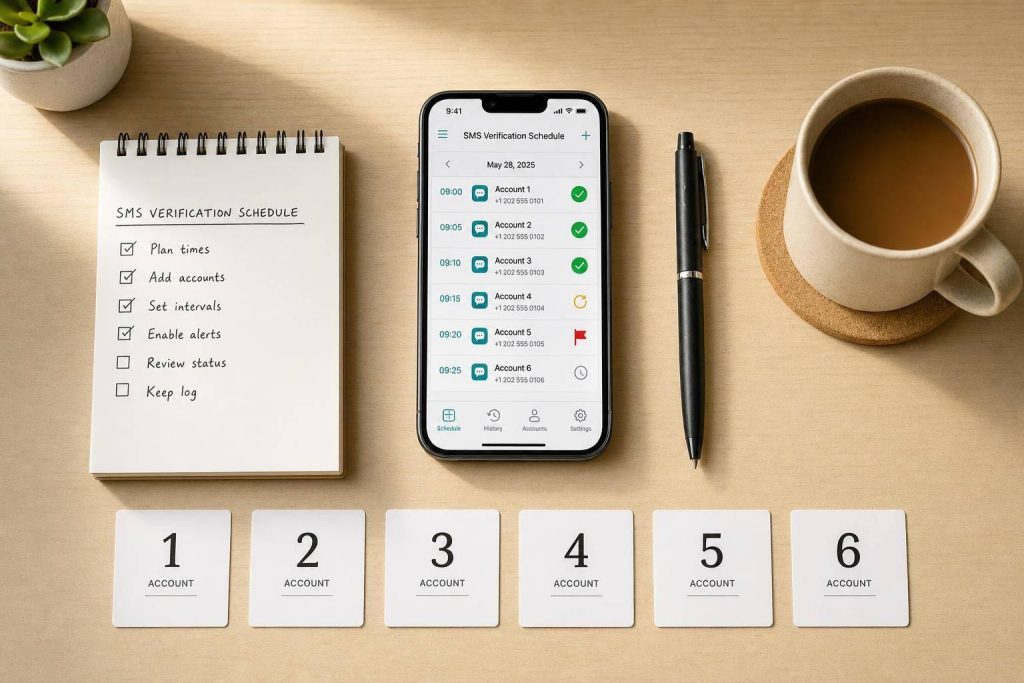
If you run many account verifications at once, timing is the whole game. A code can expire in 10 minutes or less, a second request can void the first one, and a number that was not set up right can fail at the start.
Here’s the short answer: I schedule every account before I request a single code. I map one account to one number when I can, set an exact request time, space retries by at least 30 seconds, track each step from request to submission, and move failed jobs into a fixed review path instead of guessing.
If I want the process to stay under control, I focus on these points first:
- List every account with its owner, platform, number, time zone, and status
- Separate one-time use from rented numbers so I do not lose account access later
- Queue requests in order: recovery first, setup next, testing last
- Use exact timestamps like
09/24/2026, 2:30 PM ETand store UTC too - Limit retries and use backoff windows such as 30, 40, 60, 90, and 120 seconds
- Track full outcomes, not just message delivery
- Log masked number data, message IDs, retry counts, and deletion dates
A few numbers make the risk clear:
- 1 duplicate request can cancel an earlier code
- 2 to 3 retry attempts is a common cap before manual review
- 30 days is the dashboard history limit mentioned in the article
- 90-day rentals fit accounts that may need later recovery or admin access
One thing I would not do is treat “SMS delivered” as “job done.” Delivery is only one step. The code still has to be received, entered, accepted, and logged before the verification is complete.
Here’s the article in one plain-English view:
| Area | What I focus on |
|---|---|
| Inventory | One row per account with fixed status labels |
| Number assignment | One number per account when possible; store in E.164 format |
| Scheduling | Exact request times, clear time zones, and staggered starts |
| Retries | Backoff delays, retry caps, and no early resends |
| Monitoring | Request time, receipt time, submission time, and final result |
| Recordkeeping | Masked data, audit trail, and timed deletion |
The core idea is simple: assign, schedule, space, track, and review. That is how I keep multi-account SMS verification work from turning into a pile of expired codes and repeat requests.
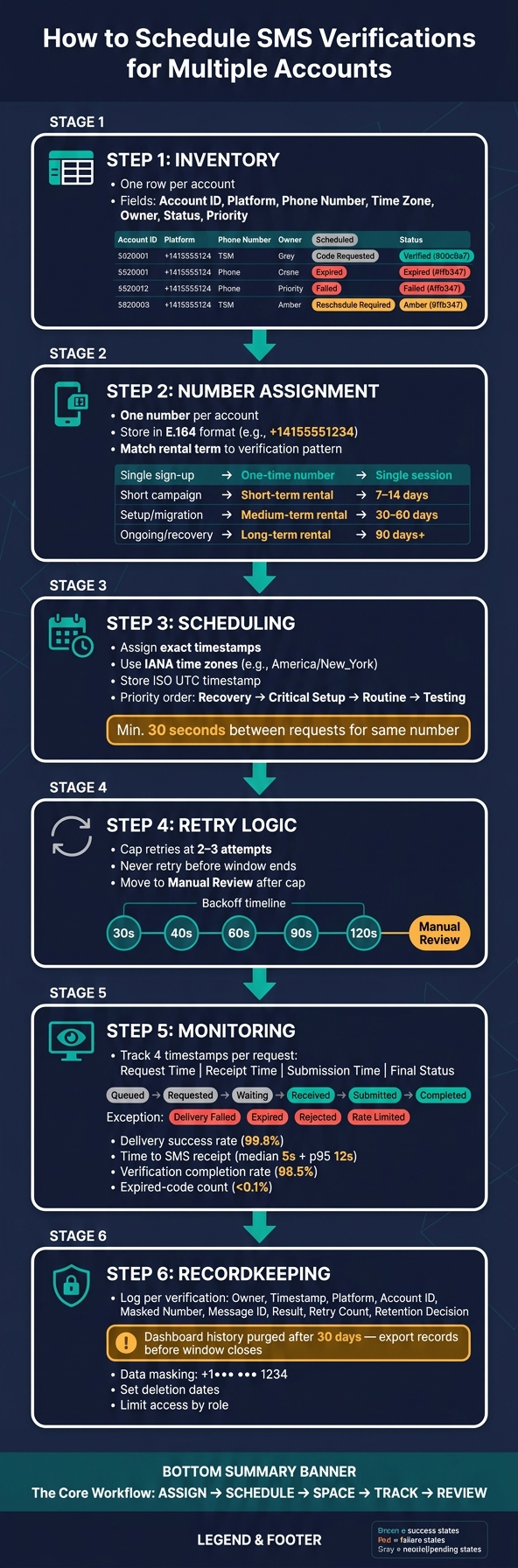
SMS Verification Scheduling Workflow: From Setup to Completion
Define Your Account Inventory and Verification Windows
Before you send any requests, set up one row per account and treat that sheet as your scheduling queue.
Each row should include:
- account ID
- platform
- assigned phone number
- scheduled time
- time zone
- request count
- owner
- status
- purpose
- verification pattern
- retention
- notes
- failure details or follow-up actions
Use MM/DD/YYYY for dates and a 12-hour clock with AM/PM for times. For example: 09/24/2026, 2:30 PM ET.
The time zone matters. A team split across Eastern, Central, Mountain, and Pacific time can easily misread an entry that only says “2:30 PM.” If your team works across regions, add a UTC time in a separate column too.
Use fixed status labels so every row moves through the same set of states:
-
Scheduled -
Code requested -
Verified -
Expired -
Failed -
Reschedule required
If a row stays at Code requested, check whether the code was delivered before you retry. For expiration, log the deadline based on the provider’s issuance time, not the message arrival time. That small detail keeps retries lined up with the queue and helps you avoid duplicate requests.
Separate One-Time Verifications from Repeat Access
Once each account is logged, split one-time work from repeat access. Not every account needs the same retention period, and treating them all the same usually creates a mess later.
Add a Verification pattern field and a Retention field to your inventory. Then assign each account to one of these categories: creation, repeat access, recovery, or admin/security changes. Those labels tell you how often an account should come back into the queue.
A one-time creation usually needs only a short record. Log the result, mark it done, and limit access to the data after setup. Repeat access accounts need a stable number assignment, a named owner, and a set schedule. Recovery requests need the most care. They’re time-sensitive, so they should always be reviewed by a person before any request goes out.
Set a Priority Order Before Building the Queue
After the queue is set, rank requests by urgency.
Put them in this order: urgent account recovery first, critical setup second, routine verifications third, and nonessential testing last.
Add a Priority reason field so the order is easy to audit. “account locked, customer-facing” says a lot more than just “high” when someone needs to scan the queue and understand what’s going on.
Keep low-priority testing at the bottom. That leaves SMS capacity open for accounts where a delay has a direct operating cost. If urgency changes, update the queue right away.
sbb-itb-5a89343
Assign Dedicated Numbers and Map Them to Each Account
Give each account its own phone number. In most cases, one number per account is the cleanest way to run this.
If you have to let accounts share a number, keep that group tight. Only group accounts that have the same owner, the same approved operators, and the same recovery policy. Then write that grouping down in your inventory so there’s no guesswork later.
A simple inventory row can do the job:
Storefront-03 | +14155551234 | U.S. mobile number | 30-day rental | assigned September 24, 2026 | owner: E-commerce team
That single line gives you enough to check ownership, track failures, and hand off the account if needed. It should also connect back to the queue fields from the previous section: account ID, owner, scheduled time, and status. That keeps the number mapping tied to the work, not floating around in a separate sheet with no context.
Keep this inventory lean. Don’t store passwords or live verification codes here. Only log what you need to identify the assignment and follow changes like reassignment, release, or replacement. You’ll use these assignments to set up the staggered request queue in the next step.
Choose the Right Number Type for Each Verification Pattern
The rental term should line up with how long the account will need the number. If you rent for too long, you burn money for no reason. If you rent for too short a time, you can create a recovery mess later.
Here’s the simple match-up:
| Verification pattern | Recommended number type | Rental term |
|---|---|---|
| Single isolated sign-up | One-time number | Single session |
| Onboarding or short campaign | Short-term rental | 7 or 14 days |
| Active setup or migration | Medium-term rental | 30 or 60 days |
| Ongoing access or login recovery | Long-term renewable rental | 90 days or renewable |
A one-time number makes sense for a sign-up that won’t need future recovery. A 7- or 14-day rental works well for onboarding or short campaigns where a second code might come up. A 30- or 60-day rental fits setup, migration, or account work that needs repeat access. And if the account may need login recovery or admin access over time, go with a 90-day or renewable rental.
Using a long-term rental for a one-time sign-up is just wasted budget. Going the other way is worse. If an account may need future recovery, a one-time number can turn into a problem fast.
Store Numbers in a Consistent Format and Limit Exposure
Before a number goes into the queue, standardize it. Store every number in E.164 format: a + sign, the country calling code, and the national number with no spaces, dashes, or parentheses.
For example, a U.S. number written as (415) 555-1234 should be stored as +14155551234.
This keeps things clean across spreadsheets, APIs, and dashboards. No mixed formats. No confusion. Use the same normalized value everywhere the number is processed or mapped. You can keep the country in a separate readable field, but the working value should always be the E.164 version.
Before you request a code, check two things:
- The platform’s country selector matches the number’s country code
- The platform accepts that number type
That matters because some services block VoIP numbers or numbers that have been recycled.
Access to codes should stay with the assigned operator only. In shared reports, mask the number instead of showing the full value. For example: +1••• ••• 1234. And never paste live codes into team chat, shared notes, or long-term logs.
When you release a number, mark it as unavailable right away. Before you reuse it, make sure no recovery flow still depends on it.
Build a Staggered Verification Schedule
Use the account-and-number map from the last step to assign exact request times. The goal is simple: each request gets its own start time, and every timing detail is logged before anything is sent.
Use a Simple Scheduling Template
Link each queue row straight to the inventory fields from the last step. Keep the same account ID, owner, and assigned number values so the queue lines up with the inventory one-to-one.
You can use this column structure in Google Sheets, Airtable, or whatever internal tool your team already has:
Queue ID | Account ID | Platform | Assigned Phone Number | Request Start Time | Time Zone | Operator | Status | Retry Count | Retry Limit | Code Expiration | Next Eligible Attempt | Fallback Action | Notes Here’s what a filled row looks like:
Q-0007 | ACCT-1042 | Google Workspace | +12125550148 | 09/24/2026 10:00 AM | America/New_York | Maya | Queued | 0 | 2 | 09/24/2026 10:10 AM | 09/24/2026 10:00:30 AM | Pause, then assign backup number | Awaiting delivery Stick with the same date format used in the inventory, and use a full IANA time zone like America/New_York instead of ET. For system checks, store an ISO timestamp too, such as 2026-09-24T14:00:00Z, alongside the human-readable time.
As the queue moves, track these statuses:
-
Queued -
Requested -
Expired -
Rate Limited -
Failed -
Manual Review
Keep them separate. If you blur them together, reporting gets messy fast.
For code expiration, calculate it when you build the queue. If the platform gives a 10-minute validity window, set code_expires_at = request_time + 10 minutes. Treat OTPs as single-use codes. Once one works, cancel any pending retries tied to that success.
Apply Backoff Rules When a Request Is Delayed or Rate-Limited
Start by spacing requests on purpose. A good baseline is at least 30 seconds between verification requests for the same phone number. If accounts share a platform, IP address, or session, leave a larger gap.
If a request gets rate-limited, don’t fire off another one right away. Mark the row as Rate Limited, cancel any duplicate queued requests for that same account and number, log the exact response and timestamp, and then wait based on exponential backoff.
Use this retry pattern:
- 30 seconds
- 40 seconds
- 60 seconds
- 90 seconds
- 120 seconds
Set a retry cap of two or three attempts for each row. After that, move it to Manual Review and use the fallback action already assigned to that row.
That fallback should be set before the row enters the queue. Common options include waiting for the next backoff window, checking that the assigned temporary phone number is right, pausing and escalating to an admin, or switching to an approved alternate delivery method. The main point is to remove guesswork. Operators shouldn’t have to make snap calls under pressure.
And one rule should stay firm: never send another request before the retry window ends.
Once the timing rules are in place, automate code capture and watch each attempt in real time.
Automate Code Capture and Monitor Results
Once a request gets past its retry window, the next job is simple: capture the code and track what happened. Pick one path based on volume. For lower volume, use dashboard monitoring. For higher volume, use API orchestration. Either way, log request time, receipt time, submission time, and final status.
With dashboard-based handling, an operator watches the live inbox or delivery log for the assigned number, records the message ID and receipt time, enters the code into the approved account workflow, and logs the outcome. For approved high-volume workflows, API orchestration is the better fit: submit the request, receive authenticated webhooks, pull the code through the provider integration, submit it to the target app, and log the result.
One thing matters here: a delivered SMS does not mean the verification is done. The code might expire, get rejected, or never get submitted at all. Those need to be tracked as separate events, not lumped together.
Every request should follow the same state flow:
Queued → Requested → Waiting → Received → Submitted → Completed
Use exception states for:
-
Delivery Failed -
Expired -
Rejected -
Rate Limited
Track results at the request level first, then roll them up by platform, country, number type, provider, and day.
- Delivery success rate: delivered messages ÷ attempted messages
- Time to SMS receipt: receipt time minus request time; report median and 95th percentile
- Verification completion rate: completed verifications ÷ sessions started
- Expired-code count: codes that reached their validity deadline before submission
- Rental expiration risk: rentals expiring before required account work is done
- Rejections by platform, carrier, country, number type, and reason
Handle Failures with a Fixed Decision Process
Use that same status log to send failures through a fixed response path. When something breaks, operators shouldn’t have to wing it. Each failure type should already have a documented response before the queue starts.
| Failure condition | Immediate action | Next permitted step |
|---|---|---|
| No SMS received | Check request ID, delivery status, and number assignment | Retry only after the configured cooldown and within provider limits |
| Code expired | Mark invalid; do not submit | Start a new verification session if the platform permits |
| Platform rejects the number | Stop repeated submissions with that number | Review the rejection reason; use an approved compatible number |
| Rate limit hit | Pause affected jobs; honor the retry-after value | Resume gradually after cooldown; record the response code |
| Wrong code | Do not guess or reuse codes from another job | Request a new code only under the platform’s retry rules |
Compare One-Time Numbers and Rentals for Ongoing Operations
The number type shapes how long you can watch the workflow and how often access needs to be renewed. Use one-time numbers for isolated verifications with no expected future access. Use rentals for accounts that may need recurring verification, recovery, or team management over time.
| Number type | Best fit | Monitoring effort | Main operational risk |
|---|---|---|---|
| One-time number | Single, isolated verification | Low | Number unavailable for later recovery or re-verification |
| Short-term rental | Several verifications during a defined project window | Moderate | Expiration during a delayed queue or missed renewal |
| Long-term rental | Repeat access, recovery, or ongoing team management | Higher | Failure to renew before a critical verification |
Whatever you choose, record the rental start date, expiration timestamp, and set a renewal alert well before the number is released. That’s the kind of small step that saves a lot of trouble later.
Conclusion: Keep Ownership, Timing, and Monitoring Documented
Keep ownership, timestamps, message IDs, results, and retention decisions in one audit log. Each completed verification should leave behind a clean record: owner, timestamp, platform, internal account identifier, masked number reference, provider request or message ID, result, retry count, and a retention or deletion decision. If a rented number was used, add the rental expiration date. If there was a failure or a manual override, log the reason too.
MobileSMS.io‘s SMS history is purged from the dashboard after 30 days, so export or log verification records before that window closes. Store only what you need for support and compliance. Mask sensitive fields. Limit access by role. Set deletion dates for anything that doesn’t need to stay long term.
A verification log should prove the work was done right, not turn into a stash of authentication secrets.
FAQs
How many accounts should I verify at once?
To help avoid rate limiting, spread verification requests out over time instead of sending them all at once.
MobileSMS.io doesn’t set a fixed cap on how many accounts you can create or verify. That said, you should still follow each platform’s terms of service.
If your team handles a high volume, long-term numbers can help cut down on rate-limiting issues.
When should I use a rental number instead of a one-time number?
Use a long-term rental number from MobileSMS.io when you need steady access for repeat verifications, account recovery, or day-to-day handling of multiple accounts.
A one-time number works best for a single, short-term verification. Rental numbers stay active for 7 to 90+ days and let you receive multiple SMS messages without starting a new activation every time.
What should I do if a verification code never arrives?
First, make sure the sender is using SMS and not a call or an in-app message. Then check that you picked the correct number and service in your MobileSMS.io dashboard. If the sender requires a waiting period, let that delay pass before asking for another code. Sending too many requests in a row can trigger limits.
Also, don’t keep sending codes to an expired number. If the problem keeps happening, contact MobileSMS.io support and share your account details, the approximate request time, and the error.