


Before I add more accounts, I centralize VM logs and test that each event reaches the right account’s records. I collect logs from 4 sources – host, guest, network, and applications – and keep protected archives in a separate cloud account.
My setup follows a few rules:
- Trace each action: Record the account, VM, operator, action, and UTC timestamp.
- Protect the records: Limit access by tenant, remove passwords and tokens, and prevent archive changes.
- Check both access and delivery: Alert on cross-account access and missing logs.
- Test before scaling: Rebuild incident timelines, measure log volume, and plan storage, retention, and costs.
- Keep verification private: Use MobileSMS.io only for approved SMS workflows – not VM logging – and log metadata rather than codes or message contents.
Whether I’m supporting sellers, client teams, testing, finance, or research, my rule stays the same: <u>logs help explain what happened; permissions determine who can act.</u>
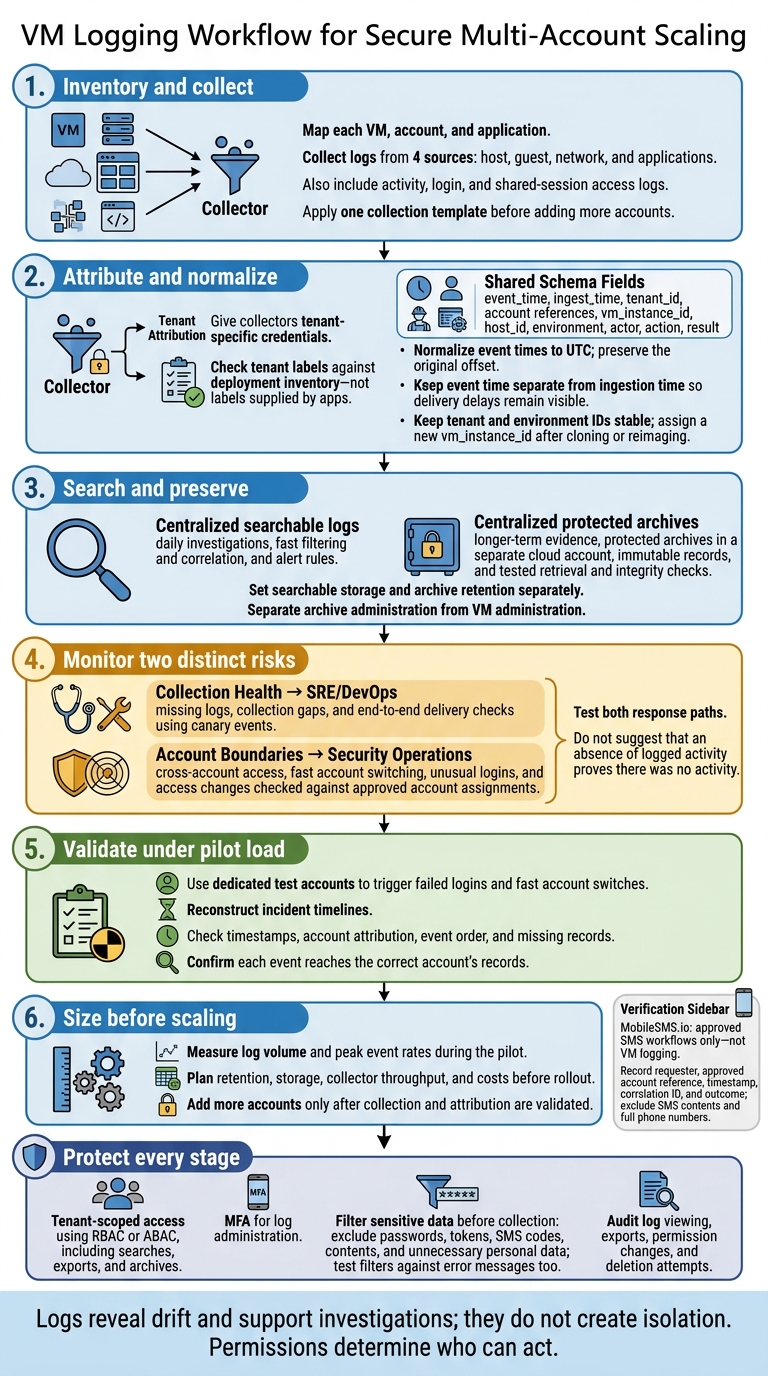
VM Logging Workflow for Secure Multi-Account Scaling
Set Up Centralized VM Logging
Build the pipeline before adding more VMs or tenants: sources, collectors, searchable storage and alerts, then protected archives.
Give collectors tenant-specific credentials, and check tenant labels against deployment inventory – not labels supplied by apps. Apply the same tenant boundary controls to search and archive access. This keeps searches, alerts, and archives aligned as the tenant count grows.
Collect Host, Guest, Network, and Application Logs
Collect host, guest, network, and application logs, plus activity, login, and shared-session access logs. Test each source with an authorized action, then confirm that the event reaches searchable storage.
If verification data enters the workflow, retain only the metadata needed for auditing. Keep SMS codes and 2FA tokens, passwords, cookies, and recovery codes out of logs.
Standardize Timestamps and Account Identifiers
Use a shared schema with event_time, ingest_time, tenant_id, account references, vm_instance_id, host_id, environment, actor, action, and result.
Keep tenant and environment IDs stable, but assign a new vm_instance_id after cloning or reimaging. Check clock synchronization during provisioning.
Normalize event times to UTC, preserve the original offset, and clearly label local-time views. Keep event time separate from ingestion time so delivery delays stay visible.
Compare Local Logs, Searchable Storage, and Archives
Use searchable storage for daily investigations and alert rules. Use archives for longer-term evidence. Monitor collection health to spot missing data early.
Choose the storage layer based on search speed, retention needs, and evidence value.
| Storage layer | Visibility | Resilience | Investigation speed | Cost drivers | Tamper resistance |
|---|---|---|---|---|---|
| Local-only logs | One VM or tenant | Depends on that VM staying available | Requires device access | VM disk space and operator time | Administrators may alter files |
| Centralized searchable logs | Authorized cross-VM searches | Independent of individual VMs once ingested | Fast filtering and correlation | Ingestion, indexing, and retention | Depends on write and delete permissions |
| Centralized protected archives | Retained evidence | Independent of individual VMs once stored | Requires retrieval and processing | Storage, retrieval, and retention | Enforced retention limits changes |
Separate archive administration from VM administration. Test archive retrieval and integrity checks before relying on retained evidence.
Set searchable storage and archive retention separately, based on investigation needs and applicable obligations. Store credentials and recovery codes in an encrypted credential manager – not in logs or archives.
Once collection is stable, use the same logs to spot boundary drift and access changes.
sbb-itb-5a89343
Secure Logs and Monitor Account Boundaries
Limit Log Access and Filter Sensitive Data
Once log collection is stable, use those logs to control access and spot account boundaries drifting.
Limit operators to records for their assigned accounts, including searches and exports. Scope permissions by tenant ID and VM ID, require MFA for log administration, and keep work and personal accounts separate. Audit log viewing, exports, permission changes, and deletion attempts.
Filter sensitive fields before collection. Exclude passwords, tokens, SMS codes, message content, and personal data you don’t need. Retain actor, account, action, result, and correlation ID fields so investigators can reconstruct activity without seeing private content.
Test filters against error messages, too. Failed requests can expose information that normal events leave out, similar to how data breaches reveal sensitive user details. Use the access audit records for the boundary checks below.
Detect Access Changes and Boundary Violations
Check login history and security settings for fast account switching and access without permission. Compare unusual logins with approved account assignments to detect cross-account access. Verify isolation through permissions – not logs alone.
Pair access alerts with collection-health alerts. Otherwise, missing logs could make activity look clean when it isn’t.
Choose Alert Rules and Check Collection Health
Set alerts for fast account switching, unusual logins, and suspicious error messages. Also alert when system logs or error messages are missing. Check collection settings before assuming no activity occurred.
Use VM Logs Across Industries and Verification Workflows
Logging for E-commerce, Agencies, and Remote Teams
After reviewing access alerts, use the same logs to trace account activity across teams and tenants. Treat these examples as workflow templates, not case studies.
An e-commerce seller investigating an inventory-sync failure would connect the integration error to the VM session that ran the job. An agency reviewing client campaign access would match application changes to the operator’s approved account assignment. A remote support team investigating a shared-VM change would connect the configuration event to the specific operator login.
Record the approved account reference, operator identity, application event, and correlation ID. Set alerts for integration failures, unapproved access, and configuration changes made without approval.
Use tenant ID, VM ID, and correlation ID to join records, keeping the actor, action, and result intact. Link application audit and approval records to VM logs: a session alone does not prove authorization.
Apply this same approach to testing, finance, and research, linking each action to the evidence records that support it.
Logging for Testing, Finance, and Research
Use those join keys to trace events through each workflow’s evidence records.
A testing team would record the VM image version, test-run reference, and teardown event to help reproduce failures and confirm cleanup. A finance team would link protected access records to application audit events and approved account assignments during an investigation. A research team would audit exports, recording the operator, dataset reference, destination, and transfer time without exposing participant identities.
Retention periods, evidence preservation, and transfer procedures must follow applicable legal, contractual, and organizational obligations.
For verification workflows, log enough metadata to trace each action without exposing sensitive content.
Log Verification Metadata With MobileSMS.io
Use MobileSMS.io for SMS verification within an authorized account workflow – not for VM logging. Record the requester, approved account reference, timestamp, correlation ID, and outcome in workflow logs. Leave out SMS contents and full phone numbers.
Allow SMS forwarding only to authorized recipients, and restrict access to connected team channels. Follow the target platform’s rules. Before assigning a rental number, assess renewal, expiration, and loss-of-access risks.
Avoid temporary numbers for critical account recovery. Where supported, prefer phishing-resistant authentication, such as passkeys or security keys.
Deploy and Test Logging Before Scaling
Before adding more accounts, test the log pipeline under pilot load. Confirm that it records every event and ties each one to the correct account.
Inventory Log Sources and Configure Collection
Map each VM, account, and application. Then pilot one stable account ID per account across isolated test VMs. Apply one collection template before adding more accounts.
Test Incident Timelines and Log Delivery
With sources mapped, check that login failures and account switches appear in the correct order, with no gaps.
Use dedicated test accounts to trigger failed logins and fast account switches. Then reconstruct what happened from the logs. Check timestamps, account attribution, and missing records to verify event order and attribution.
Review error messages and user feedback to distinguish network failures from device and application failures.
Estimate Log Volume, Storage, and Costs
Once the logs are complete and correctly attributed, size the pipeline for the next batch of accounts.
Measure log volume and peak event rates during the pilot. Use those results to plan retention, storage, and collector throughput before rollout.
Conclusion: Secure Scaling Checklist
After pilot testing confirms collection and attribution, put these controls in place:
- Require end-to-end delivery from host, guest, network, and application sources to centralized storage. Use canary events to check every path. Configure collectors to attach immutable account IDs and environment tags automatically, and normalize timestamps to UTC.
- Enforce tenant-scoped access with RBAC or ABAC. Restrict log data by tenant and role, and remove personal data, credentials, and session tokens before logs enter searchable storage.
- Keep archives immutable, and set retention periods based on each log’s purpose.
Once logs are protected, send collection alerts to SRE/DevOps and cross-account access alerts to Security Operations. Test both response paths for collection gaps and cross-account access.
Logs reveal drift and support investigations; they do not create isolation.
FAQs
How can I prevent log loss during outages?
Use cloud-based incremental backups and keep copies of your environments across multiple sites to protect logs during outages [1].
Set CloudWatch alarms for Lambda failures or drops in EventBridge rule invocations to detect delivery failures [2]. Monitor continuously for unusual data access or data movements without permission [3].
Test disaster recovery plans regularly to confirm that your Recovery Time Objective and Recovery Point Objective meet business needs [1].
How do I test tenant isolation in shared log storage?
Check that one account cannot access or change another account’s data. Use role-based access control (RBAC) and least-privilege permissions. Tag telemetry at the source with $AccountId or $AccountName so you can trace and filter logs by account.
Review access logs for cross-account data leaks and confirm that permissions are enforced correctly. For centralized S3 storage, apply IAM permission boundaries to sensitive configurations. Periodically audit automated monitoring and filtering to verify isolation across organizational units.
How can I reduce logging costs without losing evidence?
Use subscription filters to keep non-critical DEBUG, TRACE, and INFO logs out of your central monitoring account. Set up EventBridge rules in each account to forward only relevant alerts and cut data transfer costs [1].
Store only the audit details you need: timestamps, masked number references, and final statuses. Skip full messages. Export or archive dashboard logs before the automatic 30-day purge to support long-term compliance without recurring storage fees [2].